6.2.3 PyTorch 基础
这页不是 API 目录。目标是建立每次写 PyTorch 模型前都要有的反射:训练前先读 shape、dtype、device 和运算含义。
学习目标
- 从 Python 和 NumPy 数据创建张量。
- 读懂
shape、dtype、device和每一维的含义。 - 区分逐元素运算和矩阵乘法。
- 有意识地使用 broadcasting,而不是让它悄悄发生。
- 跑通一个小型前向过程,得到 logits、概率、预测和 loss。
先看 Tensor 生命周期
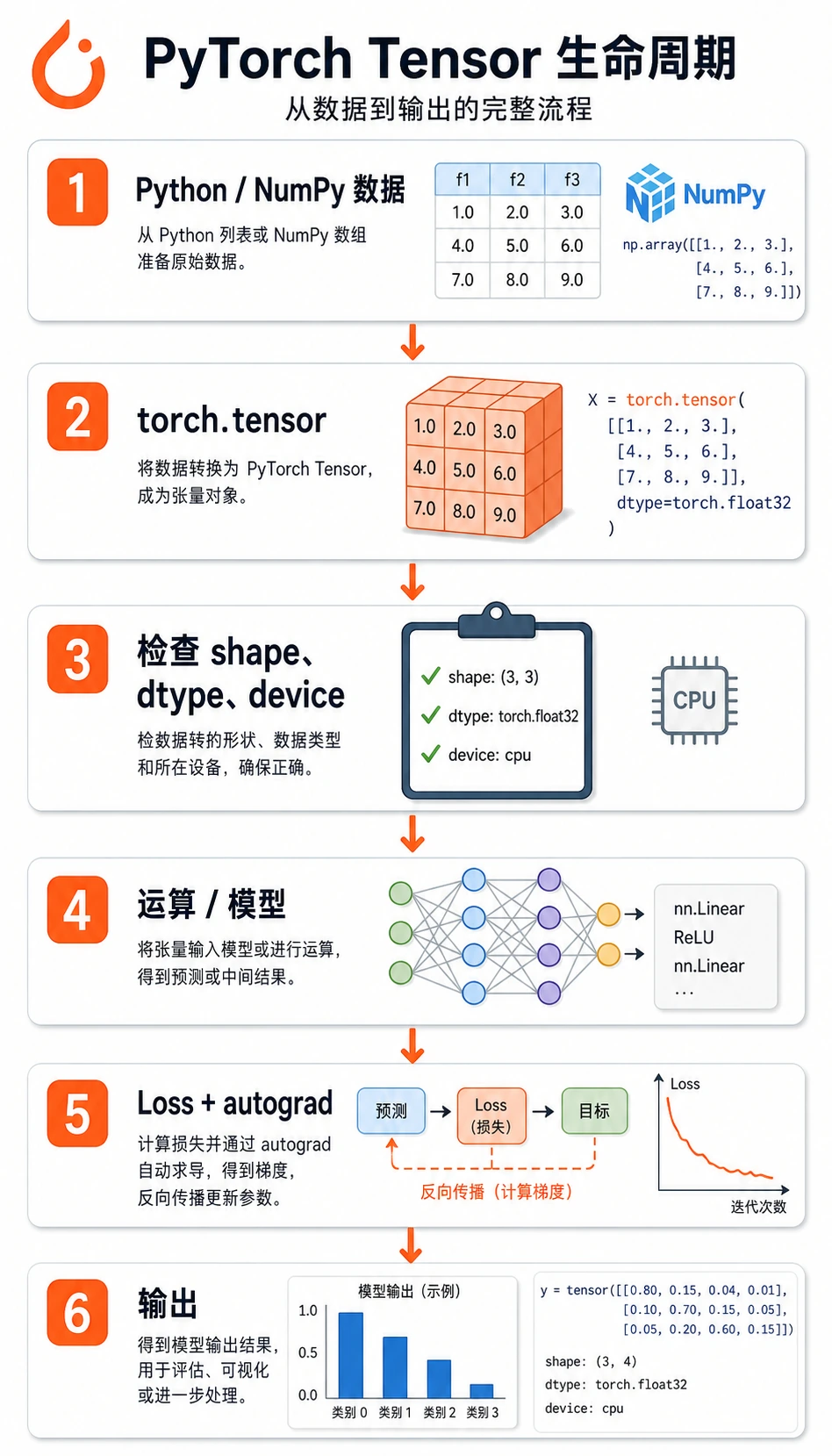
大多数 PyTorch 数据会走这条路径:
原始数据 -> tensor -> shape/dtype/device 检查 -> 运算/模型 -> loss -> 梯度/更新
新手最容易犯的错是直接跳到模型。更稳的习惯是:数据进模型前先检查张量。
Tensor 是带训练信息的数据
最短的实用定义是:
张量是 PyTorch 能计算、能跨设备移动、必要时还能追踪梯度的多维数组。
和 NumPy 数组相比,PyTorch 张量多了两个深度学习能力:
device:张量可以放在 CPU、GPU 或 Apple MPS 上。requires_grad:张量可以参与自动求导。
常见 shape:
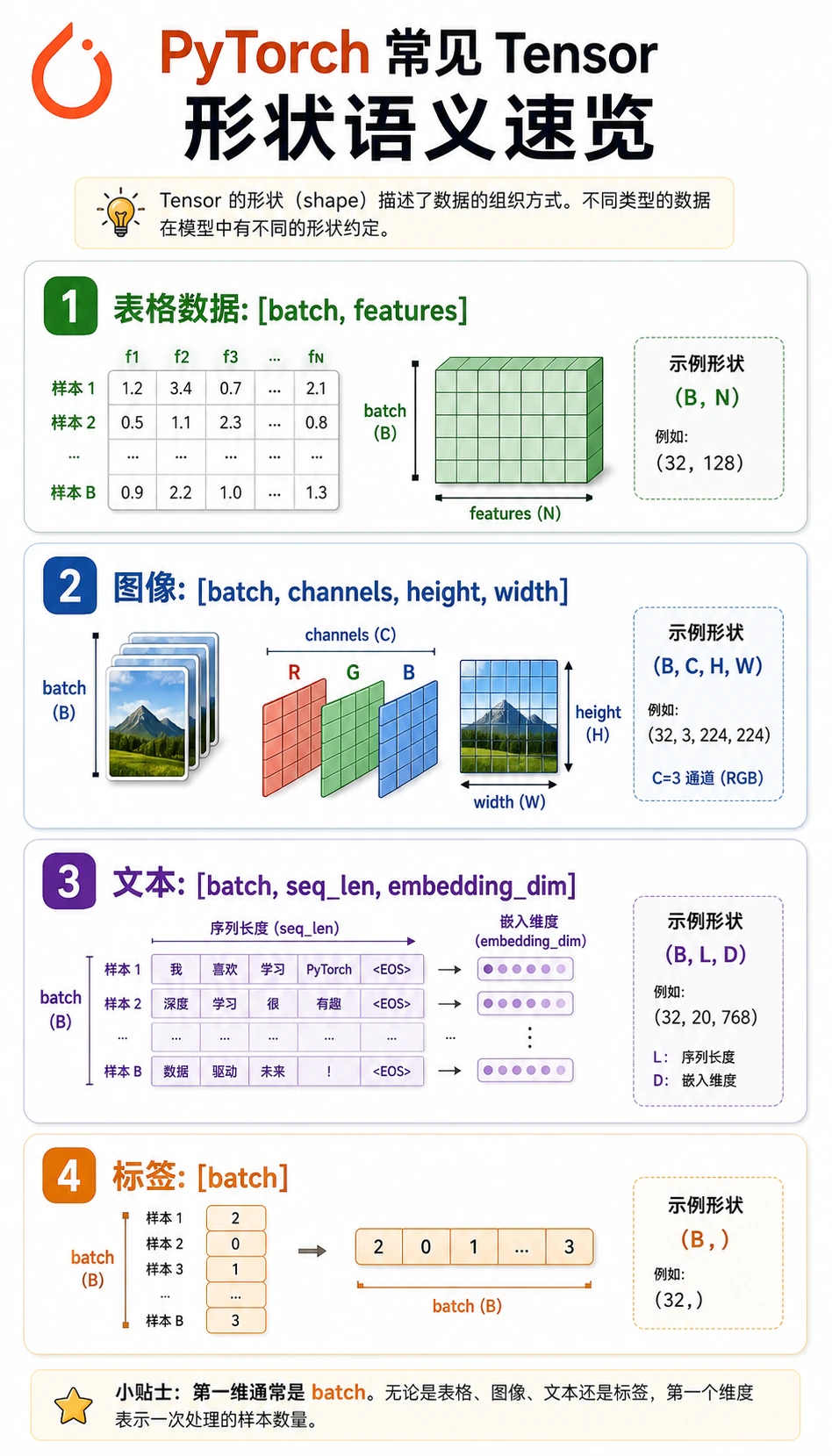
| 数据 | 常见 shape | 含义 |
|---|---|---|
| 表格 batch | [batch, features] | 行是样本,列是特征 |
| 分类标签 | [batch] | 每个样本一个整数类别 id |
| 图片 batch | [batch, channels, height, width] | PyTorch 图片惯例 |
| 文本向量 | [batch, seq_len, embedding_dim] | token 对应的向量表示 |
| logits | [batch, classes] | softmax 前的原始类别分数 |
实验 1:做数学运算前先检查张量
先运行这段。它会帮你建立后面每个训练循环都要用的检查习惯。
import torch


def describe(name, tensor, meaning):
    print(
        f"{name}: shape={tuple(tensor.shape)} "
        f"dtype={tensor.dtype} "
        f"device={tensor.device} "
        f"meaning={meaning}"
    )


X = torch.tensor(
    [
        [1.0, 2.0, 3.0],
        [4.0, 5.0, 6.0],
    ]
)
y = torch.tensor([0, 1], dtype=torch.long)

describe("X", X, "[batch, features]")
describe("y", y, "[batch]")

print("ndim:", X.ndim)
print("numel:", X.numel())
print("first row:", X[0])
print("feature means:", X.mean(dim=0))
预期输出:
X: shape=(2, 3) dtype=torch.float32 device=cpu meaning=[batch, features]
y: shape=(2,) dtype=torch.int64 device=cpu meaning=[batch]
ndim: 2
numel: 6
first row: tensor([1., 2., 3.])
feature means: tensor([2.5000, 3.5000, 4.5000])
重点看:
X是float32,这通常是模型输入类型。y是int64,也就是torch.long,这是CrossEntropyLoss对分类标签的要求。dim=0会沿 batch 方向聚合,得到每个特征的均值。
实验 2:从特征到 logits
现在手写一个非常小的分类前向过程。它模拟的是 nn.Linear 内部做的事情。
import torch
import torch.nn as nn


def describe(name, tensor, meaning):
    print(
        f"{name}: shape={tuple(tensor.shape)} "
        f"dtype={tensor.dtype} "
        f"device={tensor.device} "
        f"meaning={meaning}"
    )


X = torch.tensor(
    [
        [1.0, 2.0, 3.0],
        [4.0, 5.0, 6.0],
    ]
)
y = torch.tensor([0, 1], dtype=torch.long)

W = torch.tensor(
    [
        [0.1, 0.2],
        [0.3, -0.1],
        [0.5, 0.4],
    ]
)
b = torch.tensor([0.01, -0.02])

logits = X @ W + b
probs = torch.softmax(logits, dim=1)
pred = probs.argmax(dim=1)
loss = nn.CrossEntropyLoss()(logits, y)

describe("logits", logits, "[batch, classes]")
print("logits:", torch.round(logits * 100) / 100)
print("probabilities:", torch.round(probs * 1000) / 1000)
print("prediction:", pred)
print("loss:", round(loss.item(), 3))
预期输出:
logits: shape=(2, 2) dtype=torch.float32 device=cpu meaning=[batch, classes]
logits: tensor([[2.2100, 1.1800],
        [4.9100, 2.6800]])
probabilities: tensor([[0.7370, 0.2630],
        [0.9030, 0.0970]])
prediction: tensor([0, 0])
loss: 1.319
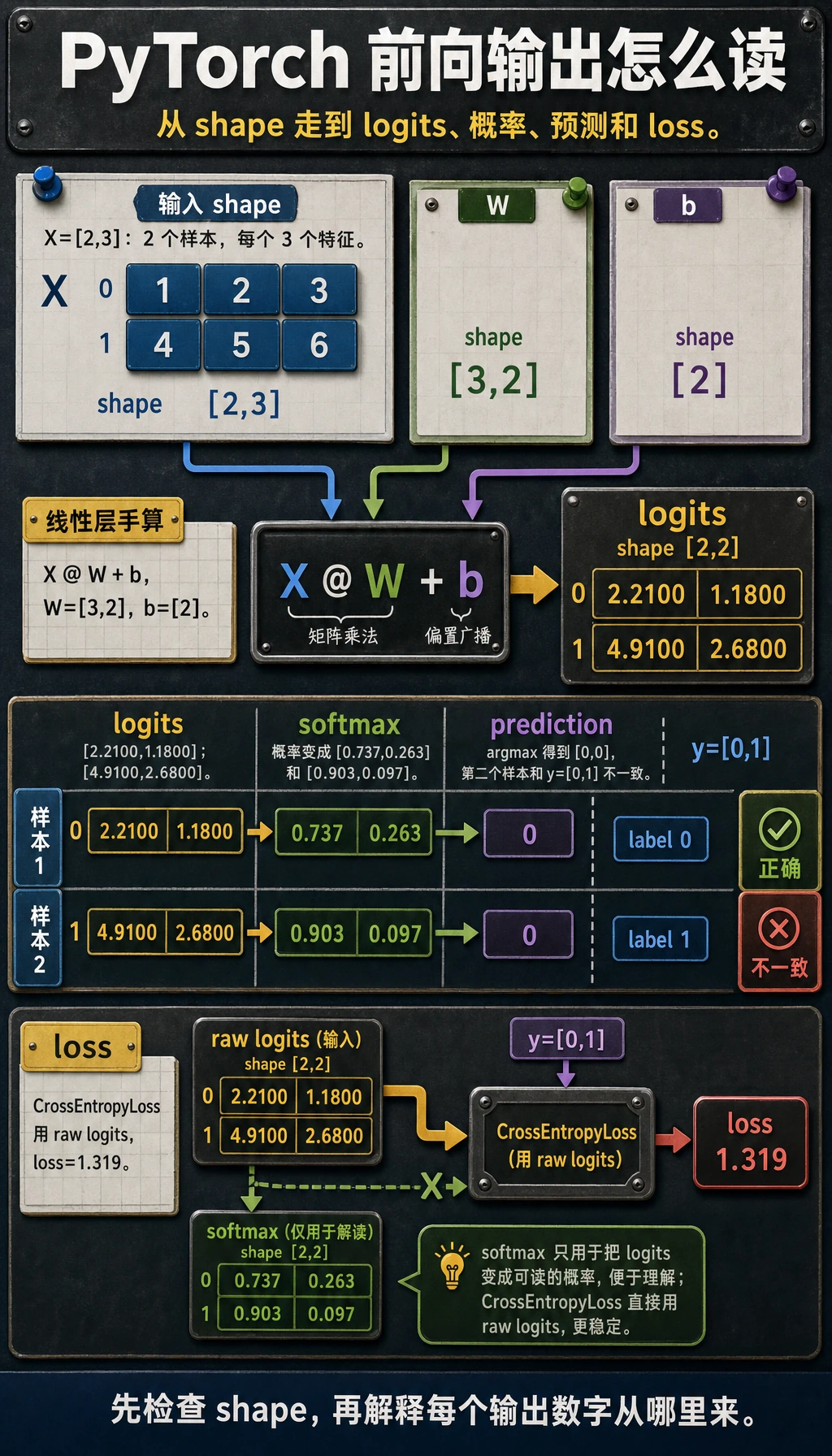
仔细读 shape:
X是[2, 3]:两个样本、三个特征。W是[3, 2]:三个输入特征、两个输出类别。X @ W变成[2, 2]:每个样本一组类别分数。b是[2],会被广播到整个 batch。CrossEntropyLoss接收原始logits,不是 softmax 后的概率。
PyTorch 多分类时,把原始 logits 传给 nn.CrossEntropyLoss()。不要在 loss 前手动做 softmax。softmax 只用于检查概率或做预测解释。
真正常用的 shape 操作
用 reshape、unsqueeze 和 squeeze 把 shape 调成下一步运算需要的样子。
import torch

x = torch.arange(12)
grid = x.reshape(3, 4)
batch = grid.unsqueeze(0)
restored = batch.squeeze(0)

print("x:", tuple(x.shape))
print("grid:", tuple(grid.shape))
print("batch:", tuple(batch.shape))
print("restored:", tuple(restored.shape))
预期输出:
x: (12,)
grid: (3, 4)
batch: (1, 3, 4)
restored: (3, 4)
实际含义:
reshape(3, 4):把同样的 12 个元素重新组织成表。unsqueeze(0):增加一个 batch 维度。squeeze(0):去掉大小为 1 的 batch 维度。
除非你明确知道为什么要用 view,否则先用 reshape。当内存布局不是连续时,reshape 更宽容。
Broadcasting:好用,但要检查方向
Broadcasting 的意思是:当 shape 兼容时,PyTorch 会把小张量自动扩展成大张量的形状。
import torch

X = torch.tensor(
    [
        [1.0, 2.0, 3.0],
        [4.0, 5.0, 6.0],
    ]
)

feature_mean = X.mean(dim=0)
centered = X - feature_mean

print("feature_mean:", feature_mean)
print("centered:", centered)
预期输出:
feature_mean: tensor([2.5000, 3.5000, 4.5000])
centered: tensor([[-1.5000, -1.5000, -1.5000],
        [ 1.5000,  1.5000,  1.5000]])
这里 feature_mean 的 shape 是 [3],X 的 shape 是 [2, 3]。PyTorch 会把同一组特征均值从每一行里减掉。
依赖 broadcasting 前,把 shape 写在代码旁边:
# X: [batch, features]
# feature_mean: [features]
centered = X - feature_mean
这条小注释能避免很多静默逻辑错误。
Device 和 NumPy 转换
真实训练代码必须让张量待在同一个 device 上。这个写法可以兼容 CPU、CUDA 和 Apple Silicon MPS。
import torch

if torch.cuda.is_available():
    device = torch.device("cuda")
elif torch.backends.mps.is_available():
    device = torch.device("mps")
else:
    device = torch.device("cpu")

X = torch.tensor([[1.0, 2.0, 3.0]])
X = X.to(device)

print("device:", X.device)
如果要转回 NumPy 画图或分析,先 detach,再搬回 CPU:
arr = X.detach().cpu().numpy()
print(type(arr), arr.shape)
为什么顺序重要:
.detach()离开梯度图。.cpu()确保 NumPy 能读到数据。.numpy()转成 NumPy 数组。
常见错误模式
| 现象 | 可能原因 | 修复方式 |
|---|---|---|
mat1 and mat2 shapes cannot be multiplied | 矩阵乘法维度不对 | 在 @ 或 nn.Linear 前打印两个 shape |
expected scalar type Long | 分类 loss 的标签是 float | 使用 y = y.long() |
Expected all tensors to be on the same device | 模型和数据不在同一设备 | 用 .to(device) 移动模型和数据 |
| loss 能跑但结果怪 | broadcasting 方向不是你以为的方向 | 写出两个 shape 并确认扩展方式 |
| NumPy 转换失败 | 张量在 GPU 上或还连着梯度图 | 用 tensor.detach().cpu().numpy() |
快速排错清单
张量进模型前,先打印:
print("shape:", tuple(X.shape))
print("dtype:", X.dtype)
print("device:", X.device)
print("meaning: [batch, features]")
进 loss 前,检查:
print("logits:", tuple(logits.shape), logits.dtype)
print("labels:", tuple(y.shape), y.dtype)
多分类里最常见的组合是:
logits: [batch, classes], float32
labels: [batch], int64 / long
练习
- 把实验 2 里的
X从两个样本改成三个样本。哪些 shape 会变,哪些不会变? - 创建 shape 为
[batch, 1]的标签,再用squeeze(1)修成CrossEntropyLoss能接受的形状。 - 把
X、W和b移到device。如果只移动其中一个,会得到什么错误? - 把
X @ W改成X * W。为什么它会失败,或者表达完全不同的含义?
小结
- PyTorch 基础不是背很多函数,而是匹配 shape、dtype、device 和运算含义。
@是矩阵乘法;*是逐元素乘法。CrossEntropyLoss需要原始 logits 和long标签。- Broadcasting 很强,但你必须知道哪一维在被扩展。