6.2.3 PyTorch の基礎
このページは API 一覧ではありません。目的は、PyTorch モデルを書く前に毎回必要になる反射を作ることです。学習前に shape、dtype、device、演算の意味を読む。
学習目標
- Python と NumPy のデータからテンソルを作れる。
shape、dtype、device、各次元の意味を読める。- 要素ごとの演算と行列積を区別できる。
- broadcasting を偶然ではなく意図して使える。
- 小さな順伝播を実行し、logits、確率、予測、loss を得られる。
まず Tensor のライフサイクルを見る
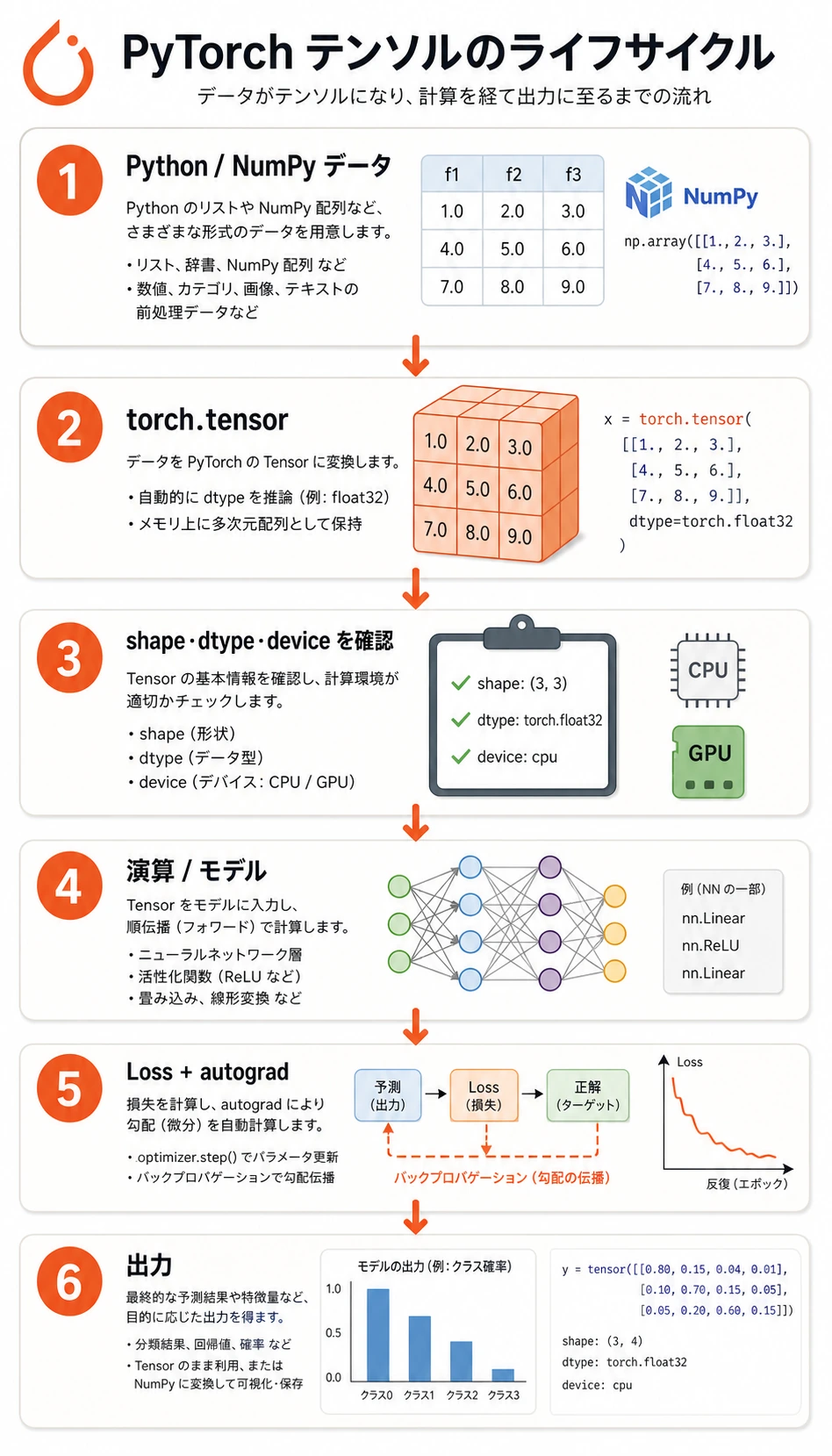
多くの PyTorch データは、次の流れを通ります。
生データ -> tensor -> shape/dtype/device の確認 -> 演算/モデル -> loss -> 勾配/更新
初心者がやりがちなのは、すぐモデルへ進むことです。より安全なのは、モデルに入れる前にテンソルを確認する習慣です。
Tensor は学習用の情報を持つデータ
短く実用的に言うと、次のようになります。
テンソルは、PyTorch が計算でき、device 間を移動でき、必要なら勾配も追跡できる多次元配列です。
NumPy 配列と比べると、PyTorch テンソルには深層学習向けの機能が 2 つあります。
device: テンソルを CPU、GPU、Apple MPS に置ける。requires_grad: 自動微分に参加できる。
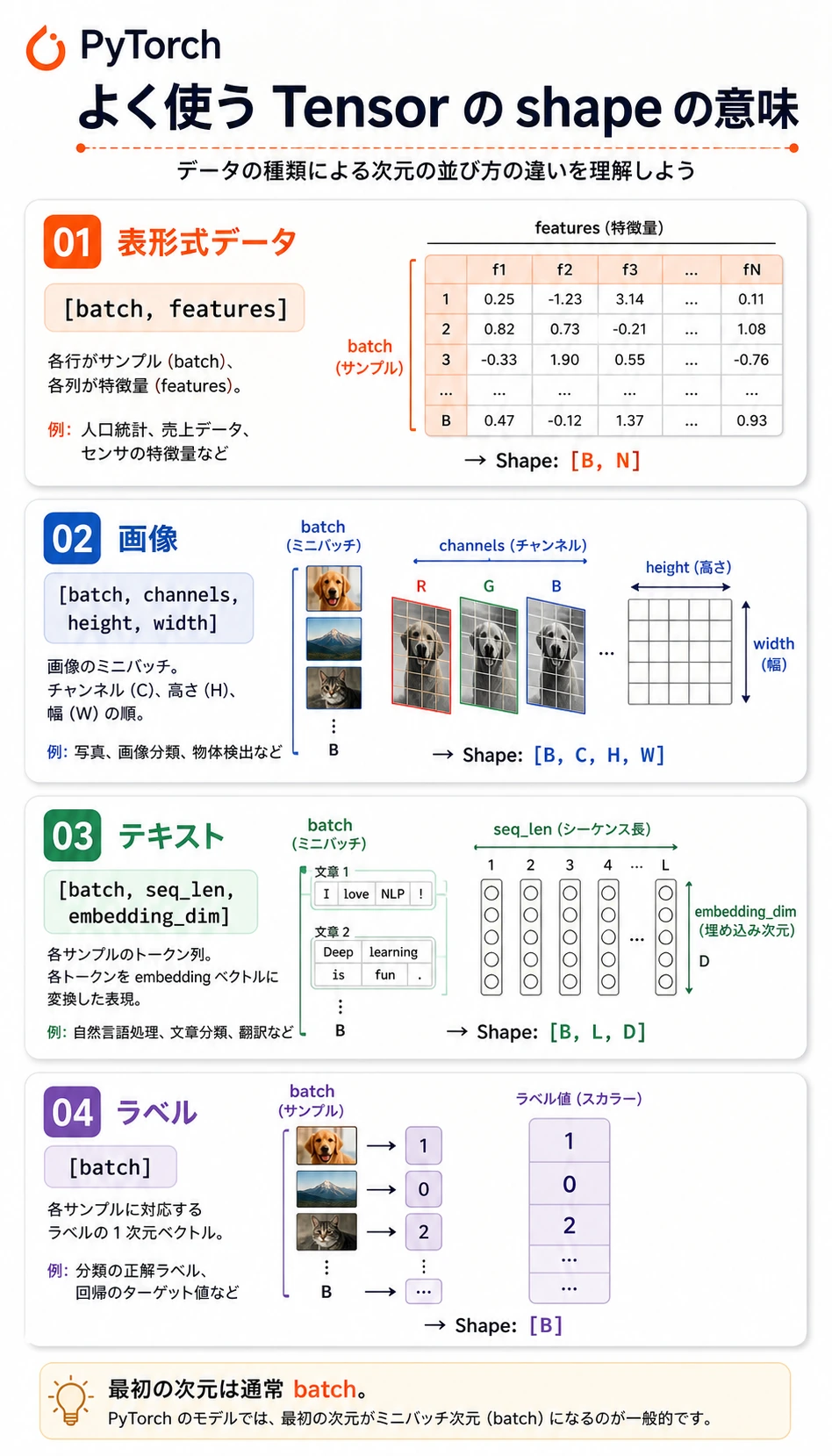
よく見る shape:
| データ | よくある shape | 意味 |
|---|---|---|
| 表形式の batch | [batch, features] | 行がサンプル、列が特徴量 |
| 分類ラベル | [batch] | 各サンプルに 1 つの整数クラス id |
| 画像 batch | [batch, channels, height, width] | PyTorch の画像の慣例 |
| テキスト埋め込み | [batch, seq_len, embedding_dim] | token ごとのベクトル表現 |
| logits | [batch, classes] | softmax 前の生のクラススコア |
実験 1: 計算する前にテンソルを調べる
まずこれを実行します。以後の学習ループで毎回使う確認習慣を作ります。
import torch


def describe(name, tensor, meaning):
    print(
        f"{name}: shape={tuple(tensor.shape)} "
        f"dtype={tensor.dtype} "
        f"device={tensor.device} "
        f"meaning={meaning}"
    )


X = torch.tensor(
    [
        [1.0, 2.0, 3.0],
        [4.0, 5.0, 6.0],
    ]
)
y = torch.tensor([0, 1], dtype=torch.long)

describe("X", X, "[batch, features]")
describe("y", y, "[batch]")

print("ndim:", X.ndim)
print("numel:", X.numel())
print("first row:", X[0])
print("feature means:", X.mean(dim=0))
期待される出力:
X: shape=(2, 3) dtype=torch.float32 device=cpu meaning=[batch, features]
y: shape=(2,) dtype=torch.int64 device=cpu meaning=[batch]
ndim: 2
numel: 6
first row: tensor([1., 2., 3.])
feature means: tensor([2.5000, 3.5000, 4.5000])
見るポイント:
Xはfloat32で、通常のモデル入力によく使う型です。yはint64、つまりtorch.longで、CrossEntropyLossが分類ラベルに期待する型です。dim=0は batch 方向に集約し、特徴量ごとの平均を返します。
実験 2: 特徴量から logits へ
次に、とても小さな分類用の順伝播を手で書きます。これは nn.Linear が内部でしていることに近いです。
import torch
import torch.nn as nn


def describe(name, tensor, meaning):
    print(
        f"{name}: shape={tuple(tensor.shape)} "
        f"dtype={tensor.dtype} "
        f"device={tensor.device} "
        f"meaning={meaning}"
    )


X = torch.tensor(
    [
        [1.0, 2.0, 3.0],
        [4.0, 5.0, 6.0],
    ]
)
y = torch.tensor([0, 1], dtype=torch.long)

W = torch.tensor(
    [
        [0.1, 0.2],
        [0.3, -0.1],
        [0.5, 0.4],
    ]
)
b = torch.tensor([0.01, -0.02])

logits = X @ W + b
probs = torch.softmax(logits, dim=1)
pred = probs.argmax(dim=1)
loss = nn.CrossEntropyLoss()(logits, y)

describe("logits", logits, "[batch, classes]")
print("logits:", torch.round(logits * 100) / 100)
print("probabilities:", torch.round(probs * 1000) / 1000)
print("prediction:", pred)
print("loss:", round(loss.item(), 3))
期待される出力:
logits: shape=(2, 2) dtype=torch.float32 device=cpu meaning=[batch, classes]
logits: tensor([[2.2100, 1.1800],
        [4.9100, 2.6800]])
probabilities: tensor([[0.7370, 0.2630],
        [0.9030, 0.0970]])
prediction: tensor([0, 0])
loss: 1.319
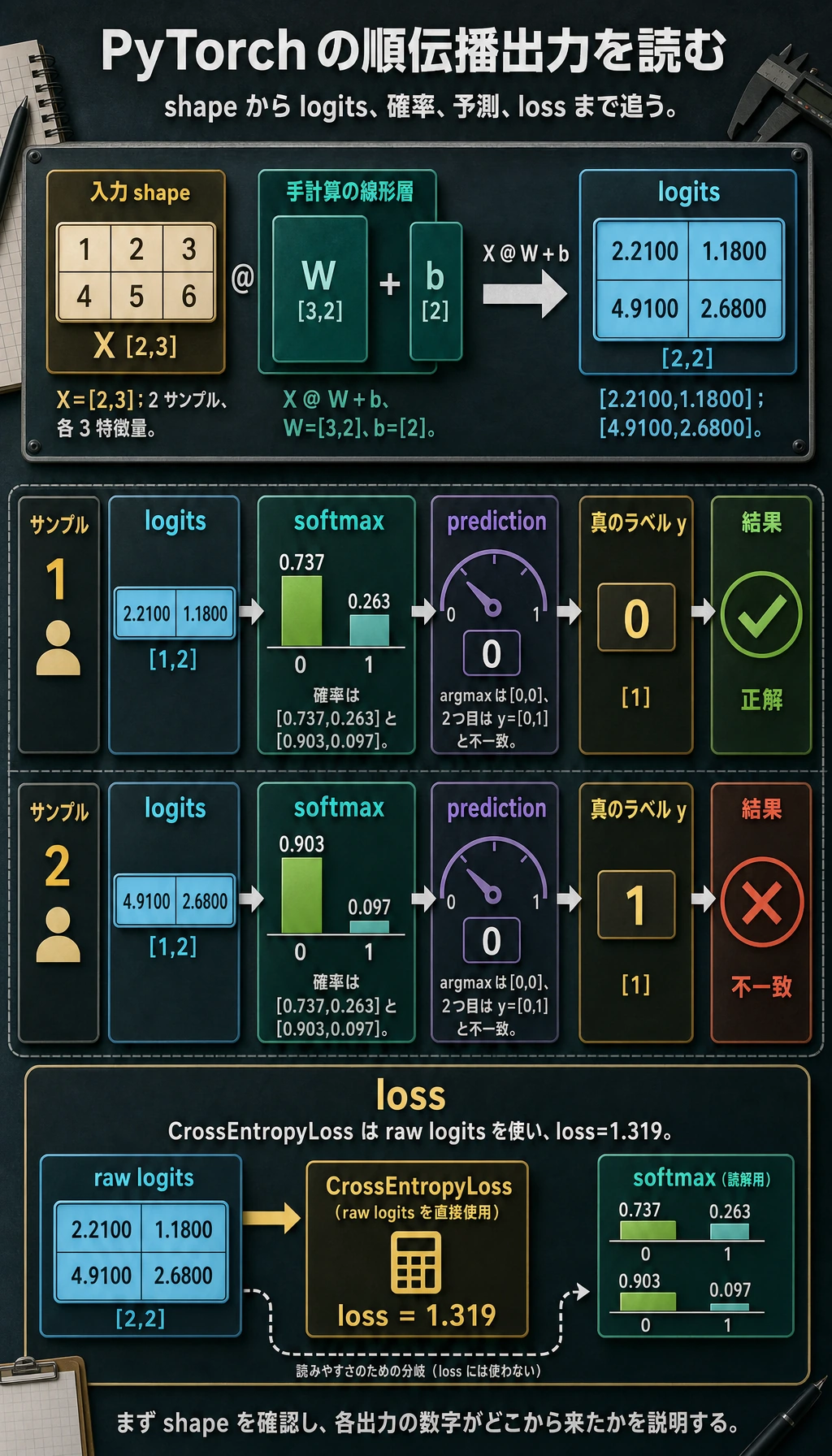
shape を丁寧に読みます。
Xは[2, 3]:2 サンプル、3 特徴量です。Wは[3, 2]:3 入力特徴量、2 出力クラスです。X @ Wは[2, 2]:各サンプルに 1 つのスコアベクトルです。bは[2]で、batch 全体へ broadcast されます。CrossEntropyLossは softmax 後の確率ではなく、生のlogitsを受け取ります。
PyTorch の多クラス分類では、生の logits を nn.CrossEntropyLoss() に渡します。loss の前に手動で softmax しないでください。softmax は、確率を読みたいときや予測を説明したいときに使います。
実際によく使う shape 操作
reshape、unsqueeze、squeeze を使って、次の演算が期待する shape に合わせます。
import torch

x = torch.arange(12)
grid = x.reshape(3, 4)
batch = grid.unsqueeze(0)
restored = batch.squeeze(0)

print("x:", tuple(x.shape))
print("grid:", tuple(grid.shape))
print("batch:", tuple(batch.shape))
print("restored:", tuple(restored.shape))
期待される出力:
x: (12,)
grid: (3, 4)
batch: (1, 3, 4)
restored: (3, 4)
実用的な意味:
reshape(3, 4):同じ 12 個の要素を表の形に並べ替える。unsqueeze(0):batch 次元を追加する。squeeze(0):サイズ 1 の batch 次元を取り除く。
view を使う理由がはっきり分かっている場合を除き、まずは reshape を使います。メモリ配置が連続でないときも、reshape のほうが扱いやすいです。
Broadcasting: 便利だが方向を確認する
Broadcasting とは、shape に互換性があるとき、小さいテンソルを大きいテンソルに合わせて自動的に拡張する仕組みです。
import torch

X = torch.tensor(
    [
        [1.0, 2.0, 3.0],
        [4.0, 5.0, 6.0],
    ]
)

feature_mean = X.mean(dim=0)
centered = X - feature_mean

print("feature_mean:", feature_mean)
print("centered:", centered)
期待される出力:
feature_mean: tensor([2.5000, 3.5000, 4.5000])
centered: tensor([[-1.5000, -1.5000, -1.5000],
        [ 1.5000,  1.5000,  1.5000]])
ここでは feature_mean の shape は [3]、X の shape は [2, 3] です。PyTorch は同じ特徴量平均を各行から引きます。
broadcasting に頼る前に、shape をコードのそばに書きます。
# X: [batch, features]
# feature_mean: [features]
centered = X - feature_mean
この小さなメモで、多くの静かな論理バグを防げます。
Device と NumPy 変換
実際の学習コードでは、テンソルを同じ device に置く必要があります。次の書き方なら CPU、CUDA、Apple Silicon MPS に対応できます。
import torch

if torch.cuda.is_available():
    device = torch.device("cuda")
elif torch.backends.mps.is_available():
    device = torch.device("mps")
else:
    device = torch.device("cpu")

X = torch.tensor([[1.0, 2.0, 3.0]])
X = X.to(device)

print("device:", X.device)
可視化や分析のために NumPy へ戻すときは、先に detach し、CPU へ移します。
arr = X.detach().cpu().numpy()
print(type(arr), arr.shape)
この順番が大事な理由:
.detach()は勾配グラフから外します。.cpu()は NumPy がデータを読める場所に移します。.numpy()は NumPy 配列に変換します。
よくあるエラーパターン
| 症状 | ありがちな原因 | 直し方 |
|---|---|---|
mat1 and mat2 shapes cannot be multiplied | 行列積の次元が合わない | @ や nn.Linear の前に両方の shape を表示する |
expected scalar type Long | 分類 loss のラベルが float | y = y.long() を使う |
Expected all tensors to be on the same device | モデルとデータが別 device にある | モデルとデータの両方を .to(device) する |
| loss は動くが結果がおかしい | broadcasting が想定外の方向に起きている | 両方の shape を書き、拡張方向を確認する |
| NumPy 変換が失敗する | テンソルが GPU 上、または勾配グラフにつながっている | tensor.detach().cpu().numpy() を使う |
クイックデバッグチェックリスト
テンソルをモデルへ入れる前に、まず表示します。
print("shape:", tuple(X.shape))
print("dtype:", X.dtype)
print("device:", X.device)
print("meaning: [batch, features]")
loss 関数の前には、これを確認します。
print("logits:", tuple(logits.shape), logits.dtype)
print("labels:", tuple(y.shape), y.dtype)
多クラス分類でよくある組み合わせは次です。
logits: [batch, classes], float32
labels: [batch], int64 / long
練習
- 実験 2 の
Xを 2 サンプルから 3 サンプルに変えてください。どの shape が変わり、どの shape は変わりませんか? - shape が
[batch, 1]のラベルを作り、squeeze(1)でCrossEntropyLossが受け取れる形に直してください。 X、W、bをdeviceに移してください。1 つだけ移すとどんなエラーになりますか?X @ WをX * Wに変えてください。なぜ失敗する、または意味がまったく変わるのでしょうか?
まとめ
- PyTorch の基礎は、多くの関数を暗記することではなく、shape、dtype、device、演算の意味を対応させることです。
@は行列積、*は要素ごとの積です。CrossEntropyLossには生の logits とlongラベルを渡します。- Broadcasting は強力ですが、どの次元が拡張されているか必ず理解して使います。