9 AI Agent 与智能体系统
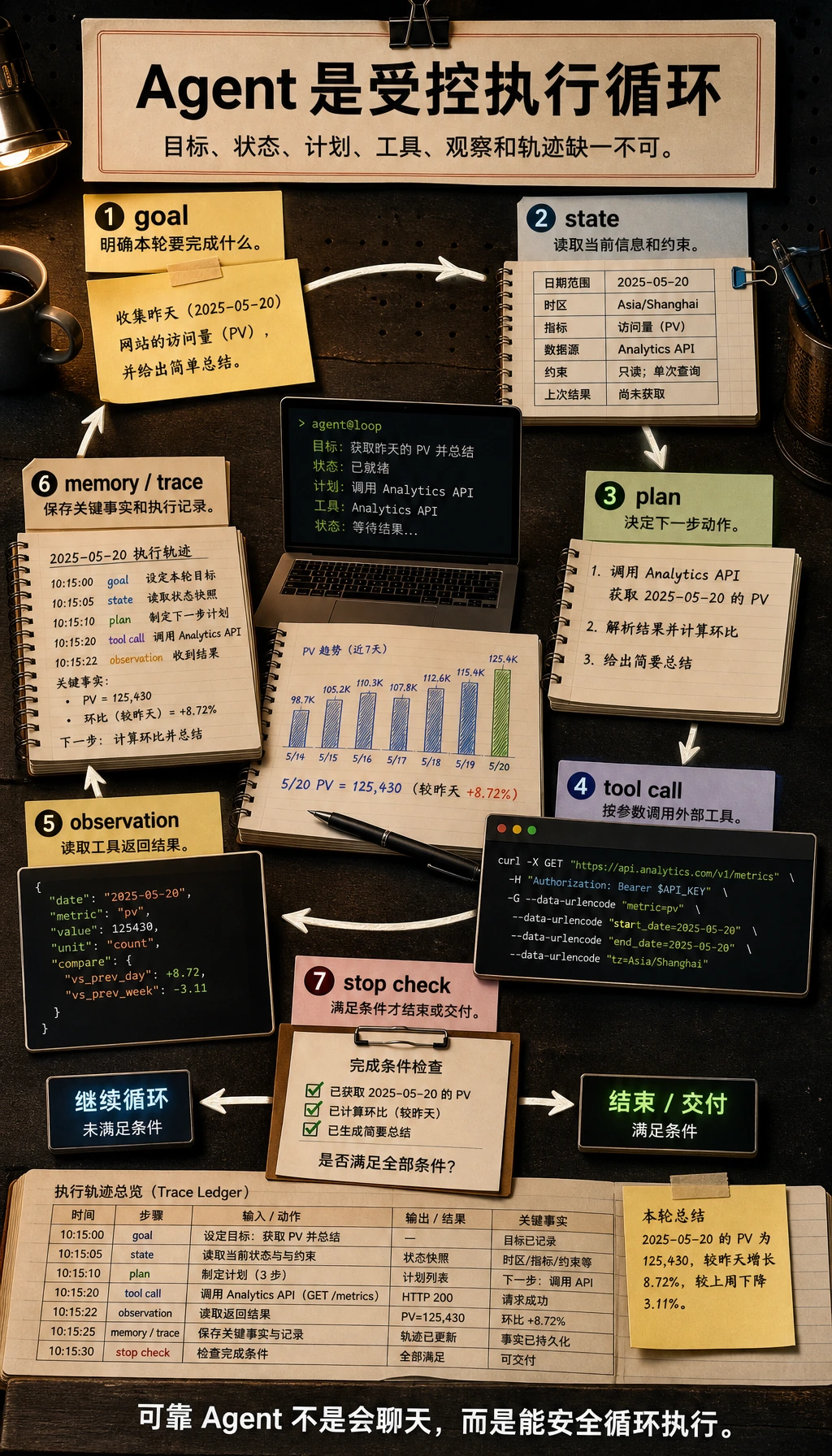
第 8 章让模型能基于文档回答。第 9 章让系统围绕目标行动:规划下一步、调用工具、读取观察结果、调整路线、安全停止,并留下人能复盘的 trace。
不要从多 Agent 框架开始。先做一个能展示每一步的小 Agent。
先看 Agent 执行闭环
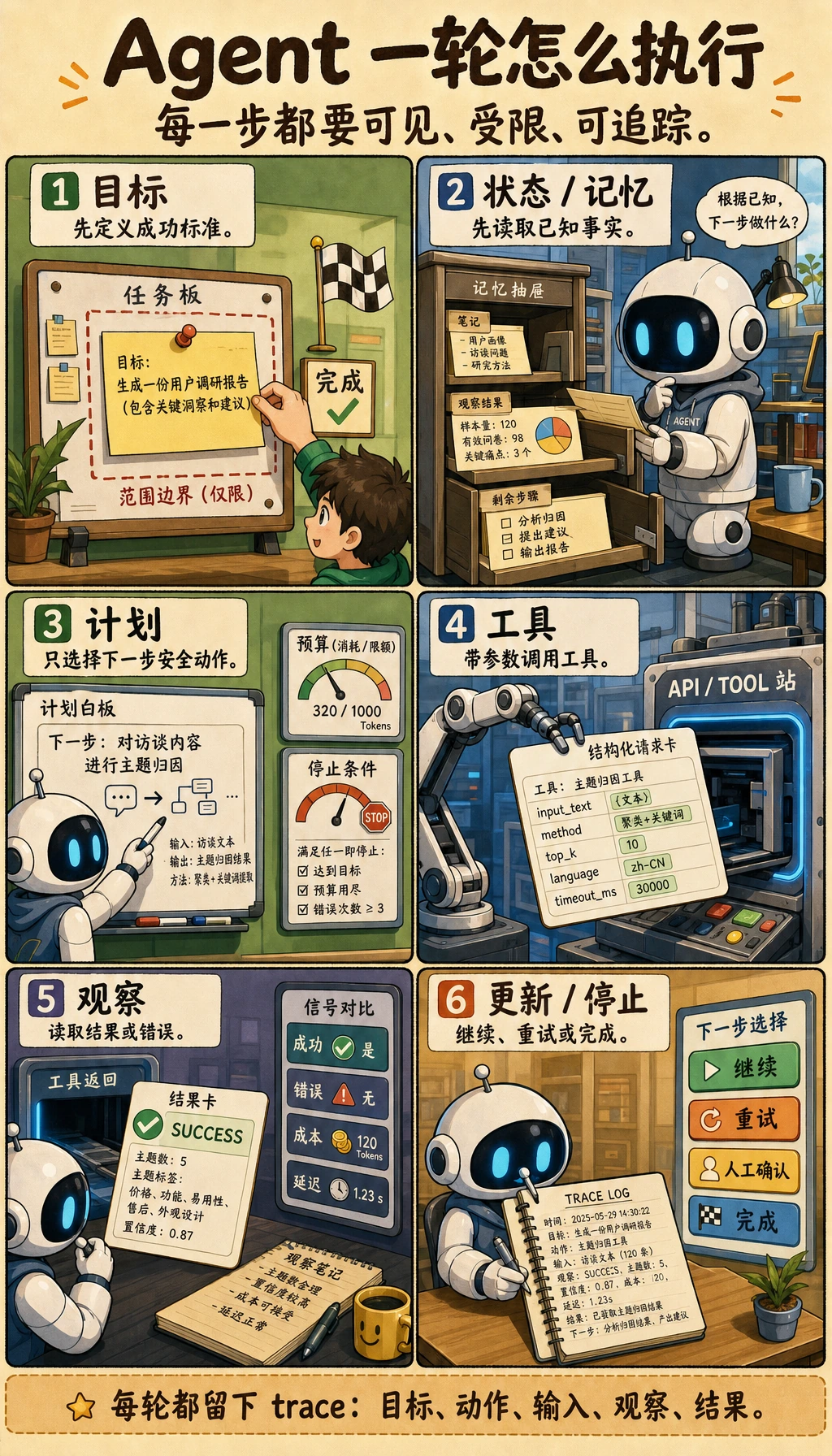
Agent 不是“给聊天机器人加工具”,而是一个受控执行闭环。
| 部分 | 通俗含义 | 必须控制什么 |
|---|---|---|
| Goal | Agent 要完成的目标 | 范围、成功标准、停止条件 |
| State | 当前已经知道什么 | 当前输入、历史观察、剩余步骤 |
| Plan | 下一步准备做什么 | 最大步数、兜底路径、人工接管 |
| Tool | 搜索、读文件、调 API、跑代码等外部动作 | schema、校验、白名单、风险等级 |
| Observation | 工具返回的结果 | 错误处理、重试规则、可信边界 |
| Memory | 哪些信息跨步骤或跨运行保留 | 短期状态和长期偏好的边界 |
| Trace | 可回放的执行记录 | 目标、动作、参数、观察、成本、最终结果 |
学习顺序与任务表
先把单 Agent 做到可追踪,再学多 Agent。
| 步骤 | 阅读内容 | 要动手做什么 | 留下什么证据 |
|---|---|---|---|
| 9.1 | Agent 基础与架构 | 解释 goal、state、plan、tool、observation、memory | 一张架构草图 |
| 9.2 | 推理与规划 | 用同一任务比较 ReAct 和 Plan-and-Execute | 一份步骤 trace |
| 9.3 | 工具调用 | 定义一两个带参数和错误的工具 | tools_schema.md |
| 9.4 | 记忆 | 区分当前状态和长期记忆 | 记忆边界说明 |
| 9.5 | MCP | 把 MCP 理解成连接工具和数据源的标准方式 | 一份接入笔记 |
| 9.6-9.7 | 框架与多 Agent | 单 Agent 闭环稳定后再学 | 框架选择说明 |
| 9.8-9.10 | 评估、安全、部署、项目 | 运行 9.10.5 实操:构建一个可追踪的单 Agent 助手 | trace 日志、安全拦截、评估用例 |
第一个可运行循环:先打印 trace
这个离线脚本不依赖 LLM。它训练的是工程习惯:每个动作都必须可回放。后面可以把固定 plan 换成模型生成的计划,但 trace 格式要保留。
新建 ch09_agent_trace.py,用 Python 3.10 或更新版本运行。
import json


def search_docs(tool_input: dict) -> str:
    return "Found notes about RAGOps, AgentOps, evaluation sets, and trace logs."


def make_todo(tool_input: dict) -> str:
    topic = tool_input["topic"]
    return f"1) Review {topic} notes; 2) add one eval case; 3) write failure notes."


TOOLS = {
    "search_docs": {"fn": search_docs, "risk": "read_only"},
    "make_todo": {"fn": make_todo, "risk": "draft_only"},
}

goal = "Prepare a short RAG review plan."
plan = [
    {
        "thought": "Find relevant course materials before making a plan.",
        "action": "search_docs",
        "input": {"query": "RAGOps AgentOps evaluation trace"},
    },
    {
        "thought": "Turn the materials into a small review checklist.",
        "action": "make_todo",
        "input": {"topic": "RAG evaluation"},
    },
]

trace = []
for step_number, step in enumerate(plan, start=1):
    tool = TOOLS.get(step["action"])
    if tool is None:
        observation = "Blocked: tool is not whitelisted."
        risk = "blocked"
    else:
        observation = tool["fn"](step["input"])
        risk = tool["risk"]

    trace.append(
        {
            "step": step_number,
            "goal": goal,
            "thought": step["thought"],
            "action": step["action"],
            "input": step["input"],
            "risk": risk,
            "observation": observation,
        }
    )

for item in trace:
    print(json.dumps(item, ensure_ascii=False))
预期输出开头如下:
{"step": 1, "goal": "Prepare a short RAG review plan.", "thought": "Find relevant course materials before making a plan.", "action": "search_docs", ...
{"step": 2, "goal": "Prepare a short RAG review plan.", "thought": "Turn the materials into a small review checklist.", "action": "make_todo", ...
操作提示:把 make_todo 改成白名单外工具名,比如 send_email。脚本应该拦截它。这就是安全边界的最小版本。
选择 Agent、工作流、RAG 还是 Function Calling
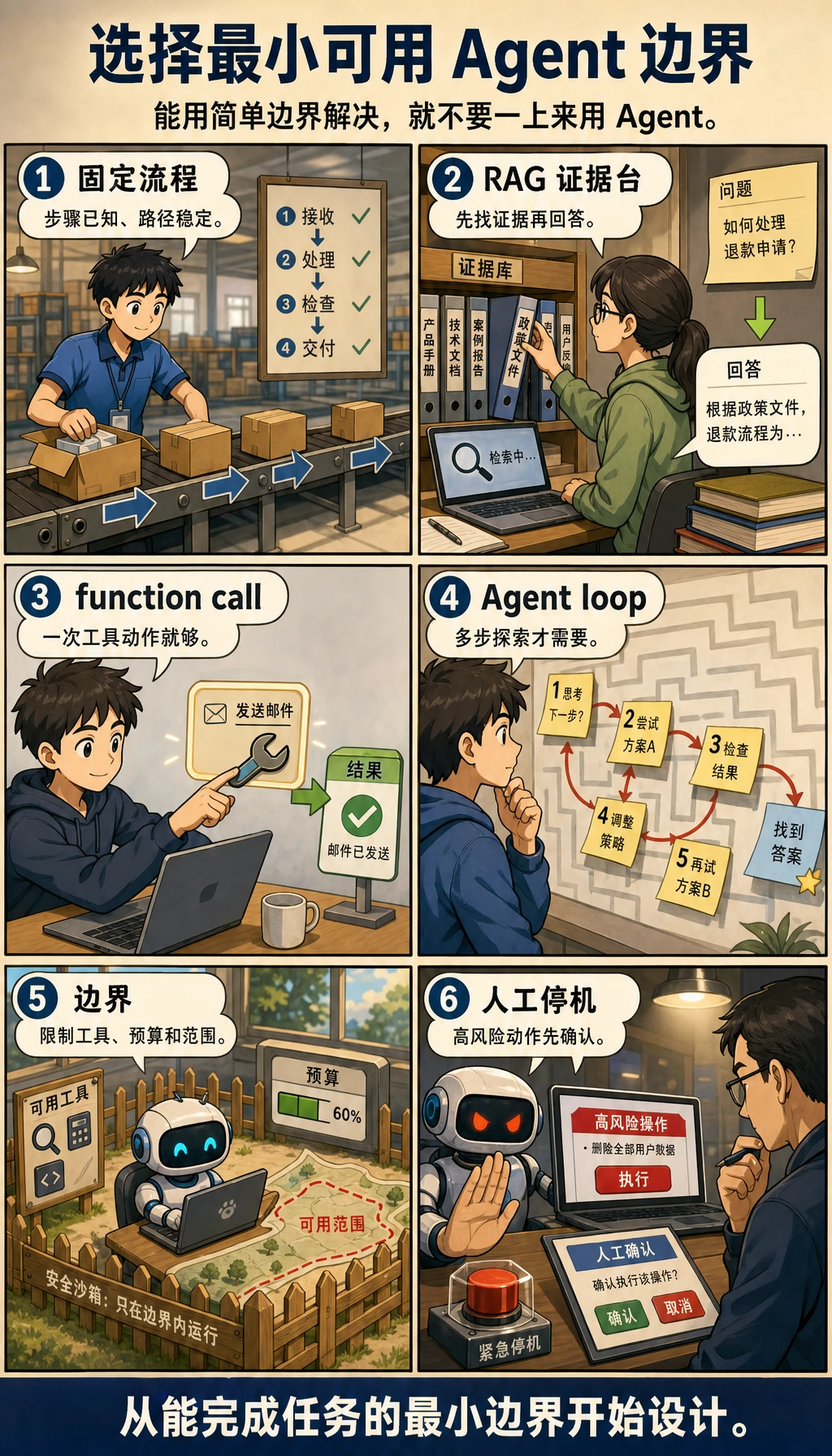
Agent 很强,但不应该默认使用。
| 问题 | 先用什么 | 什么时候用 Agent |
|---|---|---|
| 步骤固定且已知 | 工作流 | 每次观察后路线都可能变化 |
| 答案需要私有或新知识 | RAG | 检索只是更大目标中的一步 |
| 一次结构化动作就够 | Function Calling | 需要多次工具调用和状态更新 |
| 任务风险高 | 带人工确认的工作流 | Agent 可以起草,但高风险动作必须人确认 |
| 探索任务需要规划、工具、记忆和恢复 | Agent | 能记录每一步,并能安全停止 |
常见错误
- 单 Agent 还不稳定,就开始做多 Agent。
- 调工具时没有 schema、参数校验或有用的错误信息。
- 缺少停止条件,导致循环和成本飙升。
- 高风险工具没有人工确认就自动执行。
- 只展示成功 Demo,不保留失败 trace。
- 把 memory 当杂物箱,而不是区分当前状态、长期偏好和任务历史。
通关检查
离开本章前,你应该能做到:
- 解释 goal、state、plan、tool、observation、memory、trace 和 guardrail;
- 运行 trace 脚本,并拦截一个不在白名单里的工具;
- 保存
agent_traces.jsonl、tools_schema.md、safety_boundary.md和failure_cases.md; - 判断任务应该用工作流、RAG、Function Calling 还是 Agent;
- 跑通第 9 章完整工作坊,并新增一个评估任务和一个安全拦截样例。
可打印清单见 9.0 学习检查表。如果想直接做项目,从 9.10.5 实操:构建一个可追踪的单 Agent 助手 开始。