10.6.4 実践:再現可能なビジョン・ミニパイプラインを作る
このセクションでは、第 10 章を手を動かして進めるプロジェクトにします。データセットをダウンロードする必要も、クラウドモデルを呼び出す必要もありません。1 本の Python スクリプトが小さな画像データセットを生成し、そのまま一連の視覚処理を実行します。
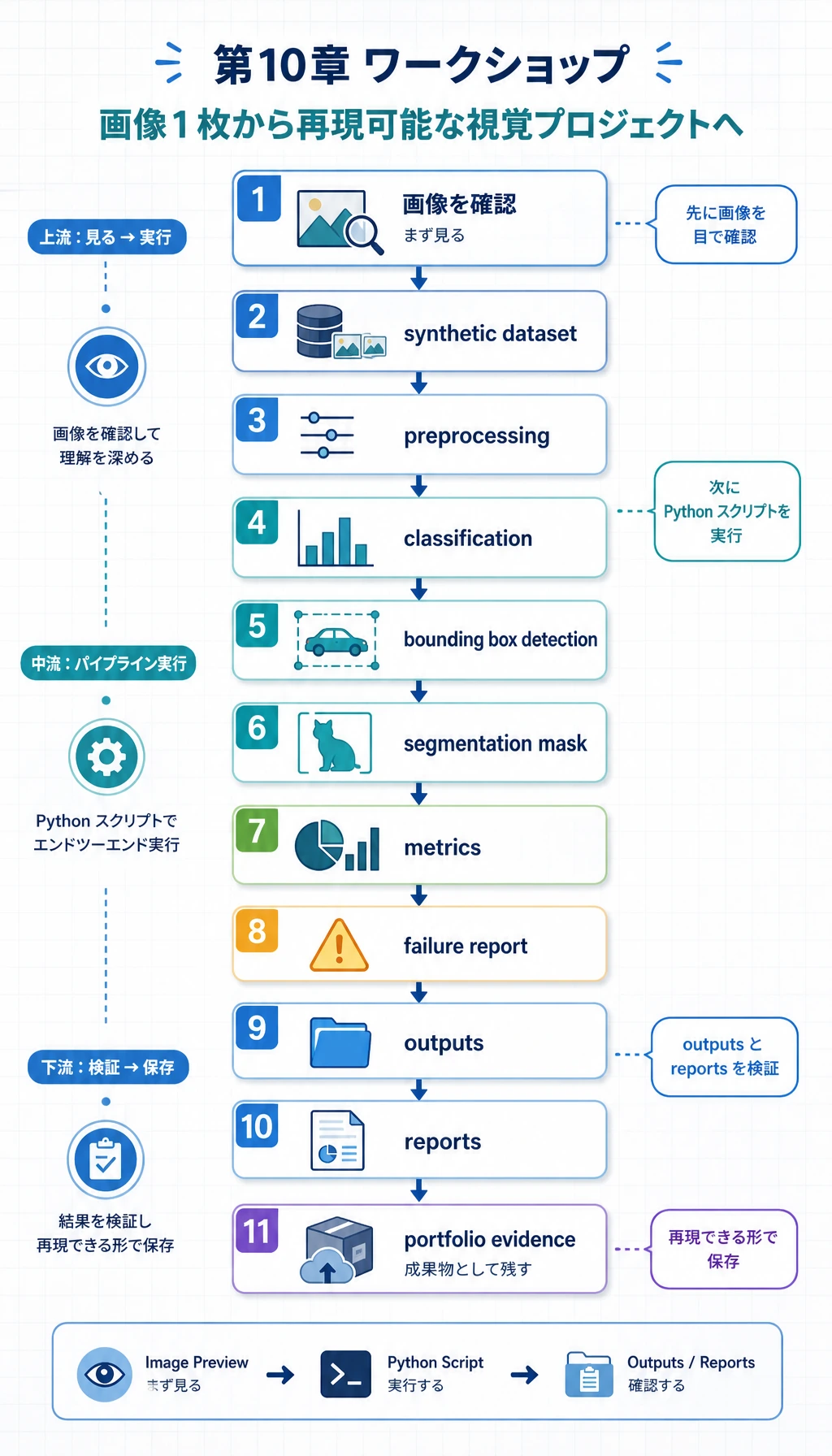
作るものは、実際のビジョンプロジェクトにもよく出てくる 4 つの部品です。
- 分類:画像が circle、square、triangle のどれかを判定する。
- 検出:前景物体の bounding box を描く。
- 分割:前景領域の mask を作る。
- 評価:指標、予測画像、失敗例を保存する。
この例では、あえて深層学習モデルではなく opencv-python と numpy を使います。理由は実用的です。初心者でもオフラインで実行でき、すべての中間ファイルを確認でき、モデルを置き換える前にプロジェクト構造を理解できます。この流れが見えたあとで、単純な分類器を CNN、YOLO 検出器、分割モデルに差し替えると、学習がかなり安定します。
作るもの
実行後、フォルダは次のようになります。
cv_workshop_run/
  data/
    labels.csv
    train_circle_00.png
    train_circle_00_mask.png
    ...
  outputs/
    test_circle_00_prediction.png
    ...
  reports/
    metrics.json
    predictions.csv
    failure_cases.md
これはポートフォリオ作成の基本形として読んでください。
data/は、モデルが何を見たかを示します。outputs/は、モデルが何を予測したかを示します。reports/は、どのように評価し、どこを調べたかを示します。
Step 0:生成するデータを理解する
まずデータの流れを見ます。ビジョンプロジェクトは学習から始まるのではなく、画像、ラベル、mask、box、split、難しいサンプルが見える状態から始まります。
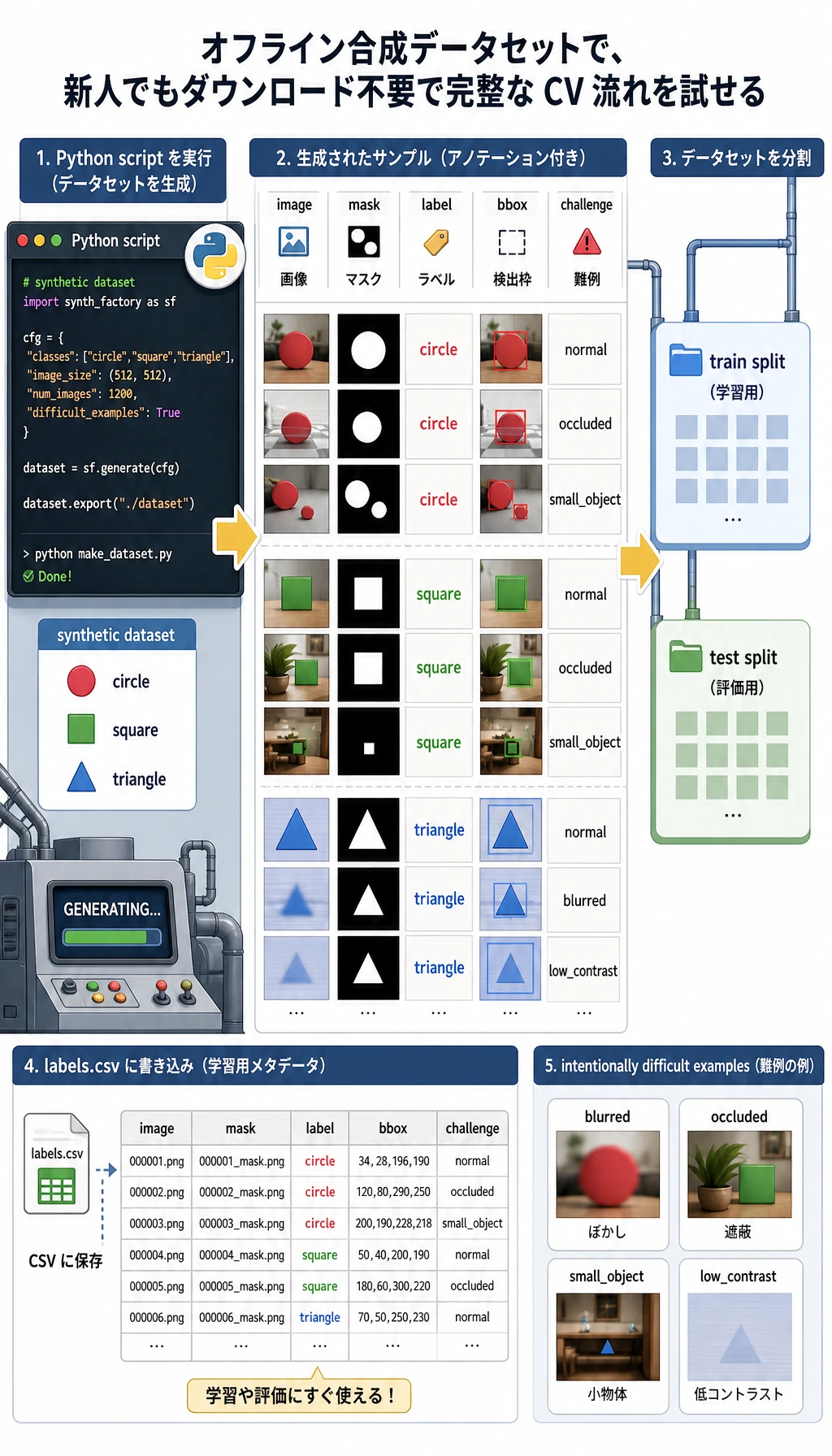
このワークショップでは次のように扱います。
imageは入力 PNG 画像。labelはcircle、square、triangleのクラス。maskはピクセル単位の前景の正解。bboxは bounding box、つまりx1, y1, x2, y2。challengeはoccluded、small_object、low_contrastなどの難しい条件。
大事なのは、合成データであること自体ではありません。大事なのは、プロジェクト全体が再現可能であることです。もう一度実行しても、同じ構造、指標、失敗例レポートを確認できます。
Step 1:きれいな作業フォルダを作る
mkdir cv-workshop
cd cv-workshop
python -m venv .venv
source .venv/bin/activate
pip install opencv-python numpy
Windows PowerShell では、次のように有効化します。
.\.venv\Scripts\Activate.ps1
すでにグローバル環境に依存パッケージが入っている場合は、仮想環境を省略しても構いません。ただし、ポートフォリオとして残すなら、仮想環境を使ったほうが再現しやすくなります。
Step 2:完全なスクリプトを保存する
vision_workshop.py を作り、次のコードを貼り付けてください。
from __future__ import annotations

import csv
import json
import math
import shutil
from dataclasses import dataclass
from pathlib import Path

import cv2
import numpy as np

ROOT = Path("cv_workshop_run")
DATA_DIR = ROOT / "data"
OUTPUT_DIR = ROOT / "outputs"
REPORT_DIR = ROOT / "reports"
IMAGE_SIZE = 128
LABELS = ["circle", "square", "triangle"]
RNG = np.random.default_rng(42)


@dataclass
class Sample:
    image_path: Path
    mask_path: Path
    label: str
    split: str
    box: tuple[int, int, int, int]
    challenge: str


def reset_workspace() -> None:
    if ROOT.exists():
        shutil.rmtree(ROOT)
    DATA_DIR.mkdir(parents=True)
    OUTPUT_DIR.mkdir(parents=True)
    REPORT_DIR.mkdir(parents=True)


def add_background_noise(img: np.ndarray, amount: int = 18) -> np.ndarray:
    noise = RNG.integers(0, amount, img.shape, dtype=np.uint8)
    return cv2.add(img, noise)


def draw_shape(label: str, index: int, split: str, challenge: str = "normal") -> tuple[np.ndarray, np.ndarray, tuple[int, int, int, int]]:
    img = np.zeros((IMAGE_SIZE, IMAGE_SIZE, 3), dtype=np.uint8)
    img[:] = (18, 24, 32)
    img = add_background_noise(img)
    mask = np.zeros((IMAGE_SIZE, IMAGE_SIZE), dtype=np.uint8)

    margin = 24
    cx = int(RNG.integers(margin + 8, IMAGE_SIZE - margin - 8))
    cy = int(RNG.integers(margin + 8, IMAGE_SIZE - margin - 8))
    size = int(RNG.integers(24, 39))
    color = (
        int(RNG.integers(80, 240)),
        int(RNG.integers(80, 240)),
        int(RNG.integers(80, 240)),
    )

    if challenge == "low_contrast":
        color = (55, 65, 75)
    if challenge == "small_object":
        size = 17
    if challenge == "edge_touching":
        cx, cy = 25, 25

    if label == "circle":
        cv2.circle(img, (cx, cy), size, color, -1)
        cv2.circle(mask, (cx, cy), size, 255, -1)
    elif label == "square":
        x1, y1, x2, y2 = cx - size, cy - size, cx + size, cy + size
        cv2.rectangle(img, (x1, y1), (x2, y2), color, -1)
        cv2.rectangle(mask, (x1, y1), (x2, y2), 255, -1)
    elif label == "triangle":
        pts = np.array(
            [[cx, cy - size], [cx - size, cy + size], [cx + size, cy + size]],
            dtype=np.int32,
        )
        cv2.fillPoly(img, [pts], color)
        cv2.fillPoly(mask, [pts], 255)
    else:
        raise ValueError(label)

    if challenge == "occluded":
        cv2.rectangle(img, (cx - size, cy - 8), (cx + size, cy + 8), (18, 24, 32), -1)
        cv2.rectangle(mask, (cx - size, cy - 8), (cx + size, cy + 8), 0, -1)
    if challenge == "blurred":
        img = cv2.GaussianBlur(img, (7, 7), 0)

    ys, xs = np.where(mask > 0)
    box = (int(xs.min()), int(ys.min()), int(xs.max()), int(ys.max()))
    return img, mask, box


def create_dataset() -> list[Sample]:
    samples: list[Sample] = []
    challenge_plan = {
        ("test", "circle", 0): "low_contrast",
        ("test", "square", 1): "occluded",
        ("test", "triangle", 2): "small_object",
    }

    for split, count in [("train", 12), ("test", 5)]:
        for label in LABELS:
            for i in range(count):
                challenge = challenge_plan.get((split, label, i), "normal")
                img, mask, box = draw_shape(label, i, split, challenge)
                image_path = DATA_DIR / f"{split}_{label}_{i:02d}.png"
                mask_path = DATA_DIR / f"{split}_{label}_{i:02d}_mask.png"
                cv2.imwrite(str(image_path), img)
                cv2.imwrite(str(mask_path), mask)
                samples.append(Sample(image_path, mask_path, label, split, box, challenge))

    with (DATA_DIR / "labels.csv").open("w", newline="", encoding="utf-8") as handle:
        writer = csv.writer(handle)
        writer.writerow(["image_path", "mask_path", "label", "split", "x1", "y1", "x2", "y2", "challenge"])
        for s in samples:
            writer.writerow([s.image_path.name, s.mask_path.name, s.label, s.split, *s.box, s.challenge])

    return samples


def segment_foreground(img: np.ndarray) -> np.ndarray:
    gray = cv2.cvtColor(img, cv2.COLOR_BGR2GRAY)
    blurred = cv2.GaussianBlur(gray, (5, 5), 0)
    _, mask = cv2.threshold(blurred, 0, 255, cv2.THRESH_BINARY + cv2.THRESH_OTSU)
    if np.mean(mask == 255) > 0.55:
        mask = cv2.bitwise_not(mask)
    kernel = np.ones((3, 3), dtype=np.uint8)
    return cv2.morphologyEx(mask, cv2.MORPH_OPEN, kernel)


def largest_box(mask: np.ndarray) -> tuple[int, int, int, int] | None:
    contours, _ = cv2.findContours(mask, cv2.RETR_EXTERNAL, cv2.CHAIN_APPROX_SIMPLE)
    if not contours:
        return None
    c = max(contours, key=cv2.contourArea)
    x, y, w, h = cv2.boundingRect(c)
    return (x, y, x + w - 1, y + h - 1)


def box_iou(a: tuple[int, int, int, int], b: tuple[int, int, int, int]) -> float:
    ax1, ay1, ax2, ay2 = a
    bx1, by1, bx2, by2 = b
    ix1, iy1 = max(ax1, bx1), max(ay1, by1)
    ix2, iy2 = min(ax2, bx2), min(ay2, by2)
    iw, ih = max(0, ix2 - ix1 + 1), max(0, iy2 - iy1 + 1)
    inter = iw * ih
    area_a = (ax2 - ax1 + 1) * (ay2 - ay1 + 1)
    area_b = (bx2 - bx1 + 1) * (by2 - by1 + 1)
    union = area_a + area_b - inter
    return inter / union if union else 0.0


def mask_iou(pred: np.ndarray, truth: np.ndarray) -> float:
    p = pred > 0
    t = truth > 0
    inter = np.logical_and(p, t).sum()
    union = np.logical_or(p, t).sum()
    return float(inter / union) if union else 0.0


def extract_features(img: np.ndarray) -> np.ndarray:
    mask = segment_foreground(img)
    contours, _ = cv2.findContours(mask, cv2.RETR_EXTERNAL, cv2.CHAIN_APPROX_SIMPLE)
    if not contours:
        return np.zeros(7, dtype=np.float32)

    c = max(contours, key=cv2.contourArea)
    area = cv2.contourArea(c)
    perimeter = cv2.arcLength(c, True)
    x, y, w, h = cv2.boundingRect(c)
    extent = area / max(1, w * h)
    aspect = w / max(1, h)
    circularity = 4 * math.pi * area / max(1.0, perimeter * perimeter)
    edges = cv2.Canny(cv2.cvtColor(img, cv2.COLOR_BGR2GRAY), 60, 160)
    edge_density = float((edges > 0).mean())
    hsv = cv2.cvtColor(img, cv2.COLOR_BGR2HSV)
    foreground = mask > 0
    mean_sat = float(hsv[:, :, 1][foreground].mean()) if foreground.any() else 0.0
    mean_val = float(hsv[:, :, 2][foreground].mean()) if foreground.any() else 0.0
    area_ratio = area / (IMAGE_SIZE * IMAGE_SIZE)
    return np.array(
        [area_ratio, extent, aspect, circularity, edge_density, mean_sat / 255, mean_val / 255],
        dtype=np.float32,
    )


def train_centroid_classifier(samples: list[Sample]) -> dict[str, np.ndarray]:
    grouped_features: dict[str, list[np.ndarray]] = {label: [] for label in LABELS}
    for s in samples:
        if s.split != "train":
            continue
        img = cv2.imread(str(s.image_path))
        grouped_features[s.label].append(extract_features(img))
    return {label: np.mean(rows, axis=0) for label, rows in grouped_features.items()}


def predict_label(feature: np.ndarray, centroids: dict[str, np.ndarray]) -> tuple[str, float]:
    distances = {label: float(np.linalg.norm(feature - center)) for label, center in centroids.items()}
    label = min(distances, key=distances.get)
    sorted_distances = sorted(distances.values())
    margin = sorted_distances[1] - sorted_distances[0] if len(sorted_distances) > 1 else 0.0
    confidence = float(1 / (1 + sorted_distances[0]) * min(1.0, 0.55 + margin * 3))
    return label, confidence


def draw_prediction(
    img: np.ndarray,
    truth_box: tuple[int, int, int, int],
    pred_box: tuple[int, int, int, int] | None,
    label: str,
    pred: str,
) -> np.ndarray:
    canvas = img.copy()
    x1, y1, x2, y2 = truth_box
    cv2.rectangle(canvas, (x1, y1), (x2, y2), (0, 190, 0), 2)
    if pred_box:
        px1, py1, px2, py2 = pred_box
        cv2.rectangle(canvas, (px1, py1), (px2, py2), (0, 0, 255), 2)
    cv2.putText(canvas, f"true={label} pred={pred}", (8, 18), cv2.FONT_HERSHEY_SIMPLEX, 0.45, (255, 255, 255), 1)
    return canvas


def evaluate(samples: list[Sample], centroids: dict[str, np.ndarray]) -> dict[str, object]:
    rows: list[dict[str, object]] = []
    confusion = {label: {pred: 0 for pred in LABELS} for label in LABELS}

    for s in samples:
        if s.split != "test":
            continue

        img = cv2.imread(str(s.image_path))
        truth_mask = cv2.imread(str(s.mask_path), cv2.IMREAD_GRAYSCALE)
        pred_mask = segment_foreground(img)
        pred_box = largest_box(pred_mask)
        feature = extract_features(img)
        pred, confidence = predict_label(feature, centroids)
        confusion[s.label][pred] += 1

        box_score = box_iou(s.box, pred_box) if pred_box else 0.0
        mask_score = mask_iou(pred_mask, truth_mask)
        annotated = draw_prediction(img, s.box, pred_box, s.label, pred)
        out_name = s.image_path.stem + "_prediction.png"
        cv2.imwrite(str(OUTPUT_DIR / out_name), annotated)

        rows.append(
            {
                "image": s.image_path.name,
                "label": s.label,
                "prediction": pred,
                "confidence": round(confidence, 3),
                "box_iou": round(box_score, 3),
                "mask_iou": round(mask_score, 3),
                "challenge": s.challenge,
                "output": out_name,
            }
        )

    correct = sum(row["label"] == row["prediction"] for row in rows)
    failures = [
        row
        for row in rows
        if row["label"] != row["prediction"]
        or row["confidence"] < 0.78
        or row["box_iou"] < 0.75
        or row["mask_iou"] < 0.82
    ]
    metrics = {
        "classification_accuracy": round(correct / len(rows), 3),
        "correct": correct,
        "total": len(rows),
        "mean_box_iou": round(float(np.mean([r["box_iou"] for r in rows])), 3),
        "mean_mask_iou": round(float(np.mean([r["mask_iou"] for r in rows])), 3),
        "failure_cases": len(failures),
        "confusion": confusion,
    }

    with (REPORT_DIR / "metrics.json").open("w", encoding="utf-8") as handle:
        json.dump(metrics, handle, indent=2)
    with (REPORT_DIR / "predictions.csv").open("w", newline="", encoding="utf-8") as handle:
        writer = csv.DictWriter(handle, fieldnames=list(rows[0].keys()))
        writer.writeheader()
        writer.writerows(rows)
    with (REPORT_DIR / "failure_cases.md").open("w", encoding="utf-8") as handle:
        handle.write("# Failure Cases\n\n")
        if not failures:
            handle.write("No failure case was triggered. Add harder real images before treating the project as reliable.\n")
        for row in failures:
            handle.write(
                f"- `{row['image']}`: true={row['label']}, pred={row['prediction']}, "
                f"confidence={row['confidence']}, box_iou={row['box_iou']}, "
                f"mask_iou={row['mask_iou']}, challenge={row['challenge']}\n"
            )

    return metrics


def main() -> None:
    reset_workspace()
    samples = create_dataset()
    centroids = train_centroid_classifier(samples)
    metrics = evaluate(samples, centroids)

    print("STEP 1: dataset")
    print(f"images: {len(samples)}")
    print(f"labels_csv: {DATA_DIR / 'labels.csv'}")
    print()
    print("STEP 2: evaluation")
    print(f"classification_accuracy: {metrics['classification_accuracy']:.3f} ({metrics['correct']}/{metrics['total']})")
    print(f"mean_box_iou: {metrics['mean_box_iou']:.3f}")
    print(f"mean_mask_iou: {metrics['mean_mask_iou']:.3f}")
    print(f"failure_cases: {metrics['failure_cases']}")
    print()
    print("STEP 3: files to inspect")
    print(f"predictions_csv: {REPORT_DIR / 'predictions.csv'}")
    print(f"failure_report: {REPORT_DIR / 'failure_cases.md'}")
    print(f"prediction_images: {OUTPUT_DIR}")


if __name__ == "__main__":
    main()
Step 3:実行する
python vision_workshop.py
次のような出力になれば成功です。
STEP 1: dataset
images: 51
labels_csv: cv_workshop_run/data/labels.csv

STEP 2: evaluation
classification_accuracy: 1.000 (15/15)
mean_box_iou: 0.909
mean_mask_iou: 0.997
failure_cases: 7

STEP 3: files to inspect
predictions_csv: cv_workshop_run/reports/predictions.csv
failure_report: cv_workshop_run/reports/failure_cases.md
prediction_images: cv_workshop_run/outputs
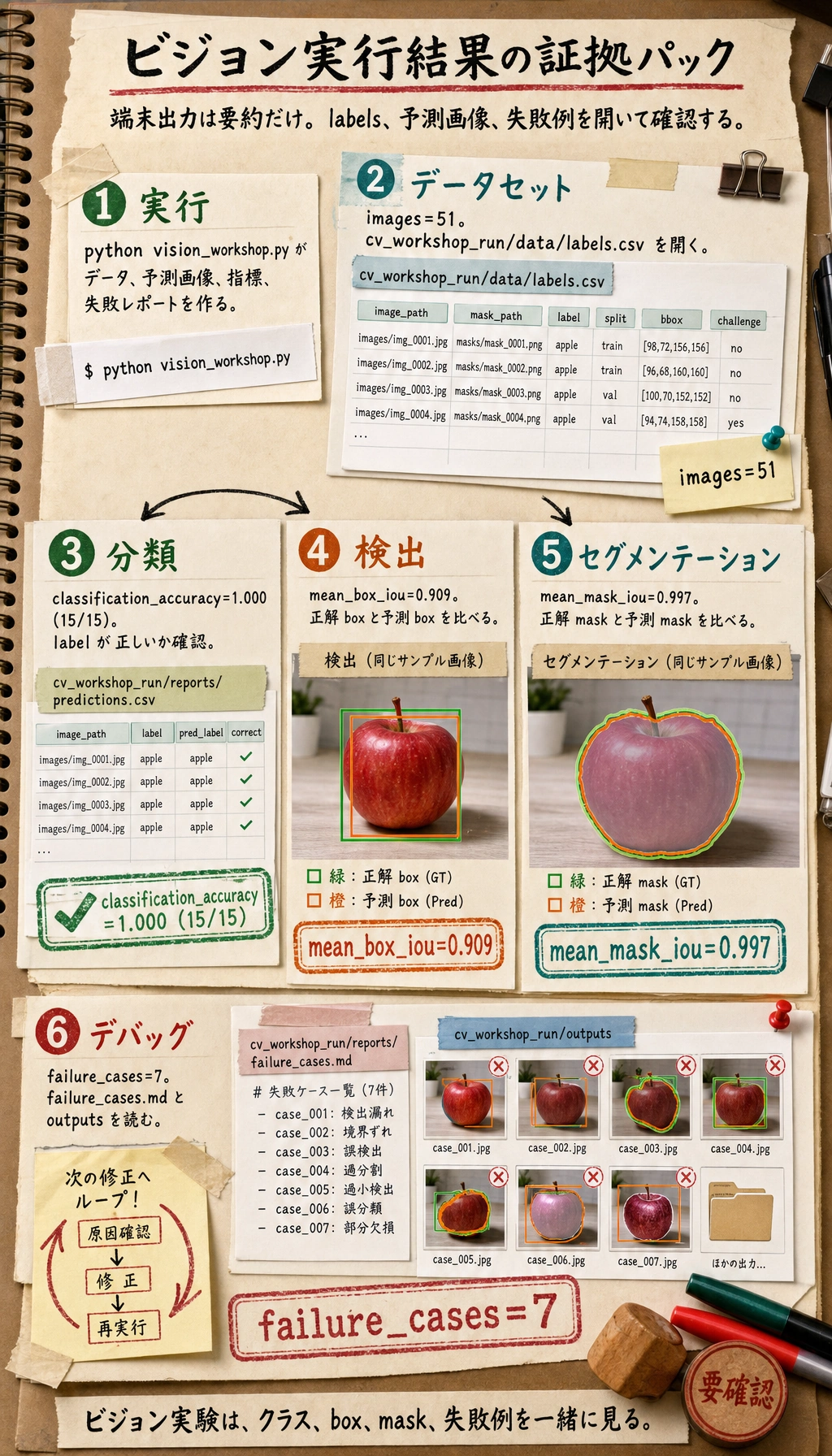
OpenCV のビルドによって小数は少し変わることがありますが、フォルダ構造とレポートファイルは同じになります。
Step 4:データセットを確認する
cv_workshop_run/data/labels.csv を開きます。1 行が 1 サンプルです。重要な列は次の通りです。
| 列 | 意味 |
|---|---|
image_path | 入力画像ファイル名 |
mask_path | 正解 mask ファイル名 |
label | クラスラベル |
split | train または test |
x1, y1, x2, y2 | 正解 bounding box |
challenge | 通常サンプルか難しいサンプルか |
この CSV は 3 種類のタスクを同時につないでいます。
- 分類は
labelを使う。 - 検出は
x1, y1, x2, y2を使う。 - 分割は
mask_pathを使う。
Step 5:パイプラインを普通の言葉で読む
スクリプトは小さいですが、実際のプロジェクトと同じ骨格を持っています。
create_dataset()が画像、mask、ラベル、box を生成する。segment_foreground()が grayscale、blur、Otsu threshold、morphology で前景領域を探す。largest_box()が segmentation mask から bounding box を作る。extract_features()が物体を数値特徴量に変換する。train_centroid_classifier()がクラスごとの代表特徴量を作る。predict_label()が最も近いクラスを選ぶ。evaluate()が指標、予測画像、失敗例を保存する。
これは深層学習モデルに勝つための例ではありません。プロジェクトの骨組みを理解するための例です。あとから次のように差し替えられます。
- centroid classifier を CNN や事前学習済み分類器にする。
largest_box()を YOLO 系の検出器にする。segment_foreground()を分割モデルにする。
Step 6:指標を理解する
ビジョンプロジェクトを信頼する前に、1 つの指標だけを見ないようにします。
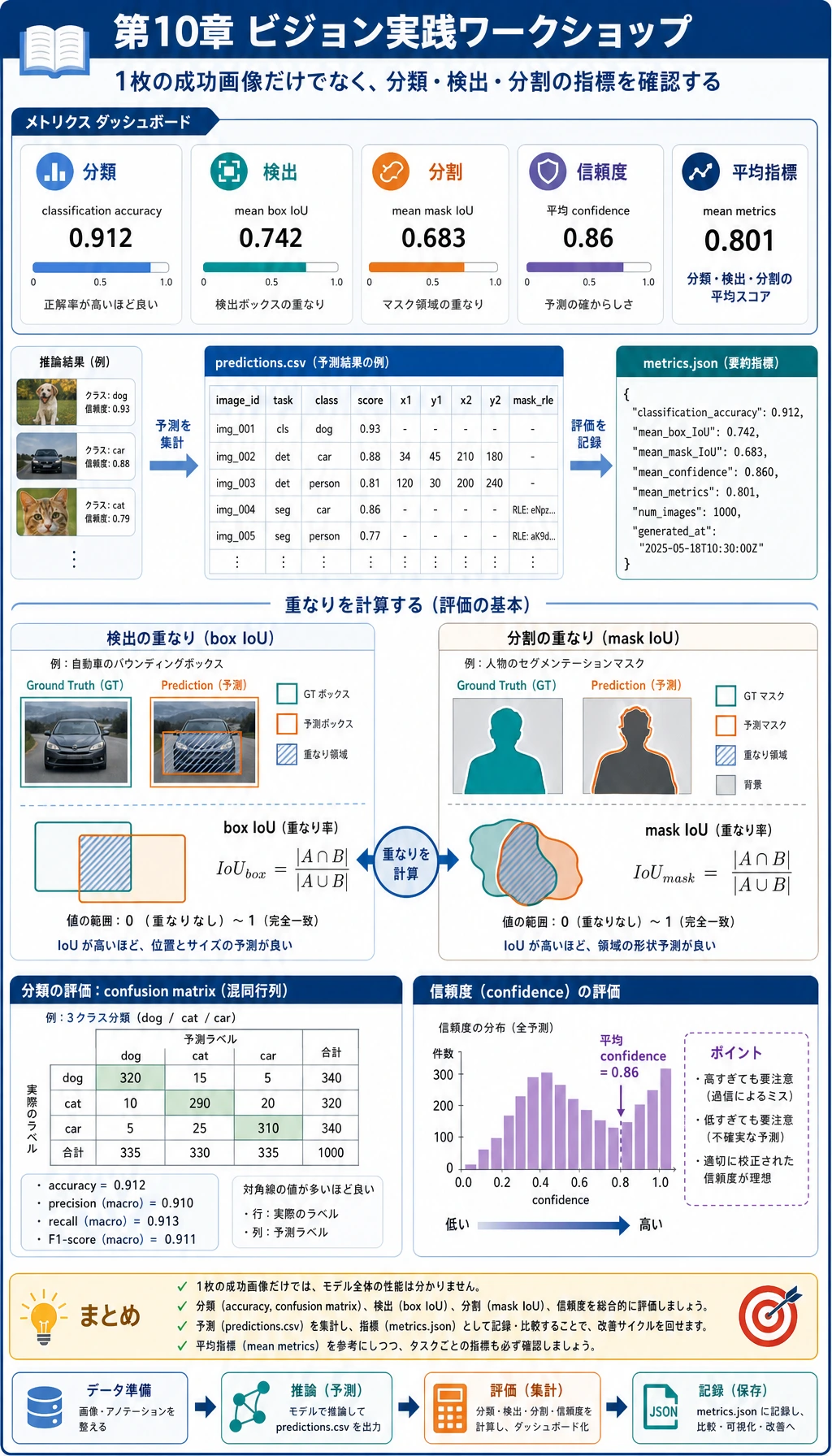
| 指標 | 何を見るか | なぜ重要か |
|---|---|---|
classification_accuracy | クラスラベルが正しいか | 分類には有用だが、検出や分割には不十分 |
confusion | どのクラスが混同されるか | クラス単位のミスを見つける |
box_iou | 予測 box と正解 box の重なり | 検出評価の基本的な考え方 |
mask_iou | 予測 mask と正解 mask の重なり | 分割評価の基本的な考え方 |
confidence | 単純分類器がどれだけ確信しているか | ラベルが合っていても怪しいサンプルを見つけられる |
なぜ classification_accuracy が 1.000 でも failure_cases が 0 ではないのでしょうか。ビジョンプロジェクトでは、クラスは当たっていても、box が弱い、mask が弱い、confidence が低い、ということがあるからです。実プロジェクトではこの違いがとても重要です。
Step 7:予測画像を確認する
cv_workshop_run/outputs/ の画像を開きます。
各出力画像には次のものがあります。
- 緑の box:正解 box。
- 赤の box:予測 box。
- テキストラベル:
true=... pred=...。
赤い box と緑の box がうまく重ならない場合、分類が正しくても検出品質はまだ十分ではありません。
Step 8:失敗レポートを読む
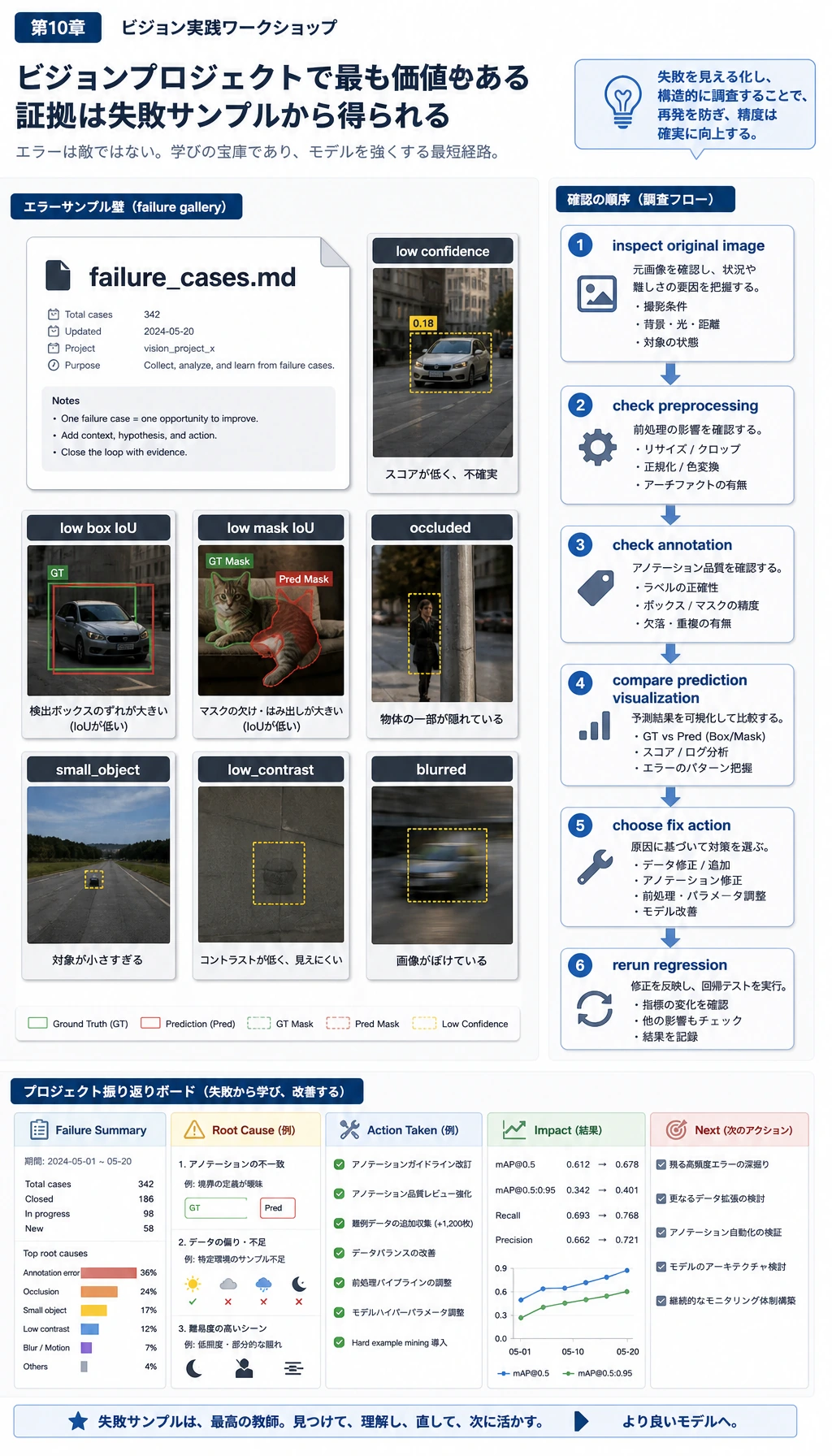
次を開きます。
cv_workshop_run/reports/failure_cases.md
有用な失敗レポートは、単に「間違い」と書くだけではありません。どの証拠によって怪しいと判断したかを書きます。
- confidence が低い。
- box IoU が低い。
- mask IoU が低い。
- occlusion がある。
- small object である。
- low contrast である。
- blur や edge-touching object がある。
初心者が「モデルが悪い」と言ったときは、もう少し具体的に問い直します。
- 画像は不鮮明か。
- アノテーションは正しいか。
- 物体が小さすぎないか。
- 前処理が信号を壊していないか。
- 指標のしきい値が厳しすぎないか。
Step 9:よくあるエラーと直し方
| 問題 | よくある原因 | 修正 |
|---|---|---|
ModuleNotFoundError: No module named 'cv2' | 現在の Python 環境に OpenCV が入っていない | 環境を有効化して pip install opencv-python numpy を実行する |
| 出力フォルダが空 | 想定と違うフォルダで実行している | pwd を確認し、プロジェクトフォルダで再実行する |
| すべての mask が空に見える | コントラストが低く、threshold が失敗している | 元画像を確認し、コントラスト調整や別の分割方法を試す |
| accuracy は高いが failure report が空ではない | ラベルは正しいが、box、mask、confidence に問題がある | 正常な状況として、失敗例を確認する |
| スクリプト編集後に指標が変わった | 乱数、しきい値、画像操作が変わった | seed を残し、README に変更内容を書く |
Step 10:練習タスク
順番に試してみてください。
starという 4 つ目のクラスを追加する。challenge_planを変更し、より多くの test サンプルをblurredやoccludedにする。box_iouの失敗しきい値を0.75から0.60に下げ、failure_cases.mdを比較する。- original、mask、prediction を横に並べた画像を保存する。
- baseline が動いたあと、centroid classifier を小さな CNN や事前学習済み分類器に置き換える。
完了基準
このワークショップは、次ができたら完了です。
python vision_workshop.pyを実行できた。labels.csvを開いて意味を説明できた。- 予測画像を少なくとも 3 枚確認した。
metrics.jsonとpredictions.csvを読んだ。- 失敗例を 1 つ選び、短く原因を説明した。
画像ファイル、アノテーション、予測可視化、指標、失敗分析をなぜ一緒に残す必要があるのか説明できれば、第 10 章でいちばん大事な一線を越えています。単に「モデルを動かす」のではなく、再現可能なビジョンプロジェクトを作れる状態になっています。