10.6.4 实操:构建一个可复现的视觉迷你流水线
这一节把第 10 章变成一个可以跟着操作的项目。你不需要下载数据集,也不需要调用云端模型。一个 Python 脚本会自己生成小型图像数据集,然后跑完整视觉流程:
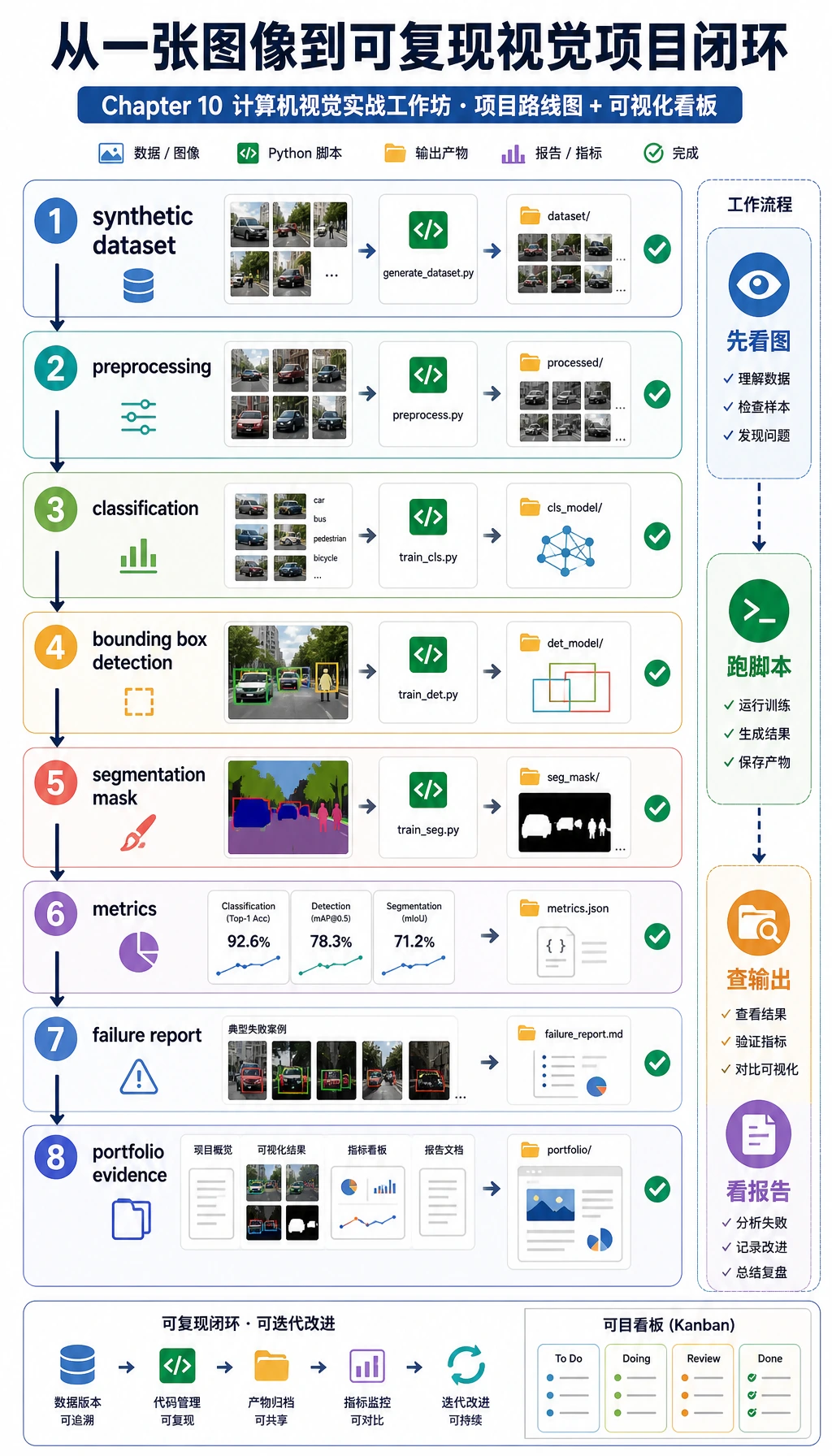
你会做出真实视觉项目里常见的四件事:
- 分类:判断图中是圆形、方形还是三角形。
- 检测:给前景目标画出 bounding box。
- 分割:给前景区域生成 mask。
- 评估:保存指标、预测图和失败样本。
本例刻意使用 opencv-python 和 numpy,而不是深度学习模型。原因很实际:新人可以离线运行、看到每个中间文件,并先理解项目结构。等这条闭环跑通后,再把简单分类器替换成 CNN、YOLO 检测器或分割模型会稳很多。
你将构建什么
运行完成后,文件夹会长这样:
cv_workshop_run/
  data/
    labels.csv
    train_circle_00.png
    train_circle_00_mask.png
    ...
  outputs/
    test_circle_00_prediction.png
    ...
  reports/
    metrics.json
    predictions.csv
    failure_cases.md
可以把它当成作品集习惯:
data/证明模型看到了什么。outputs/证明模型预测了什么。reports/证明你如何评估和排查问题。
Step 0:先理解将要生成的数据
先看数据流。视觉项目不是从训练开始,而是从图像、标签、mask、框、划分方式和难例是否可见开始。
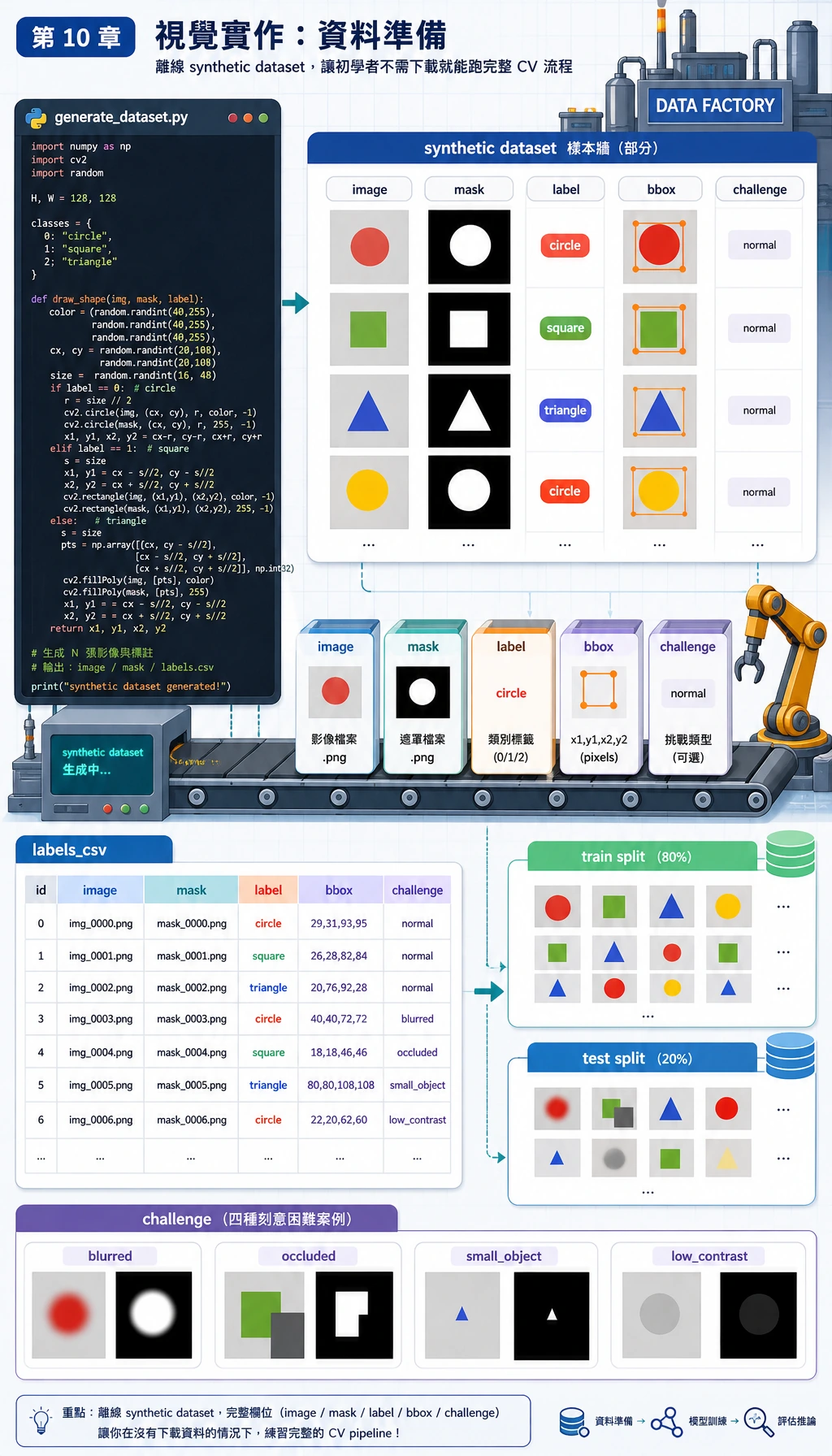
在这个工作坊中:
image是输入 PNG 图像;label是类别:circle、square或triangle;mask是像素级前景答案;bbox是 bounding box:x1, y1, x2, y2;challenge标记更难的样本,例如occluded、small_object或low_contrast。
重点不在于数据是合成的,而在于整个项目可复现。你可以重新运行脚本,得到同样的结构、指标和失败报告。
Step 1:创建一个干净文件夹
mkdir cv-workshop
cd cv-workshop
python -m venv .venv
source .venv/bin/activate
pip install opencv-python numpy
如果你用 Windows PowerShell,虚拟环境这样激活:
.\.venv\Scripts\Activate.ps1
如果你已经在全局环境装好了依赖,也可以不建虚拟环境。但如果你想把项目放进作品集,虚拟环境能让别人更容易复现。
Step 2:保存完整脚本
创建 vision_workshop.py,把下面代码粘进去:
from __future__ import annotations

import csv
import json
import math
import shutil
from dataclasses import dataclass
from pathlib import Path

import cv2
import numpy as np

ROOT = Path("cv_workshop_run")
DATA_DIR = ROOT / "data"
OUTPUT_DIR = ROOT / "outputs"
REPORT_DIR = ROOT / "reports"
IMAGE_SIZE = 128
LABELS = ["circle", "square", "triangle"]
RNG = np.random.default_rng(42)


@dataclass
class Sample:
    image_path: Path
    mask_path: Path
    label: str
    split: str
    box: tuple[int, int, int, int]
    challenge: str


def reset_workspace() -> None:
    if ROOT.exists():
        shutil.rmtree(ROOT)
    DATA_DIR.mkdir(parents=True)
    OUTPUT_DIR.mkdir(parents=True)
    REPORT_DIR.mkdir(parents=True)


def add_background_noise(img: np.ndarray, amount: int = 18) -> np.ndarray:
    noise = RNG.integers(0, amount, img.shape, dtype=np.uint8)
    return cv2.add(img, noise)


def draw_shape(label: str, index: int, split: str, challenge: str = "normal") -> tuple[np.ndarray, np.ndarray, tuple[int, int, int, int]]:
    img = np.zeros((IMAGE_SIZE, IMAGE_SIZE, 3), dtype=np.uint8)
    img[:] = (18, 24, 32)
    img = add_background_noise(img)
    mask = np.zeros((IMAGE_SIZE, IMAGE_SIZE), dtype=np.uint8)

    margin = 24
    cx = int(RNG.integers(margin + 8, IMAGE_SIZE - margin - 8))
    cy = int(RNG.integers(margin + 8, IMAGE_SIZE - margin - 8))
    size = int(RNG.integers(24, 39))
    color = (
        int(RNG.integers(80, 240)),
        int(RNG.integers(80, 240)),
        int(RNG.integers(80, 240)),
    )

    if challenge == "low_contrast":
        color = (55, 65, 75)
    if challenge == "small_object":
        size = 17
    if challenge == "edge_touching":
        cx, cy = 25, 25

    if label == "circle":
        cv2.circle(img, (cx, cy), size, color, -1)
        cv2.circle(mask, (cx, cy), size, 255, -1)
    elif label == "square":
        x1, y1, x2, y2 = cx - size, cy - size, cx + size, cy + size
        cv2.rectangle(img, (x1, y1), (x2, y2), color, -1)
        cv2.rectangle(mask, (x1, y1), (x2, y2), 255, -1)
    elif label == "triangle":
        pts = np.array(
            [[cx, cy - size], [cx - size, cy + size], [cx + size, cy + size]],
            dtype=np.int32,
        )
        cv2.fillPoly(img, [pts], color)
        cv2.fillPoly(mask, [pts], 255)
    else:
        raise ValueError(label)

    if challenge == "occluded":
        cv2.rectangle(img, (cx - size, cy - 8), (cx + size, cy + 8), (18, 24, 32), -1)
        cv2.rectangle(mask, (cx - size, cy - 8), (cx + size, cy + 8), 0, -1)
    if challenge == "blurred":
        img = cv2.GaussianBlur(img, (7, 7), 0)

    ys, xs = np.where(mask > 0)
    box = (int(xs.min()), int(ys.min()), int(xs.max()), int(ys.max()))
    return img, mask, box


def create_dataset() -> list[Sample]:
    samples: list[Sample] = []
    challenge_plan = {
        ("test", "circle", 0): "low_contrast",
        ("test", "square", 1): "occluded",
        ("test", "triangle", 2): "small_object",
    }

    for split, count in [("train", 12), ("test", 5)]:
        for label in LABELS:
            for i in range(count):
                challenge = challenge_plan.get((split, label, i), "normal")
                img, mask, box = draw_shape(label, i, split, challenge)
                image_path = DATA_DIR / f"{split}_{label}_{i:02d}.png"
                mask_path = DATA_DIR / f"{split}_{label}_{i:02d}_mask.png"
                cv2.imwrite(str(image_path), img)
                cv2.imwrite(str(mask_path), mask)
                samples.append(Sample(image_path, mask_path, label, split, box, challenge))

    with (DATA_DIR / "labels.csv").open("w", newline="", encoding="utf-8") as handle:
        writer = csv.writer(handle)
        writer.writerow(["image_path", "mask_path", "label", "split", "x1", "y1", "x2", "y2", "challenge"])
        for s in samples:
            writer.writerow([s.image_path.name, s.mask_path.name, s.label, s.split, *s.box, s.challenge])

    return samples


def segment_foreground(img: np.ndarray) -> np.ndarray:
    gray = cv2.cvtColor(img, cv2.COLOR_BGR2GRAY)
    blurred = cv2.GaussianBlur(gray, (5, 5), 0)
    _, mask = cv2.threshold(blurred, 0, 255, cv2.THRESH_BINARY + cv2.THRESH_OTSU)
    if np.mean(mask == 255) > 0.55:
        mask = cv2.bitwise_not(mask)
    kernel = np.ones((3, 3), dtype=np.uint8)
    return cv2.morphologyEx(mask, cv2.MORPH_OPEN, kernel)


def largest_box(mask: np.ndarray) -> tuple[int, int, int, int] | None:
    contours, _ = cv2.findContours(mask, cv2.RETR_EXTERNAL, cv2.CHAIN_APPROX_SIMPLE)
    if not contours:
        return None
    c = max(contours, key=cv2.contourArea)
    x, y, w, h = cv2.boundingRect(c)
    return (x, y, x + w - 1, y + h - 1)


def box_iou(a: tuple[int, int, int, int], b: tuple[int, int, int, int]) -> float:
    ax1, ay1, ax2, ay2 = a
    bx1, by1, bx2, by2 = b
    ix1, iy1 = max(ax1, bx1), max(ay1, by1)
    ix2, iy2 = min(ax2, bx2), min(ay2, by2)
    iw, ih = max(0, ix2 - ix1 + 1), max(0, iy2 - iy1 + 1)
    inter = iw * ih
    area_a = (ax2 - ax1 + 1) * (ay2 - ay1 + 1)
    area_b = (bx2 - bx1 + 1) * (by2 - by1 + 1)
    union = area_a + area_b - inter
    return inter / union if union else 0.0


def mask_iou(pred: np.ndarray, truth: np.ndarray) -> float:
    p = pred > 0
    t = truth > 0
    inter = np.logical_and(p, t).sum()
    union = np.logical_or(p, t).sum()
    return float(inter / union) if union else 0.0


def extract_features(img: np.ndarray) -> np.ndarray:
    mask = segment_foreground(img)
    contours, _ = cv2.findContours(mask, cv2.RETR_EXTERNAL, cv2.CHAIN_APPROX_SIMPLE)
    if not contours:
        return np.zeros(7, dtype=np.float32)

    c = max(contours, key=cv2.contourArea)
    area = cv2.contourArea(c)
    perimeter = cv2.arcLength(c, True)
    x, y, w, h = cv2.boundingRect(c)
    extent = area / max(1, w * h)
    aspect = w / max(1, h)
    circularity = 4 * math.pi * area / max(1.0, perimeter * perimeter)
    edges = cv2.Canny(cv2.cvtColor(img, cv2.COLOR_BGR2GRAY), 60, 160)
    edge_density = float((edges > 0).mean())
    hsv = cv2.cvtColor(img, cv2.COLOR_BGR2HSV)
    foreground = mask > 0
    mean_sat = float(hsv[:, :, 1][foreground].mean()) if foreground.any() else 0.0
    mean_val = float(hsv[:, :, 2][foreground].mean()) if foreground.any() else 0.0
    area_ratio = area / (IMAGE_SIZE * IMAGE_SIZE)
    return np.array(
        [area_ratio, extent, aspect, circularity, edge_density, mean_sat / 255, mean_val / 255],
        dtype=np.float32,
    )


def train_centroid_classifier(samples: list[Sample]) -> dict[str, np.ndarray]:
    grouped_features: dict[str, list[np.ndarray]] = {label: [] for label in LABELS}
    for s in samples:
        if s.split != "train":
            continue
        img = cv2.imread(str(s.image_path))
        grouped_features[s.label].append(extract_features(img))
    return {label: np.mean(rows, axis=0) for label, rows in grouped_features.items()}


def predict_label(feature: np.ndarray, centroids: dict[str, np.ndarray]) -> tuple[str, float]:
    distances = {label: float(np.linalg.norm(feature - center)) for label, center in centroids.items()}
    label = min(distances, key=distances.get)
    sorted_distances = sorted(distances.values())
    margin = sorted_distances[1] - sorted_distances[0] if len(sorted_distances) > 1 else 0.0
    confidence = float(1 / (1 + sorted_distances[0]) * min(1.0, 0.55 + margin * 3))
    return label, confidence


def draw_prediction(
    img: np.ndarray,
    truth_box: tuple[int, int, int, int],
    pred_box: tuple[int, int, int, int] | None,
    label: str,
    pred: str,
) -> np.ndarray:
    canvas = img.copy()
    x1, y1, x2, y2 = truth_box
    cv2.rectangle(canvas, (x1, y1), (x2, y2), (0, 190, 0), 2)
    if pred_box:
        px1, py1, px2, py2 = pred_box
        cv2.rectangle(canvas, (px1, py1), (px2, py2), (0, 0, 255), 2)
    cv2.putText(canvas, f"true={label} pred={pred}", (8, 18), cv2.FONT_HERSHEY_SIMPLEX, 0.45, (255, 255, 255), 1)
    return canvas


def evaluate(samples: list[Sample], centroids: dict[str, np.ndarray]) -> dict[str, object]:
    rows: list[dict[str, object]] = []
    confusion = {label: {pred: 0 for pred in LABELS} for label in LABELS}

    for s in samples:
        if s.split != "test":
            continue

        img = cv2.imread(str(s.image_path))
        truth_mask = cv2.imread(str(s.mask_path), cv2.IMREAD_GRAYSCALE)
        pred_mask = segment_foreground(img)
        pred_box = largest_box(pred_mask)
        feature = extract_features(img)
        pred, confidence = predict_label(feature, centroids)
        confusion[s.label][pred] += 1

        box_score = box_iou(s.box, pred_box) if pred_box else 0.0
        mask_score = mask_iou(pred_mask, truth_mask)
        annotated = draw_prediction(img, s.box, pred_box, s.label, pred)
        out_name = s.image_path.stem + "_prediction.png"
        cv2.imwrite(str(OUTPUT_DIR / out_name), annotated)

        rows.append(
            {
                "image": s.image_path.name,
                "label": s.label,
                "prediction": pred,
                "confidence": round(confidence, 3),
                "box_iou": round(box_score, 3),
                "mask_iou": round(mask_score, 3),
                "challenge": s.challenge,
                "output": out_name,
            }
        )

    correct = sum(row["label"] == row["prediction"] for row in rows)
    failures = [
        row
        for row in rows
        if row["label"] != row["prediction"]
        or row["confidence"] < 0.78
        or row["box_iou"] < 0.75
        or row["mask_iou"] < 0.82
    ]
    metrics = {
        "classification_accuracy": round(correct / len(rows), 3),
        "correct": correct,
        "total": len(rows),
        "mean_box_iou": round(float(np.mean([r["box_iou"] for r in rows])), 3),
        "mean_mask_iou": round(float(np.mean([r["mask_iou"] for r in rows])), 3),
        "failure_cases": len(failures),
        "confusion": confusion,
    }

    with (REPORT_DIR / "metrics.json").open("w", encoding="utf-8") as handle:
        json.dump(metrics, handle, indent=2)
    with (REPORT_DIR / "predictions.csv").open("w", newline="", encoding="utf-8") as handle:
        writer = csv.DictWriter(handle, fieldnames=list(rows[0].keys()))
        writer.writeheader()
        writer.writerows(rows)
    with (REPORT_DIR / "failure_cases.md").open("w", encoding="utf-8") as handle:
        handle.write("# Failure Cases\n\n")
        if not failures:
            handle.write("No failure case was triggered. Add harder real images before treating the project as reliable.\n")
        for row in failures:
            handle.write(
                f"- `{row['image']}`: true={row['label']}, pred={row['prediction']}, "
                f"confidence={row['confidence']}, box_iou={row['box_iou']}, "
                f"mask_iou={row['mask_iou']}, challenge={row['challenge']}\n"
            )

    return metrics


def main() -> None:
    reset_workspace()
    samples = create_dataset()
    centroids = train_centroid_classifier(samples)
    metrics = evaluate(samples, centroids)

    print("STEP 1: dataset")
    print(f"images: {len(samples)}")
    print(f"labels_csv: {DATA_DIR / 'labels.csv'}")
    print()
    print("STEP 2: evaluation")
    print(f"classification_accuracy: {metrics['classification_accuracy']:.3f} ({metrics['correct']}/{metrics['total']})")
    print(f"mean_box_iou: {metrics['mean_box_iou']:.3f}")
    print(f"mean_mask_iou: {metrics['mean_mask_iou']:.3f}")
    print(f"failure_cases: {metrics['failure_cases']}")
    print()
    print("STEP 3: files to inspect")
    print(f"predictions_csv: {REPORT_DIR / 'predictions.csv'}")
    print(f"failure_report: {REPORT_DIR / 'failure_cases.md'}")
    print(f"prediction_images: {OUTPUT_DIR}")


if __name__ == "__main__":
    main()
Step 3:运行脚本
python vision_workshop.py
你应该看到类似输出:
STEP 1: dataset
images: 51
labels_csv: cv_workshop_run/data/labels.csv

STEP 2: evaluation
classification_accuracy: 1.000 (15/15)
mean_box_iou: 0.909
mean_mask_iou: 0.997
failure_cases: 7

STEP 3: files to inspect
predictions_csv: cv_workshop_run/reports/predictions.csv
failure_report: cv_workshop_run/reports/failure_cases.md
prediction_images: cv_workshop_run/outputs
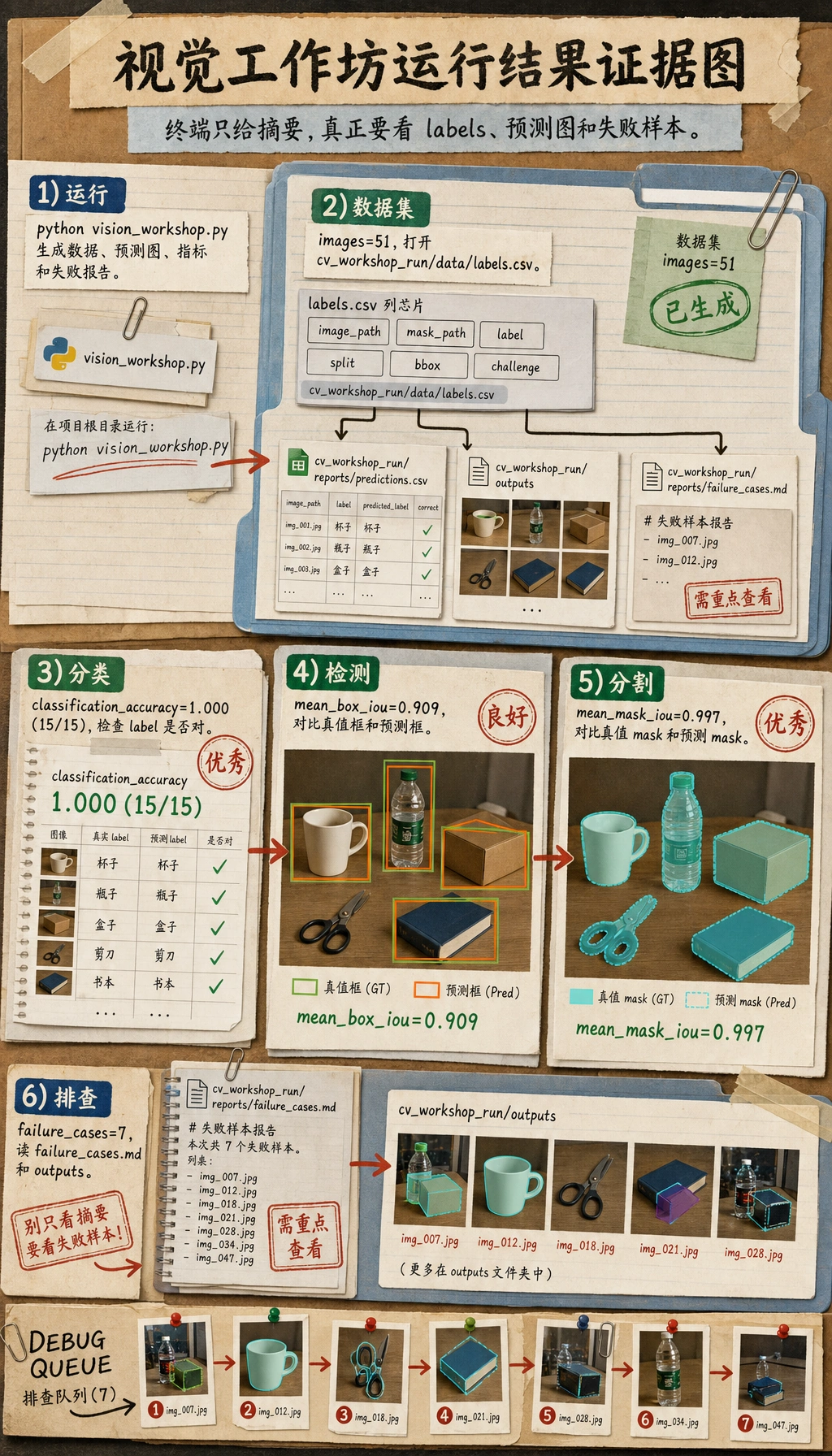
不同 OpenCV 构建下小数可能略有差异,但文件夹结构和报告文件应该一致。
Step 4:检查数据集
打开 cv_workshop_run/data/labels.csv。每一行是一张样本。重点列如下:
| 列 | 含义 |
|---|---|
image_path | 输入图像文件名 |
mask_path | 真值 mask 文件名 |
label | 类别标签 |
split | train 或 test |
x1, y1, x2, y2 | 真值 bounding box |
challenge | 普通样本还是困难样本 |
这个 CSV 同时连接了三类任务:
- 分类用
label; - 检测用
x1, y1, x2, y2; - 分割用
mask_path。
Step 5:用白话读懂流水线
脚本不大,但已经包含真实项目的骨架:
create_dataset()生成图像、mask、标签和框。segment_foreground()用灰度、模糊、Otsu 阈值和形态学找前景区域。largest_box()把分割 mask 转成 bounding box。extract_features()把目标变成数值特征。train_centroid_classifier()为每个类别建立一个原型特征向量。predict_label()选择距离最近的类别原型。evaluate()保存指标、预测图和失败样本。
这个例子不是为了打赢深度学习模型,而是为了让你看懂项目骨架。后续你可以替换:
- 把 centroid classifier 换成 CNN 或预训练分类模型;
- 把
largest_box()换成 YOLO 风格检测器; - 把
segment_foreground()换成分割模型。
Step 6:理解指标
信任一个视觉项目之前,不要只看一个指标:
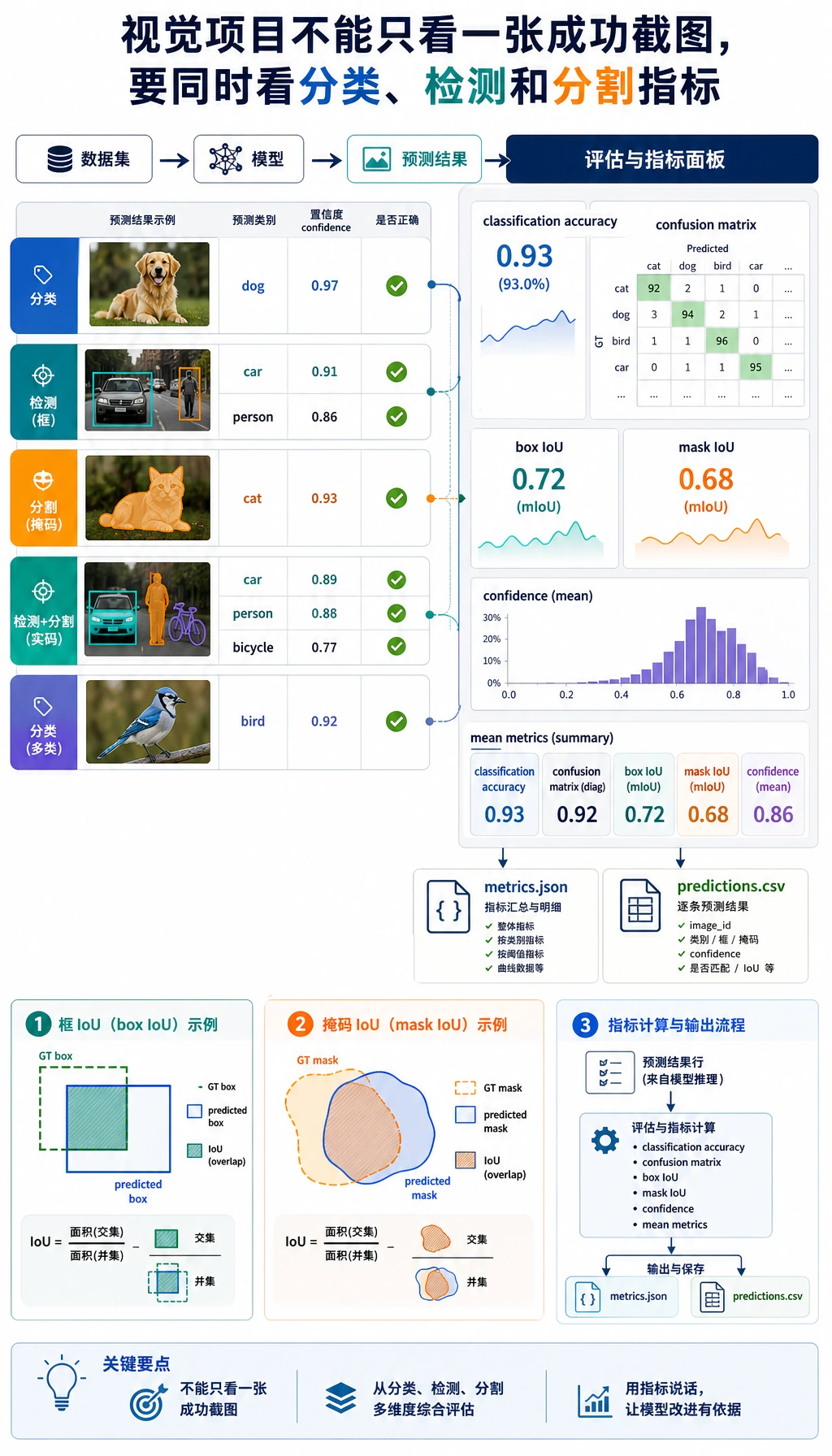
| 指标 | 检查什么 | 为什么重要 |
|---|---|---|
classification_accuracy | 类别是否正确 | 对分类有用,但不足以评价检测或分割 |
confusion | 哪些类别容易混淆 | 帮你定位类别层面的错误 |
box_iou | 预测框和真值框重叠程度 | 检测评估的核心直觉 |
mask_iou | 预测 mask 和真值 mask 重叠程度 | 分割评估的核心直觉 |
confidence | 简单分类器有多确定 | 即使类别正确,也能找出可疑样本 |
为什么 classification_accuracy 可以是 1.000,但 failure_cases 仍然大于 0?因为视觉项目可能类别判断对了,但框不够准、mask 不够稳、置信度不够高。真实项目里,这个差异很重要。
Step 7:检查预测图片
打开 cv_workshop_run/outputs/ 里的图片。
每张输出图包含:
- 绿色框:真值框;
- 红色框:预测框;
- 文字标签:
true=... pred=...。
如果红框和绿框重叠不好,即使分类对了,检测质量也还不够。
Step 8:阅读失败报告
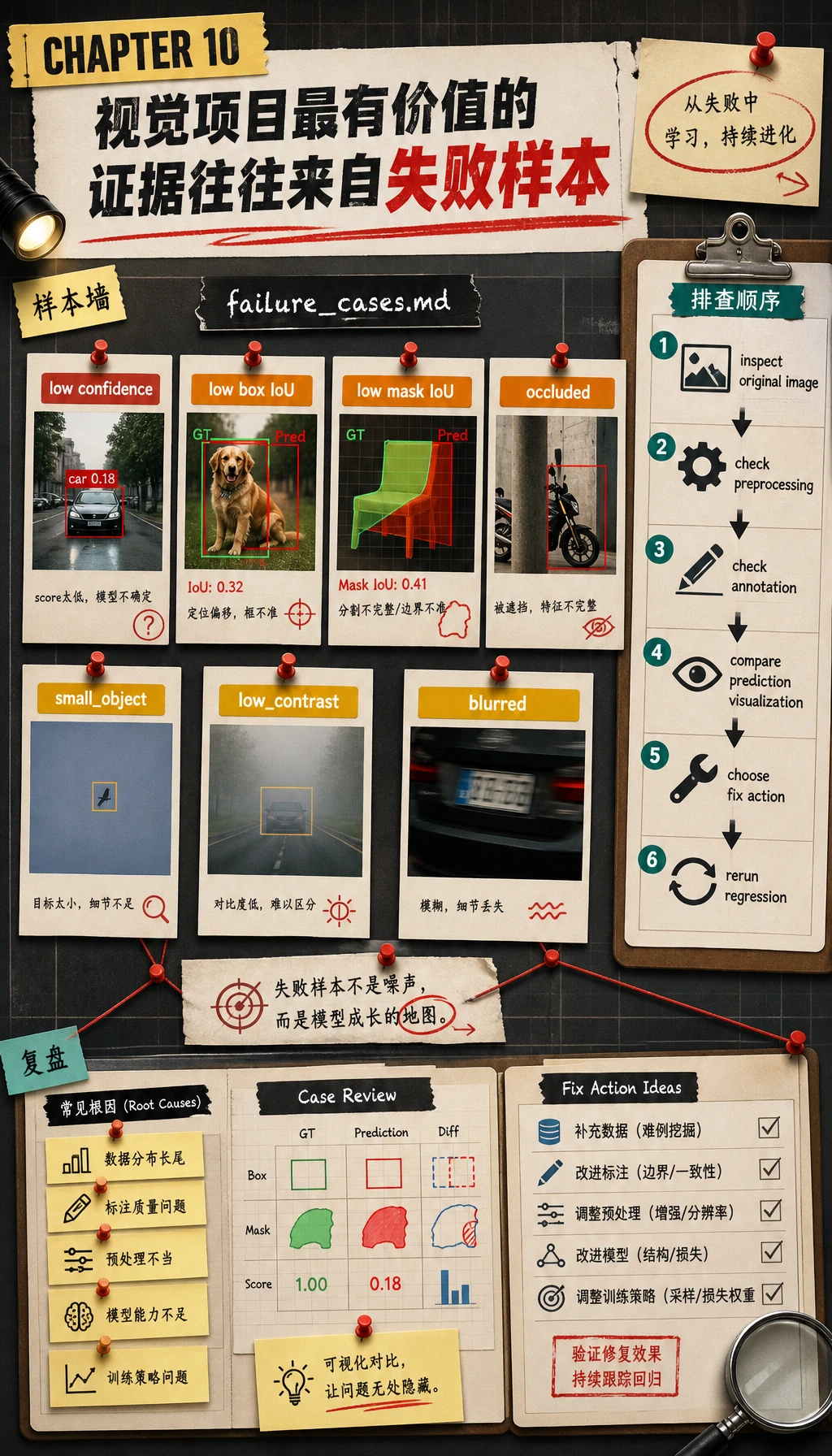
打开:
cv_workshop_run/reports/failure_cases.md
有用的失败报告不应该只写“错了”,而要写出让样本可疑的证据:
- 低置信度;
- 低 box IoU;
- 低 mask IoU;
- 遮挡;
- 小目标;
- 低对比度;
- 模糊或贴边目标。
当新人说“模型不好”时,应该追问更具体的问题:
- 图像是否不清楚?
- 标注是否有问题?
- 目标是否太小?
- 预处理是否破坏了信号?
- 指标阈值是否过严?
Step 9:常见错误与修复
| 问题 | 可能原因 | 修复 |
|---|---|---|
ModuleNotFoundError: No module named 'cv2' | 当前 Python 环境没装 OpenCV | 激活环境后运行 pip install opencv-python numpy |
| 输出文件夹为空 | 脚本不是在你以为的目录运行 | 先运行 pwd 或进入项目文件夹再执行 |
| 所有 mask 都很空 | 对比度太低,阈值分割失败 | 检查原图,调整对比度,或换分割方法 |
| 准确率很高但失败报告不为空 | 类别对了,但框、mask 或置信度仍有问题 | 这是正常现象,要继续查看失败样本 |
| 修改脚本后指标变了 | 随机生成、阈值或图像操作变了 | 保留随机种子,并在 README 记录修改 |
Step 10:练习任务
按顺序尝试这些改动:
- 增加第四类
star。 - 修改
challenge_plan,让更多测试样本变成blurred或occluded。 - 把
box_iou的失败阈值从0.75降到0.60,对比failure_cases.md。 - 保存原图、mask、预测图的三联图。
- 跑通 baseline 后,再把 centroid classifier 换成小 CNN 或预训练分类模型。
完成标准
完成本工作坊的标准是:
- 成功运行
python vision_workshop.py; - 打开并理解
labels.csv; - 检查至少 3 张预测图;
- 阅读
metrics.json和predictions.csv; - 写出一个失败样本的简短解释。
如果你能解释为什么一个视觉项目需要同时保存图像文件、标注、预测可视化、指标和失败样本分析,就说明你跨过了第 10 章最重要的一关:你不只是“跑模型”,而是在构建一个可复现的视觉项目。