10.6.4 Hands-on: Build a Reproducible Vision Mini Pipeline
This workshop turns Chapter 10 into a follow-along project. You will not download a dataset or call a cloud model. Instead, one Python script will create a small synthetic image dataset and then run a complete vision loop:
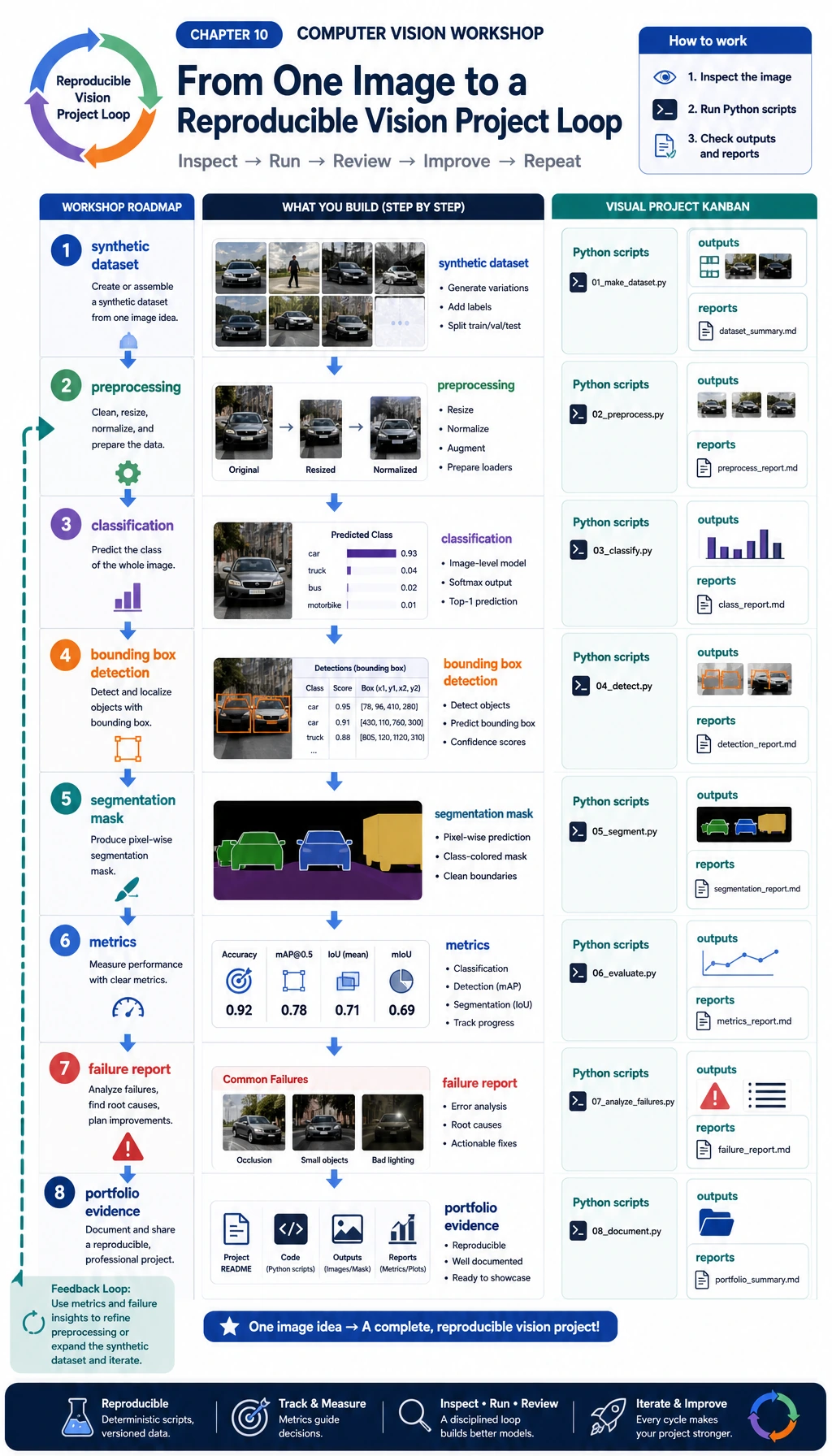
You will build four pieces that appear in real vision projects:
- Classification: decide whether an image contains a circle, square, or triangle.
- Detection: draw a bounding box around the foreground object.
- Segmentation: create a mask for the foreground region.
- Evaluation: save metrics, prediction images, and failure cases.
This example intentionally uses opencv-python and numpy instead of a deep learning model. The reason is practical: beginners can run it offline, see every intermediate file, and understand the project structure before replacing the simple classifier with a CNN, YOLO detector, or segmentation model.
What You Will Build
By the end, your folder will contain:
cv_workshop_run/
  data/
    labels.csv
    train_circle_00.png
    train_circle_00_mask.png
    ...
  outputs/
    test_circle_00_prediction.png
    ...
  reports/
    metrics.json
    predictions.csv
    failure_cases.md
Read this as a portfolio habit:
data/proves what the model saw.outputs/proves what the model predicted.reports/proves how you evaluated and debugged it.
Step 0: Understand the Data We Will Generate
First look at the data flow. A vision project starts before training: image, label, mask, bounding box, split, and hard examples must all be visible.
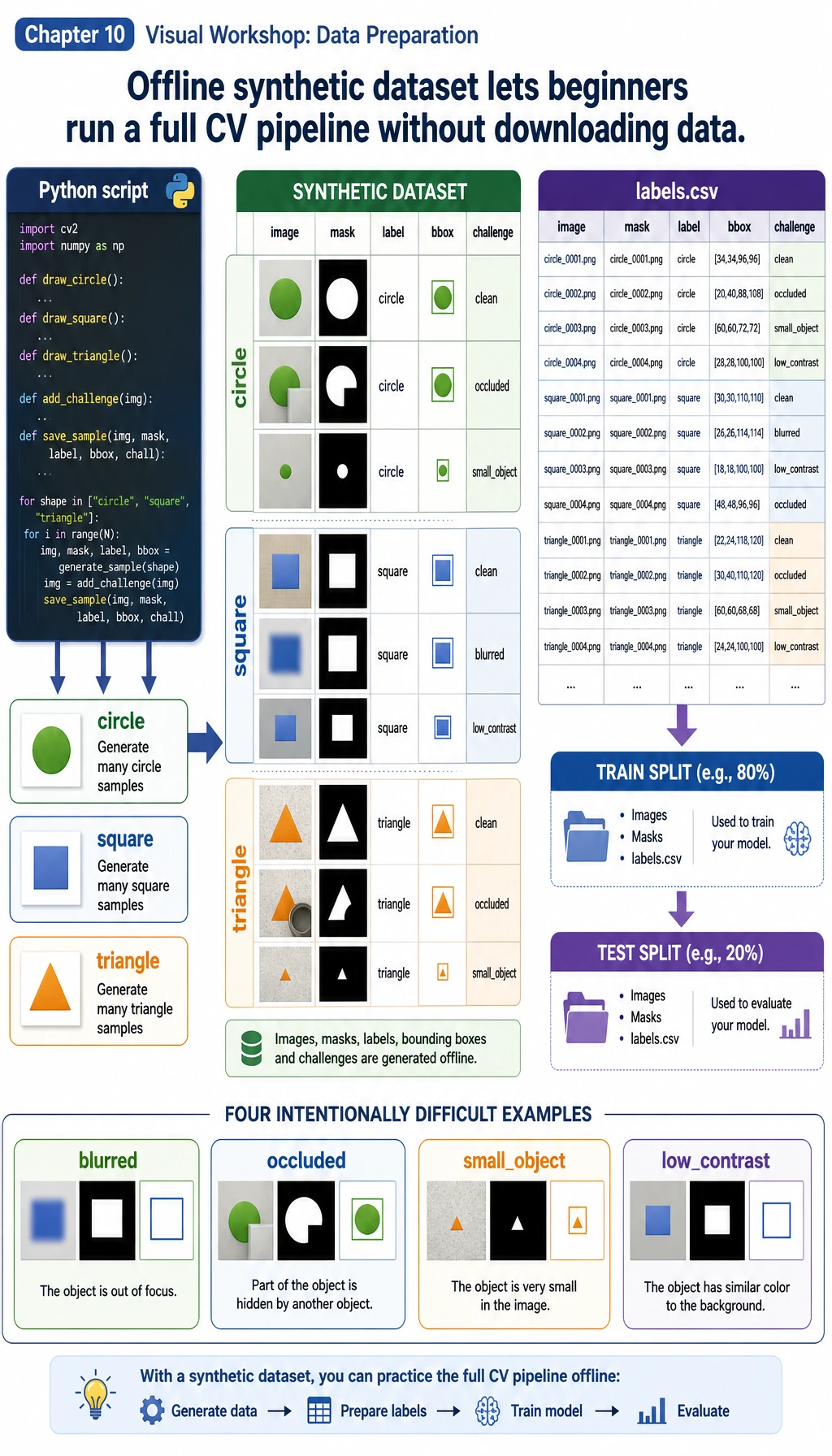
In this workshop:
imageis the input PNG.labelis the class:circle,square, ortriangle.maskis the pixel-level foreground answer.bboxmeans bounding box:x1, y1, x2, y2.challengemarks harder samples such asoccluded,small_object, orlow_contrast.
The important idea is not that the data is synthetic. The important idea is that the whole project is reproducible. You can run it again and get the same structure, metrics, and failure report.
Step 1: Create a Clean Folder
mkdir cv-workshop
cd cv-workshop
python -m venv .venv
source .venv/bin/activate
pip install opencv-python numpy
On Windows PowerShell, activate the environment with:
.\.venv\Scripts\Activate.ps1
If you already have Python packages installed globally, you can skip the virtual environment. For a portfolio project, however, using a virtual environment makes your work easier to reproduce.
Step 2: Save the Complete Script
Create a file named vision_workshop.py and paste this code:
from __future__ import annotations

import csv
import json
import math
import shutil
from dataclasses import dataclass
from pathlib import Path

import cv2
import numpy as np

ROOT = Path("cv_workshop_run")
DATA_DIR = ROOT / "data"
OUTPUT_DIR = ROOT / "outputs"
REPORT_DIR = ROOT / "reports"
IMAGE_SIZE = 128
LABELS = ["circle", "square", "triangle"]
RNG = np.random.default_rng(42)


@dataclass
class Sample:
    image_path: Path
    mask_path: Path
    label: str
    split: str
    box: tuple[int, int, int, int]
    challenge: str


def reset_workspace() -> None:
    if ROOT.exists():
        shutil.rmtree(ROOT)
    DATA_DIR.mkdir(parents=True)
    OUTPUT_DIR.mkdir(parents=True)
    REPORT_DIR.mkdir(parents=True)


def add_background_noise(img: np.ndarray, amount: int = 18) -> np.ndarray:
    noise = RNG.integers(0, amount, img.shape, dtype=np.uint8)
    return cv2.add(img, noise)


def draw_shape(label: str, index: int, split: str, challenge: str = "normal") -> tuple[np.ndarray, np.ndarray, tuple[int, int, int, int]]:
    img = np.zeros((IMAGE_SIZE, IMAGE_SIZE, 3), dtype=np.uint8)
    img[:] = (18, 24, 32)
    img = add_background_noise(img)
    mask = np.zeros((IMAGE_SIZE, IMAGE_SIZE), dtype=np.uint8)

    margin = 24
    cx = int(RNG.integers(margin + 8, IMAGE_SIZE - margin - 8))
    cy = int(RNG.integers(margin + 8, IMAGE_SIZE - margin - 8))
    size = int(RNG.integers(24, 39))
    color = (
        int(RNG.integers(80, 240)),
        int(RNG.integers(80, 240)),
        int(RNG.integers(80, 240)),
    )

    if challenge == "low_contrast":
        color = (55, 65, 75)
    if challenge == "small_object":
        size = 17
    if challenge == "edge_touching":
        cx, cy = 25, 25

    if label == "circle":
        cv2.circle(img, (cx, cy), size, color, -1)
        cv2.circle(mask, (cx, cy), size, 255, -1)
    elif label == "square":
        x1, y1, x2, y2 = cx - size, cy - size, cx + size, cy + size
        cv2.rectangle(img, (x1, y1), (x2, y2), color, -1)
        cv2.rectangle(mask, (x1, y1), (x2, y2), 255, -1)
    elif label == "triangle":
        pts = np.array(
            [[cx, cy - size], [cx - size, cy + size], [cx + size, cy + size]],
            dtype=np.int32,
        )
        cv2.fillPoly(img, [pts], color)
        cv2.fillPoly(mask, [pts], 255)
    else:
        raise ValueError(label)

    if challenge == "occluded":
        cv2.rectangle(img, (cx - size, cy - 8), (cx + size, cy + 8), (18, 24, 32), -1)
        cv2.rectangle(mask, (cx - size, cy - 8), (cx + size, cy + 8), 0, -1)
    if challenge == "blurred":
        img = cv2.GaussianBlur(img, (7, 7), 0)

    ys, xs = np.where(mask > 0)
    box = (int(xs.min()), int(ys.min()), int(xs.max()), int(ys.max()))
    return img, mask, box


def create_dataset() -> list[Sample]:
    samples: list[Sample] = []
    challenge_plan = {
        ("test", "circle", 0): "low_contrast",
        ("test", "square", 1): "occluded",
        ("test", "triangle", 2): "small_object",
    }

    for split, count in [("train", 12), ("test", 5)]:
        for label in LABELS:
            for i in range(count):
                challenge = challenge_plan.get((split, label, i), "normal")
                img, mask, box = draw_shape(label, i, split, challenge)
                image_path = DATA_DIR / f"{split}_{label}_{i:02d}.png"
                mask_path = DATA_DIR / f"{split}_{label}_{i:02d}_mask.png"
                cv2.imwrite(str(image_path), img)
                cv2.imwrite(str(mask_path), mask)
                samples.append(Sample(image_path, mask_path, label, split, box, challenge))

    with (DATA_DIR / "labels.csv").open("w", newline="", encoding="utf-8") as handle:
        writer = csv.writer(handle)
        writer.writerow(["image_path", "mask_path", "label", "split", "x1", "y1", "x2", "y2", "challenge"])
        for s in samples:
            writer.writerow([s.image_path.name, s.mask_path.name, s.label, s.split, *s.box, s.challenge])

    return samples


def segment_foreground(img: np.ndarray) -> np.ndarray:
    gray = cv2.cvtColor(img, cv2.COLOR_BGR2GRAY)
    blurred = cv2.GaussianBlur(gray, (5, 5), 0)
    _, mask = cv2.threshold(blurred, 0, 255, cv2.THRESH_BINARY + cv2.THRESH_OTSU)
    if np.mean(mask == 255) > 0.55:
        mask = cv2.bitwise_not(mask)
    kernel = np.ones((3, 3), dtype=np.uint8)
    return cv2.morphologyEx(mask, cv2.MORPH_OPEN, kernel)


def largest_box(mask: np.ndarray) -> tuple[int, int, int, int] | None:
    contours, _ = cv2.findContours(mask, cv2.RETR_EXTERNAL, cv2.CHAIN_APPROX_SIMPLE)
    if not contours:
        return None
    c = max(contours, key=cv2.contourArea)
    x, y, w, h = cv2.boundingRect(c)
    return (x, y, x + w - 1, y + h - 1)


def box_iou(a: tuple[int, int, int, int], b: tuple[int, int, int, int]) -> float:
    ax1, ay1, ax2, ay2 = a
    bx1, by1, bx2, by2 = b
    ix1, iy1 = max(ax1, bx1), max(ay1, by1)
    ix2, iy2 = min(ax2, bx2), min(ay2, by2)
    iw, ih = max(0, ix2 - ix1 + 1), max(0, iy2 - iy1 + 1)
    inter = iw * ih
    area_a = (ax2 - ax1 + 1) * (ay2 - ay1 + 1)
    area_b = (bx2 - bx1 + 1) * (by2 - by1 + 1)
    union = area_a + area_b - inter
    return inter / union if union else 0.0


def mask_iou(pred: np.ndarray, truth: np.ndarray) -> float:
    p = pred > 0
    t = truth > 0
    inter = np.logical_and(p, t).sum()
    union = np.logical_or(p, t).sum()
    return float(inter / union) if union else 0.0


def extract_features(img: np.ndarray) -> np.ndarray:
    mask = segment_foreground(img)
    contours, _ = cv2.findContours(mask, cv2.RETR_EXTERNAL, cv2.CHAIN_APPROX_SIMPLE)
    if not contours:
        return np.zeros(7, dtype=np.float32)

    c = max(contours, key=cv2.contourArea)
    area = cv2.contourArea(c)
    perimeter = cv2.arcLength(c, True)
    x, y, w, h = cv2.boundingRect(c)
    extent = area / max(1, w * h)
    aspect = w / max(1, h)
    circularity = 4 * math.pi * area / max(1.0, perimeter * perimeter)
    edges = cv2.Canny(cv2.cvtColor(img, cv2.COLOR_BGR2GRAY), 60, 160)
    edge_density = float((edges > 0).mean())
    hsv = cv2.cvtColor(img, cv2.COLOR_BGR2HSV)
    foreground = mask > 0
    mean_sat = float(hsv[:, :, 1][foreground].mean()) if foreground.any() else 0.0
    mean_val = float(hsv[:, :, 2][foreground].mean()) if foreground.any() else 0.0
    area_ratio = area / (IMAGE_SIZE * IMAGE_SIZE)
    return np.array(
        [area_ratio, extent, aspect, circularity, edge_density, mean_sat / 255, mean_val / 255],
        dtype=np.float32,
    )


def train_centroid_classifier(samples: list[Sample]) -> dict[str, np.ndarray]:
    grouped_features: dict[str, list[np.ndarray]] = {label: [] for label in LABELS}
    for s in samples:
        if s.split != "train":
            continue
        img = cv2.imread(str(s.image_path))
        grouped_features[s.label].append(extract_features(img))
    return {label: np.mean(rows, axis=0) for label, rows in grouped_features.items()}


def predict_label(feature: np.ndarray, centroids: dict[str, np.ndarray]) -> tuple[str, float]:
    distances = {label: float(np.linalg.norm(feature - center)) for label, center in centroids.items()}
    label = min(distances, key=distances.get)
    sorted_distances = sorted(distances.values())
    margin = sorted_distances[1] - sorted_distances[0] if len(sorted_distances) > 1 else 0.0
    confidence = float(1 / (1 + sorted_distances[0]) * min(1.0, 0.55 + margin * 3))
    return label, confidence


def draw_prediction(
    img: np.ndarray,
    truth_box: tuple[int, int, int, int],
    pred_box: tuple[int, int, int, int] | None,
    label: str,
    pred: str,
) -> np.ndarray:
    canvas = img.copy()
    x1, y1, x2, y2 = truth_box
    cv2.rectangle(canvas, (x1, y1), (x2, y2), (0, 190, 0), 2)
    if pred_box:
        px1, py1, px2, py2 = pred_box
        cv2.rectangle(canvas, (px1, py1), (px2, py2), (0, 0, 255), 2)
    cv2.putText(canvas, f"true={label} pred={pred}", (8, 18), cv2.FONT_HERSHEY_SIMPLEX, 0.45, (255, 255, 255), 1)
    return canvas


def evaluate(samples: list[Sample], centroids: dict[str, np.ndarray]) -> dict[str, object]:
    rows: list[dict[str, object]] = []
    confusion = {label: {pred: 0 for pred in LABELS} for label in LABELS}

    for s in samples:
        if s.split != "test":
            continue

        img = cv2.imread(str(s.image_path))
        truth_mask = cv2.imread(str(s.mask_path), cv2.IMREAD_GRAYSCALE)
        pred_mask = segment_foreground(img)
        pred_box = largest_box(pred_mask)
        feature = extract_features(img)
        pred, confidence = predict_label(feature, centroids)
        confusion[s.label][pred] += 1

        box_score = box_iou(s.box, pred_box) if pred_box else 0.0
        mask_score = mask_iou(pred_mask, truth_mask)
        annotated = draw_prediction(img, s.box, pred_box, s.label, pred)
        out_name = s.image_path.stem + "_prediction.png"
        cv2.imwrite(str(OUTPUT_DIR / out_name), annotated)

        rows.append(
            {
                "image": s.image_path.name,
                "label": s.label,
                "prediction": pred,
                "confidence": round(confidence, 3),
                "box_iou": round(box_score, 3),
                "mask_iou": round(mask_score, 3),
                "challenge": s.challenge,
                "output": out_name,
            }
        )

    correct = sum(row["label"] == row["prediction"] for row in rows)
    failures = [
        row
        for row in rows
        if row["label"] != row["prediction"]
        or row["confidence"] < 0.78
        or row["box_iou"] < 0.75
        or row["mask_iou"] < 0.82
    ]
    metrics = {
        "classification_accuracy": round(correct / len(rows), 3),
        "correct": correct,
        "total": len(rows),
        "mean_box_iou": round(float(np.mean([r["box_iou"] for r in rows])), 3),
        "mean_mask_iou": round(float(np.mean([r["mask_iou"] for r in rows])), 3),
        "failure_cases": len(failures),
        "confusion": confusion,
    }

    with (REPORT_DIR / "metrics.json").open("w", encoding="utf-8") as handle:
        json.dump(metrics, handle, indent=2)
    with (REPORT_DIR / "predictions.csv").open("w", newline="", encoding="utf-8") as handle:
        writer = csv.DictWriter(handle, fieldnames=list(rows[0].keys()))
        writer.writeheader()
        writer.writerows(rows)
    with (REPORT_DIR / "failure_cases.md").open("w", encoding="utf-8") as handle:
        handle.write("# Failure Cases\n\n")
        if not failures:
            handle.write("No failure case was triggered. Add harder real images before treating the project as reliable.\n")
        for row in failures:
            handle.write(
                f"- `{row['image']}`: true={row['label']}, pred={row['prediction']}, "
                f"confidence={row['confidence']}, box_iou={row['box_iou']}, "
                f"mask_iou={row['mask_iou']}, challenge={row['challenge']}\n"
            )

    return metrics


def main() -> None:
    reset_workspace()
    samples = create_dataset()
    centroids = train_centroid_classifier(samples)
    metrics = evaluate(samples, centroids)

    print("STEP 1: dataset")
    print(f"images: {len(samples)}")
    print(f"labels_csv: {DATA_DIR / 'labels.csv'}")
    print()
    print("STEP 2: evaluation")
    print(f"classification_accuracy: {metrics['classification_accuracy']:.3f} ({metrics['correct']}/{metrics['total']})")
    print(f"mean_box_iou: {metrics['mean_box_iou']:.3f}")
    print(f"mean_mask_iou: {metrics['mean_mask_iou']:.3f}")
    print(f"failure_cases: {metrics['failure_cases']}")
    print()
    print("STEP 3: files to inspect")
    print(f"predictions_csv: {REPORT_DIR / 'predictions.csv'}")
    print(f"failure_report: {REPORT_DIR / 'failure_cases.md'}")
    print(f"prediction_images: {OUTPUT_DIR}")


if __name__ == "__main__":
    main()
Step 3: Run It
python vision_workshop.py
You should see output similar to this:
STEP 1: dataset
images: 51
labels_csv: cv_workshop_run/data/labels.csv

STEP 2: evaluation
classification_accuracy: 1.000 (15/15)
mean_box_iou: 0.909
mean_mask_iou: 0.997
failure_cases: 7

STEP 3: files to inspect
predictions_csv: cv_workshop_run/reports/predictions.csv
failure_report: cv_workshop_run/reports/failure_cases.md
prediction_images: cv_workshop_run/outputs
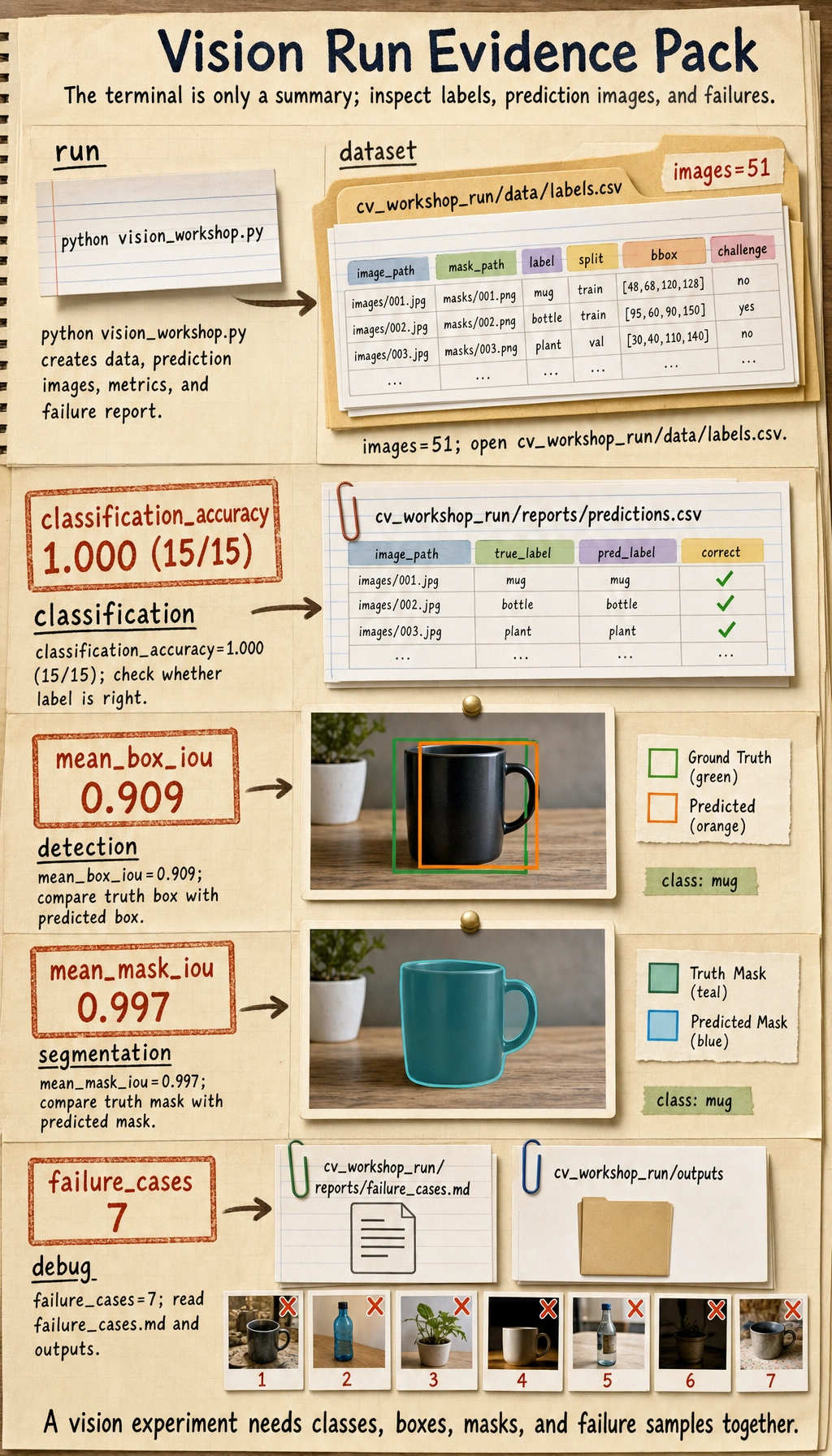
The exact decimals can differ slightly across OpenCV builds, but the folder structure and report files should be the same.
Step 4: Inspect the Dataset
Open cv_workshop_run/data/labels.csv. Each row is one sample. The important columns are:
| Column | Meaning |
|---|---|
image_path | Input image filename |
mask_path | Ground-truth mask filename |
label | Class label |
split | train or test |
x1, y1, x2, y2 | Ground-truth bounding box |
challenge | Whether this is a normal or hard sample |
This one CSV already connects three task types:
- classification uses
label; - detection uses
x1, y1, x2, y2; - segmentation uses
mask_path.
Step 5: Read the Model Pipeline in Plain English
The script is small, but it contains the same logic as a real project:
create_dataset()creates images, masks, labels, and boxes.segment_foreground()uses grayscale, blur, Otsu thresholding, and morphology to find the object region.largest_box()turns the segmentation mask into a bounding box.extract_features()converts the object into numeric features.train_centroid_classifier()builds one prototype feature vector per class.predict_label()chooses the nearest class prototype.evaluate()saves metrics, prediction images, and failure cases.
This is not meant to beat a deep learning model. It is meant to show the project skeleton. Later, you can replace:
- the centroid classifier with a CNN or pretrained classifier;
largest_box()with a YOLO-style detector;segment_foreground()with a segmentation model.
Step 6: Understand the Metrics
Before trusting a vision project, check more than one metric:
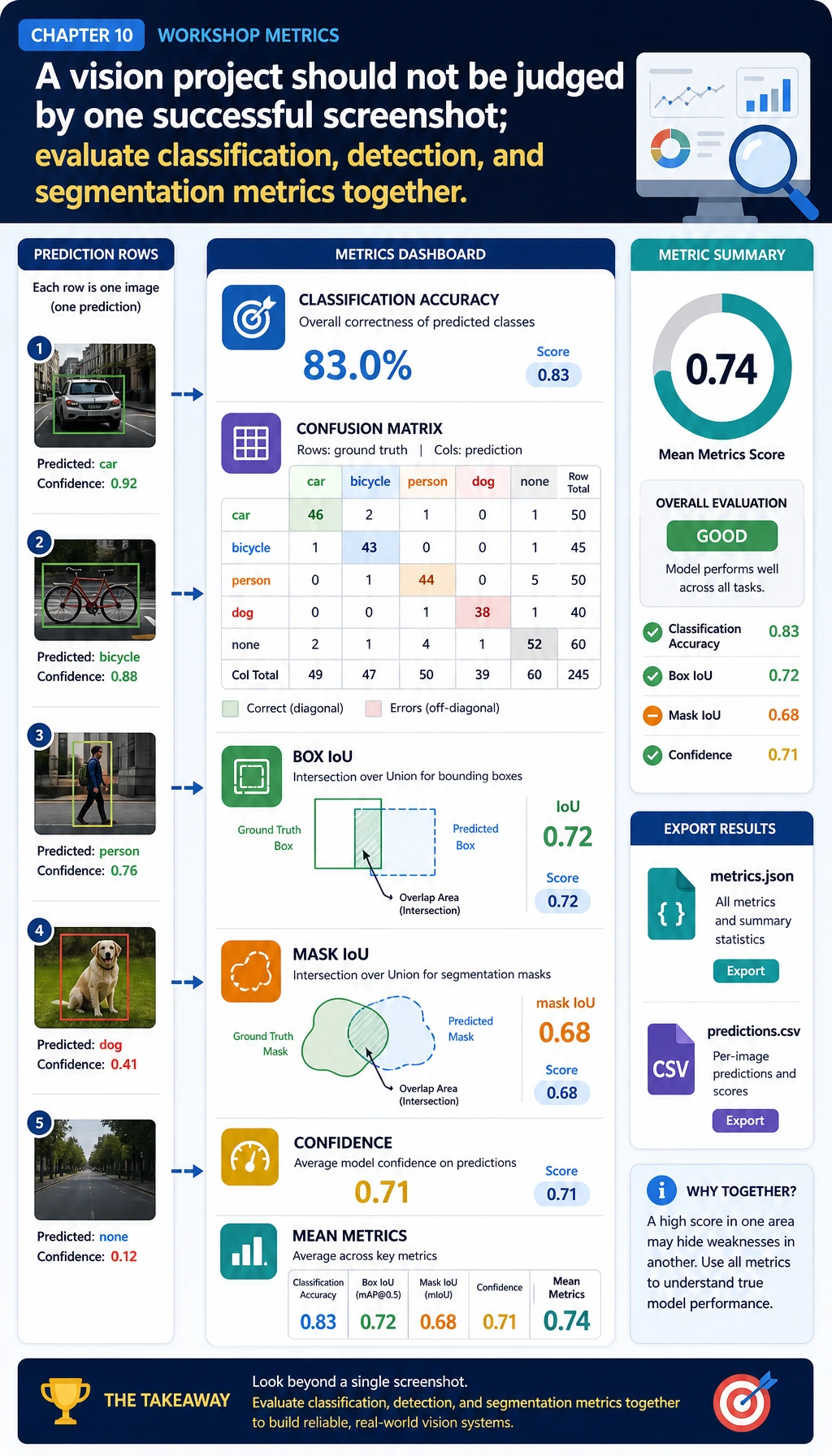
| Metric | What it checks | Why it matters |
|---|---|---|
classification_accuracy | Whether the class label is correct | Useful for classification, but not enough for detection or segmentation |
confusion | Which classes are mixed up | Helps you find class-level mistakes |
box_iou | Whether the predicted box overlaps the true box | Core idea behind detection evaluation |
mask_iou | Whether the predicted mask overlaps the true mask | Core idea behind segmentation evaluation |
confidence | How certain the simple classifier is | Helps find suspicious cases even when the label is correct |
Why can classification_accuracy be 1.000 while failure_cases is still greater than zero? Because a vision project can get the label right but still have a weak box, weak mask, or low confidence. In real projects, that difference matters.
Step 7: Inspect Prediction Images
Open files in cv_workshop_run/outputs/.
Each output image has:
- a green box for the ground truth;
- a red box for the predicted box;
- a text label showing
true=... pred=....
If a red box and green box do not overlap well, the classification may still be correct, but detection quality is not good enough.
Step 8: Read the Failure Report
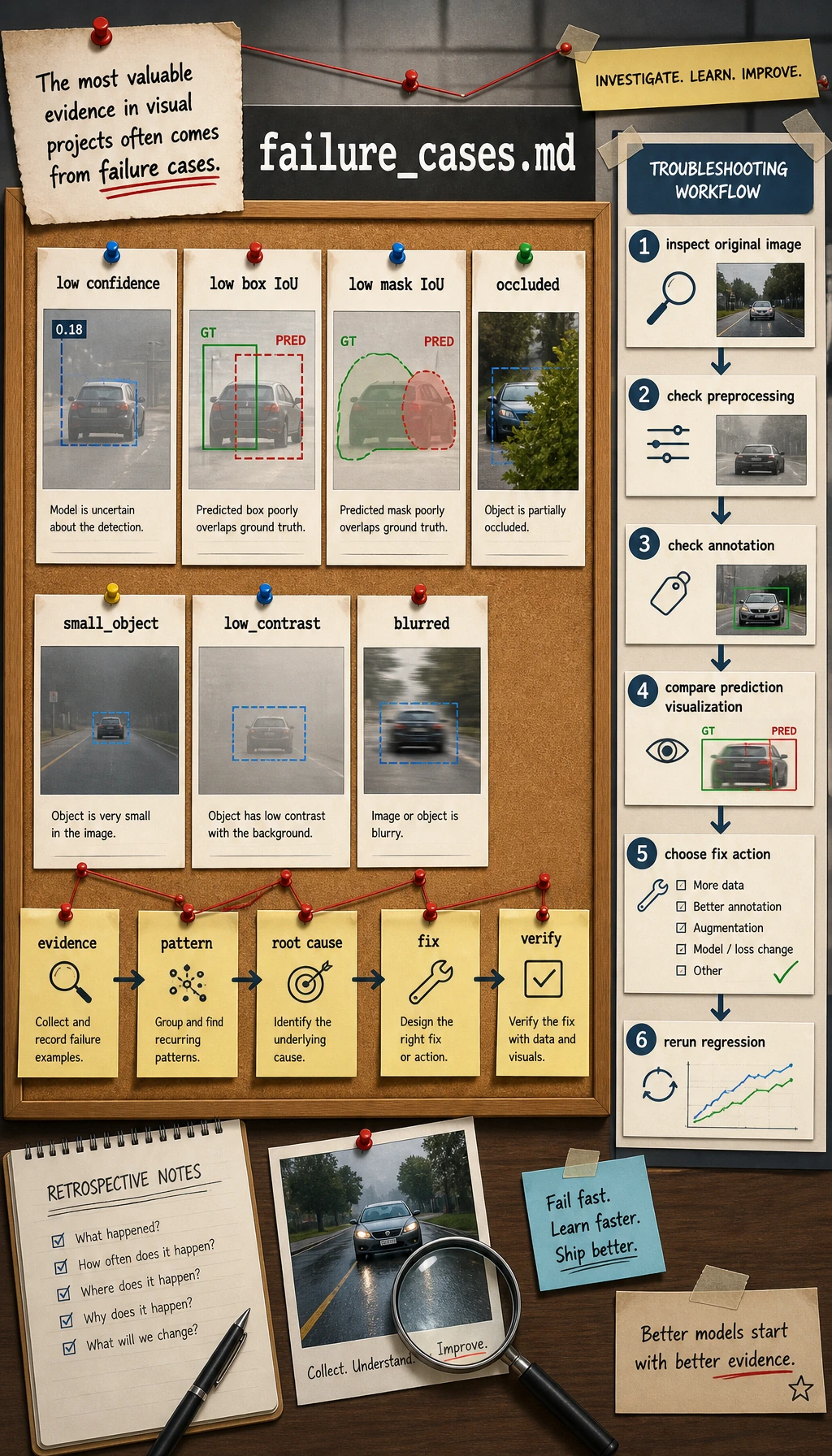
Open:
cv_workshop_run/reports/failure_cases.md
A useful failure report should not only say "wrong." It should say what evidence made the sample suspicious:
- low confidence;
- low box IoU;
- low mask IoU;
- occlusion;
- small object;
- low contrast;
- blur or edge-touching objects.
When a beginner says "the model is bad," ask a more precise question:
- Is the image unclear?
- Is the annotation wrong?
- Is the object too small?
- Is preprocessing destroying the signal?
- Is the metric threshold too strict?
Step 9: Common Errors and Fixes
| Problem | Likely Cause | Fix |
|---|---|---|
ModuleNotFoundError: No module named 'cv2' | OpenCV is not installed in the current Python environment | Run pip install opencv-python numpy after activating the environment |
| Output folder is empty | The script did not run from the folder you expected | Run pwd or cd into the project folder, then run again |
| All masks look empty | Thresholding failed because contrast is too low | Inspect original images, adjust contrast, or use a different segmentation method |
| Accuracy is high but failure report is not empty | Labels are correct, but boxes/masks/confidence still have issues | Treat this as normal; inspect the failure cases instead of ignoring them |
| Metrics change after editing the script | Random generation, thresholds, or image operations changed | Keep the random seed and record script changes in the README |
Step 10: Practice Tasks
Try these changes one by one:
- Add a fourth class named
star. - Change
challenge_planso more test samples areblurredoroccluded. - Lower the failure threshold for
box_ioufrom0.75to0.60, then comparefailure_cases.md. - Save side-by-side images showing original, mask, and prediction.
- Replace the centroid classifier with a small CNN or a pretrained classifier after you finish this baseline.
Completion Standard
You can consider this workshop complete when you have:
- run
python vision_workshop.py; - opened
labels.csv; - inspected at least three prediction images;
- read
metrics.jsonandpredictions.csv; - written one short explanation of a failure sample.
If you can explain why one project needs image files, annotations, prediction visualizations, metrics, and failure analysis together, you have crossed the most important line in Chapter 10: you are no longer only "running a model"; you are building a reproducible vision project.