8.3.4 Function Calling 初识
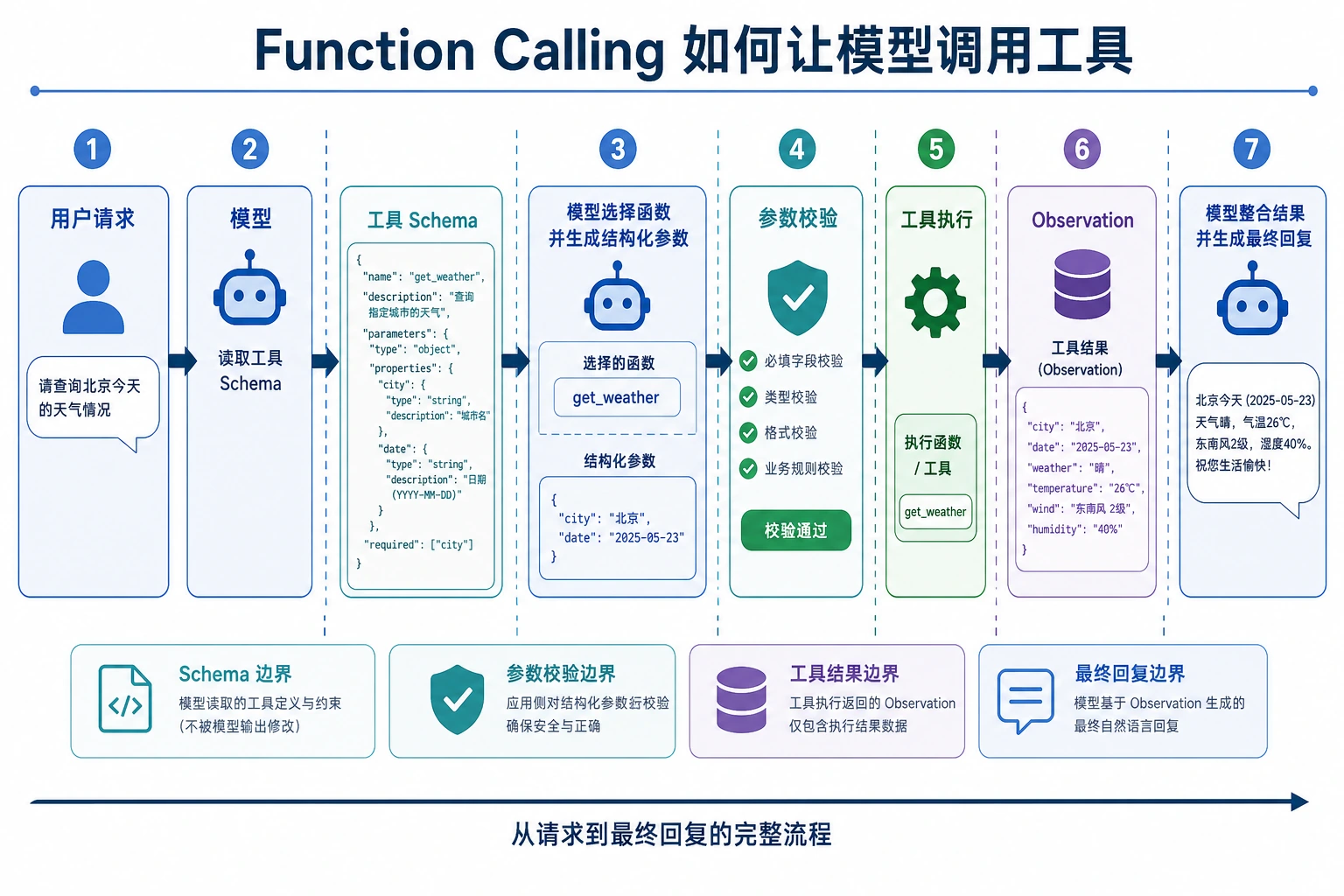
很多新人第一次做 LLM 应用时,会把模型当成“万能文本生成器”。 但真正走向实用系统时,你很快会发现:
模型不只要会说,还得会把任务转成可执行动作。
这就是 Function Calling 要解决的问题。
学习目标
- 理解为什么仅靠自然语言输出很难稳定调用工具
- 理解函数 schema、参数、调用结果这几个核心概念
- 看懂一个最小的函数调用闭环
- 知道 Function Calling 最适合什么场景
新人先掌握 / 进阶再理解
如果你是新人,这一节先抓一句话:Function Calling 不是让模型真的去执行代码,而是让模型先输出一份结构化“调用意图”,再由程序检查、执行和返回结果。
如果你已经做过 LLM 应用,可以进一步关注:工具 schema 是否足够清楚,参数校验是否完整,工具失败后怎么重试或降级,调用日志是否能支撑调试和评估。
一、为什么纯文本输出不够?
一个常见的脆弱做法
假设用户问:
“北京今天多少度?”
你让模型返回一句话:
“我建议调用
get_weather(city='Beijing')”
这看起来像能用,但其实很脆:
- 格式可能不稳定
- 参数名可能乱写
- 城市名可能写成“北京”或“Beijing”
- 甚至可能多输出一堆解释
真正的问题是什么?
问题不在于模型不会理解任务,而在于:
自然语言太自由,不适合做稳定的程序接口。
程序更喜欢的是:
- 固定字段
- 明确参数
- 可校验结构
这正是 Function Calling 的价值。
二、Function Calling 到底是什么?
一句话理解
Function Calling = 让模型输出结构化工具调用,而不是随意文本。
它通常包括:
- 调哪个工具
- 传哪些参数
例如:
{
  "name": "get_weather",
  "arguments": {
    "city": "Beijing"
  }
}
这比自由文本强在哪?
因为它更像程序接口,而不是聊天内容。
程序拿到这个结构后,可以:
- 校验字段
- 自动执行
- 失败重试
- 记录日志
也就是说,Function Calling 是在给模型和程序之间搭桥。
三、先看一个最小闭环
定义两个工具
import ast
import operator

OPS = {
    ast.Add: operator.add,
    ast.Sub: operator.sub,
    ast.Mult: operator.mul,
    ast.Div: operator.truediv,
}


def safe_calculate(expression):
    def visit(node):
        if isinstance(node, ast.Expression):
            return visit(node.body)
        if isinstance(node, ast.Constant) and isinstance(node.value, (int, float)):
            return node.value
        if isinstance(node, ast.BinOp) and type(node.op) in OPS:
            return OPS[type(node.op)](visit(node.left), visit(node.right))
        if isinstance(node, ast.UnaryOp) and isinstance(node.op, ast.USub):
            return -visit(node.operand)
        raise ValueError("unsupported_expression")

    return visit(ast.parse(expression, mode="eval"))


def get_weather(city):
    data = {
        "Beijing": {"temperature": 22, "condition": "sunny"},
        "Shanghai": {"temperature": 25, "condition": "cloudy"}
    }
    return data.get(city, {"error": "city_not_found"})

def calculate(expression):
    return {"result": safe_calculate(expression)}
定义“模型输出”的调用结构
tool_call = {
    "name": "get_weather",
    "arguments": {
        "city": "Beijing"
    }
}

print(tool_call)
预期输出:
{'name': 'get_weather', 'arguments': {'city': 'Beijing'}}
真正执行这个调用
def dispatch(call):
    if call["name"] == "get_weather":
        return get_weather(**call["arguments"])
    if call["name"] == "calculate":
        return calculate(**call["arguments"])
    return {"error": "unknown_tool"}

tool_call = {
    "name": "get_weather",
    "arguments": {"city": "Beijing"}
}

result = dispatch(tool_call)
print(result)
预期输出:
{'temperature': 22, 'condition': 'sunny'}
这就是函数调用闭环的最小版本:
- 识别任务
- 产出结构化调用
- 程序执行
- 拿到结果
四、Schema 是什么?
Schema 可以理解成“工具说明书”
模型要正确调用工具,必须知道:
- 工具叫什么
- 每个参数叫什么
- 参数是什么类型
- 参数是不是必须传
这就是 schema 的作用。
一个简单 schema 示例
weather_schema = {
    "name": "get_weather",
    "description": "查询指定城市天气",
    "parameters": {
        "city": {
            "type": "string",
            "description": "城市英文名,例如 Beijing"
        }
    },
    "required": ["city"]
}

print(weather_schema)
预期输出:
{'name': 'get_weather', 'description': '查询指定城市天气', 'parameters': {'city': {'type': 'string', 'description': '城市英文名,例如 Beijing'}}, 'required': ['city']}
schema 不是“装饰文案”,而是在告诉模型和程序:
这个工具允许怎样被调用。
五、为什么参数校验很重要?
模型不一定总能给对参数
就算模型选对了工具,也可能:
- 漏字段
- 类型不对
- 参数值无效
例如:
bad_call = {
    "name": "get_weather",
    "arguments": {"city_name": "Beijing"}
}
如果你的程序不校验,就会在执行阶段直接炸掉。
一个最小校验示例
def validate_weather_call(call):
    if call.get("name") != "get_weather":
        return False, "wrong_tool"

    args = call.get("arguments", {})
    if "city" not in args:
        return False, "missing_city"
    if not isinstance(args["city"], str):
        return False, "city_must_be_string"

    return True, "ok"

good_call = {"name": "get_weather", "arguments": {"city": "Beijing"}}
bad_call = {"name": "get_weather", "arguments": {"city_name": "Beijing"}}

print(validate_weather_call(good_call))
print(validate_weather_call(bad_call))
预期输出:
(True, 'ok')
(False, 'missing_city')
六、一个更完整的教学例子:问天气和计算器
先模拟“模型决定调用哪个工具”
这里不用真实大模型,我们先写一个教学版规则函数,重点是让你看清“工具调用结构”。
def mock_llm_tool_selector(user_query):
    if "天气" in user_query:
        city = "Beijing" if "北京" in user_query else "Shanghai"
        return {
            "name": "get_weather",
            "arguments": {"city": city}
        }

    if "计算" in user_query:
        expression = user_query.replace("计算", "").strip()
        return {
            "name": "calculate",
            "arguments": {"expression": expression}
        }

    return None
再接上执行器
import ast
import operator

OPS = {
    ast.Add: operator.add,
    ast.Sub: operator.sub,
    ast.Mult: operator.mul,
    ast.Div: operator.truediv,
}


def safe_calculate(expression):
    def visit(node):
        if isinstance(node, ast.Expression):
            return visit(node.body)
        if isinstance(node, ast.Constant) and isinstance(node.value, (int, float)):
            return node.value
        if isinstance(node, ast.BinOp) and type(node.op) in OPS:
            return OPS[type(node.op)](visit(node.left), visit(node.right))
        if isinstance(node, ast.UnaryOp) and isinstance(node.op, ast.USub):
            return -visit(node.operand)
        raise ValueError("unsupported_expression")

    return visit(ast.parse(expression, mode="eval"))


def get_weather(city):
    data = {
        "Beijing": {"temperature": 22, "condition": "sunny"},
        "Shanghai": {"temperature": 25, "condition": "cloudy"}
    }
    return data.get(city, {"error": "city_not_found"})

def calculate(expression):
    return {"result": safe_calculate(expression)}

def dispatch(call):
    if call["name"] == "get_weather":
        return get_weather(**call["arguments"])
    if call["name"] == "calculate":
        return calculate(**call["arguments"])
    return {"error": "unknown_tool"}

queries = [
    "北京今天天气怎么样",
    "计算 3 * (4 + 5)"
]

for q in queries:
    call = mock_llm_tool_selector(q)
    result = dispatch(call)
    print("用户问题:", q)
    print("工具调用:", call)
    print("执行结果:", result)
    print("-" * 40)
预期输出:
用户问题: 北京今天天气怎么样
工具调用: {'name': 'get_weather', 'arguments': {'city': 'Beijing'}}
执行结果: {'temperature': 22, 'condition': 'sunny'}
----------------------------------------
用户问题: 计算 3 * (4 + 5)
工具调用: {'name': 'calculate', 'arguments': {'expression': '3 * (4 + 5)'}}
执行结果: {'result': 27}
----------------------------------------
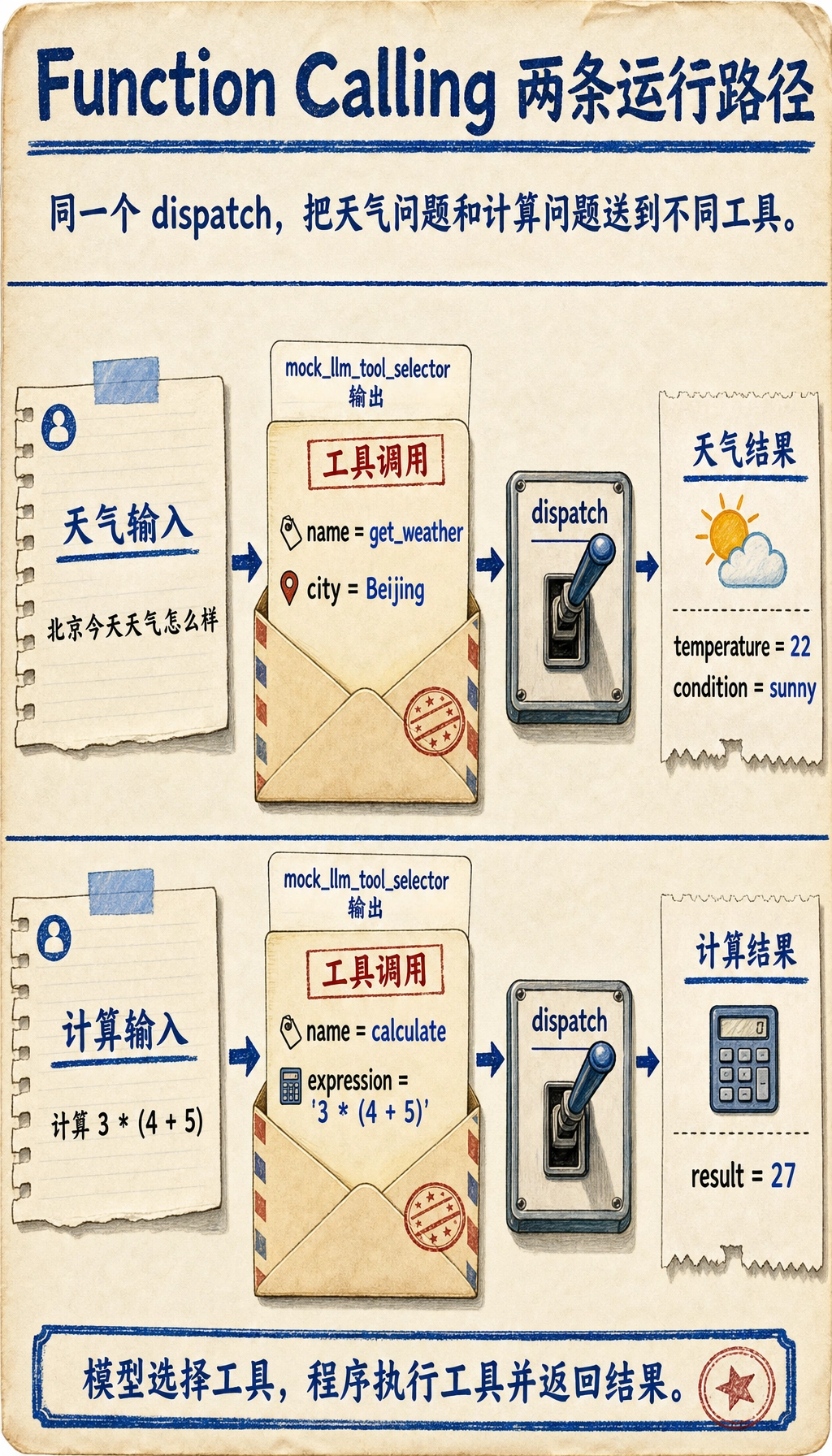
这个例子已经非常接近真实系统的骨架了。
七、Function Calling 最适合什么任务?
特别适合
- 查天气
- 查知识库
- 查数据库
- 数学计算
- 调搜索接口
- 提交工单
也就是:
模型负责决定“做什么”,程序负责真正执行。
不太适合
如果任务本质上只是:
- 写一段文案
- 做开放生成
- 纯聊天陪伴
那未必一定要用 Function Calling。
八、如果你的目标是做“知识库驱动的课件生成助手”,最小工具集应该长什么样?
这类项目第一次做时,不需要一上来就几十个工具。 更稳的最小工具集通常只要 4 个:
-
retrieve_internal_docs(topic)查内部知识库 -
retrieve_external_docs(topic)补外部资料 -
build_courseware_schema(materials)把资料整理成固定结构 -
export_word(schema)套模板并导出 Word
你可以先把它想成:
- 模型不是直接写 Word
- 模型是在决定“下一步该调用哪一个环节”
一个很小的工具定义示例可以先写成:
tools = [
    {
        "name": "retrieve_internal_docs",
        "description": "按主题检索内部知识库资料",
        "parameters": {"topic": {"type": "string"}},
    },
    {
        "name": "export_word",
        "description": "把结构化课件内容导出为 Word 文档",
        "parameters": {"title": {"type": "string"}, "sections": {"type": "array"}},
    },
]

print(tools)
预期输出:
[{'name': 'retrieve_internal_docs', 'description': '按主题检索内部知识库资料', 'parameters': {'topic': {'type': 'string'}}}, {'name': 'export_word', 'description': '把结构化课件内容导出为 Word 文档', 'parameters': {'title': {'type': 'string'}, 'sections': {'type': 'array'}}}]
九、最常见的工程问题
选错工具
比如本来该查知识库,结果去调计算器。
参数不稳定
例如:
citycity_namelocation
模型可能混着来。
工具执行失败
即使工具调用结构正确,也可能:
- API 超时
- 参数非法
- 城市不存在
这说明:
Function Calling 不是“模型会调工具了就万事大吉”,后面还必须有工程兜底。
十、初学者最常踩的坑
把 Function Calling 当成“模型直接执行代码”
不是。 模型只是产出结构化调用意图,真正执行的是你的程序。
工具 schema 写得太模糊
如果工具说明不清、参数定义不清,模型更容易调错。
不做参数校验
只要进了线上,这是很危险的习惯。
小结前先看一眼:Function Calling 的工程闭环
这个闭环很重要,因为它提醒你:Function Calling 的难点不是“模型能不能说出函数名”,而是模型、schema、校验、执行器和错误处理能不能组成稳定系统。
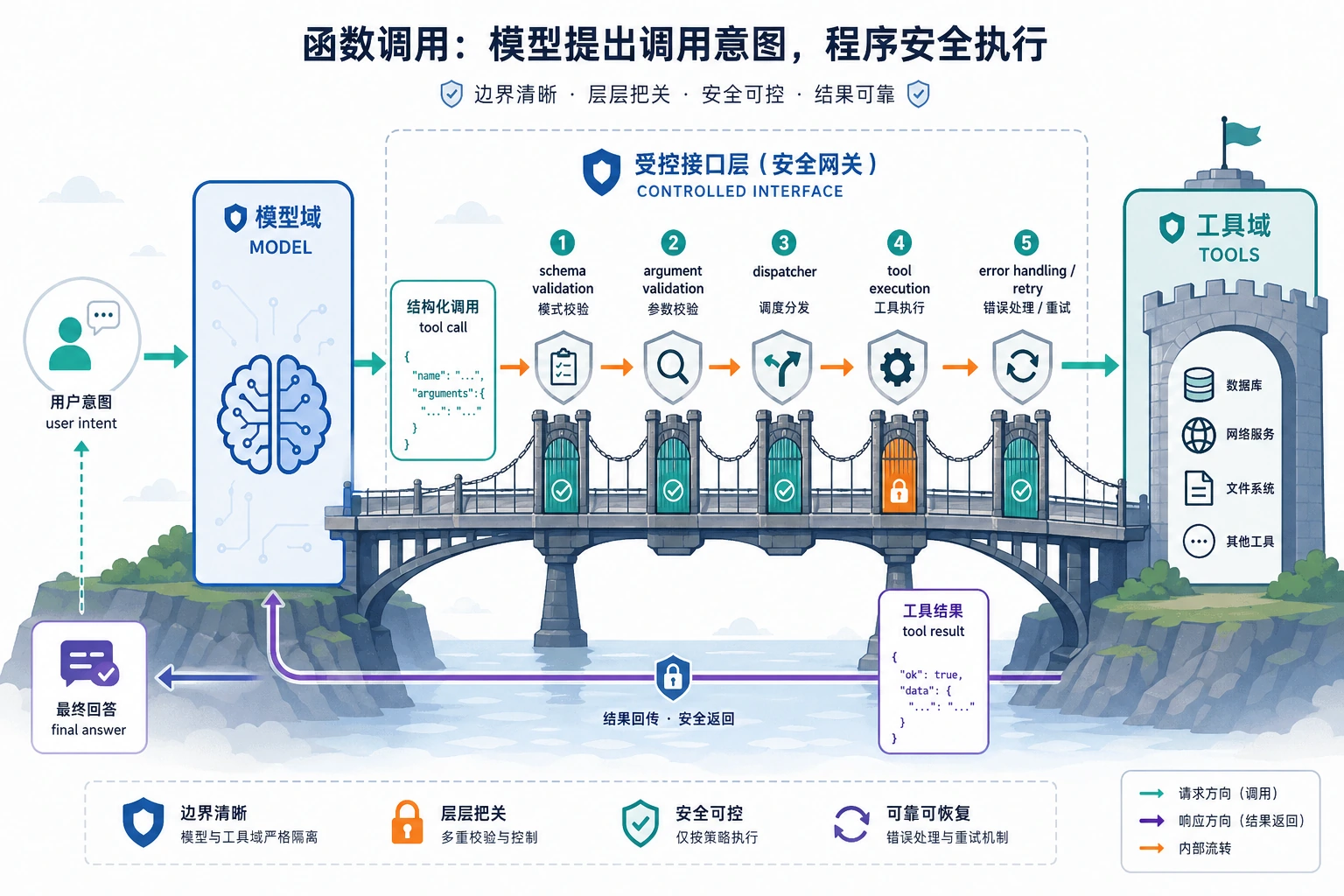
模型只负责提出 tool call,程序才负责校验、执行和兜底。看图时重点盯住 schema、arguments validation、dispatcher 和 retry/error handling 这几道闸门。
这一节的学习闭环
| 层次 | 你应该能做到什么 |
|---|---|
| 直觉 | 能解释为什么自由文本不适合直接当程序接口 |
| 代码 | 能写出一个最小 tool call、dispatch 和参数校验函数 |
| 工程 | 能说明 schema、校验、错误处理和日志各自负责什么 |
| 后续连接 | 能理解 Function Calling 为什么是 Agent 工具调用的前置基础 |
小结
这一节最重要的不是记住 name 和 arguments 这两个字段,而是抓住这个本质:
Function Calling 是把模型的自然语言理解能力,接到程序的结构化执行能力上。
理解了这一点,后面你再学 Agent、工具策略、多工具协作,就会顺很多。
练习
- 给本节示例再加一个工具,比如
search_docs(keyword)。 - 为
calculate写一个参数校验函数,防止危险表达式。 - 想一想:如果模型老是把“北京天气”错误路由到
calculate,你会先改 prompt、schema 还是执行器? - 用自己的话解释:Function Calling 为什么比“让模型直接返回一段命令文本”更稳?