6.8.5 実践ワークショップ:PyTorch 学習証拠パックを作る

まず図を見てからコードを実行してください。このワークショップの目的は大きなモデルを学習することではありません。第 6 章の流れ、つまり shape 確認、Dataset、DataLoader、nn.Module、学習ループ、検証ループ、checkpoint、loss 曲線、エラー復習、README 証拠を練習します。
学習目標
- ダウンロード不要の小さな画像分類データセットをローカルで作る
- 単純な
Flatten + Linearbaseline と小さな CNN を比較する Dataset、DataLoader、nn.Module、loss、optimizer、validation を正しく使う- 学習ログ、モデル比較、混同行列、復習サンプル、loss 曲線、checkpoint を保存する
- shape 不一致、loss が下がらない、過学習、メモリ不足などの典型的な失敗を説明する
何を作るのか
このワークショップでは、deep_learning_workshop_run/ というローカルフォルダを作ります。
タスクは次の通りです。
16x16 の合成グレースケール画像を、vertical stripe、horizontal stripe、diagonal stripe の 3 クラスに分類する。
データはコードで生成します。CPU でも動き、データセットのダウンロードも不要です。それでも、実際の画像プロジェクトやテキストプロジェクトで繰り返し使うエンジニアリング習慣を練習できます。
| 第 6 章の考え方 | プロジェクトでやること |
|---|---|
| Tensor shape | 学習前に (batch, channel, height, width) を追跡する |
| Dataset | 画像、ラベル、sample id をカスタム Dataset で包む |
| DataLoader | 学習データを batch 化し、shuffle する |
| Baseline | まず Flatten + Linear モデルを学習する |
| CNN | 小さな畳み込みネットワークを学習する |
| Training loop | zero_grad -> forward -> loss -> backward -> step を実行する |
| Validation | 検証 accuracy で最良モデルを選ぶ |
| Evidence | ログ、曲線、エラー、checkpoint、README を保存する |
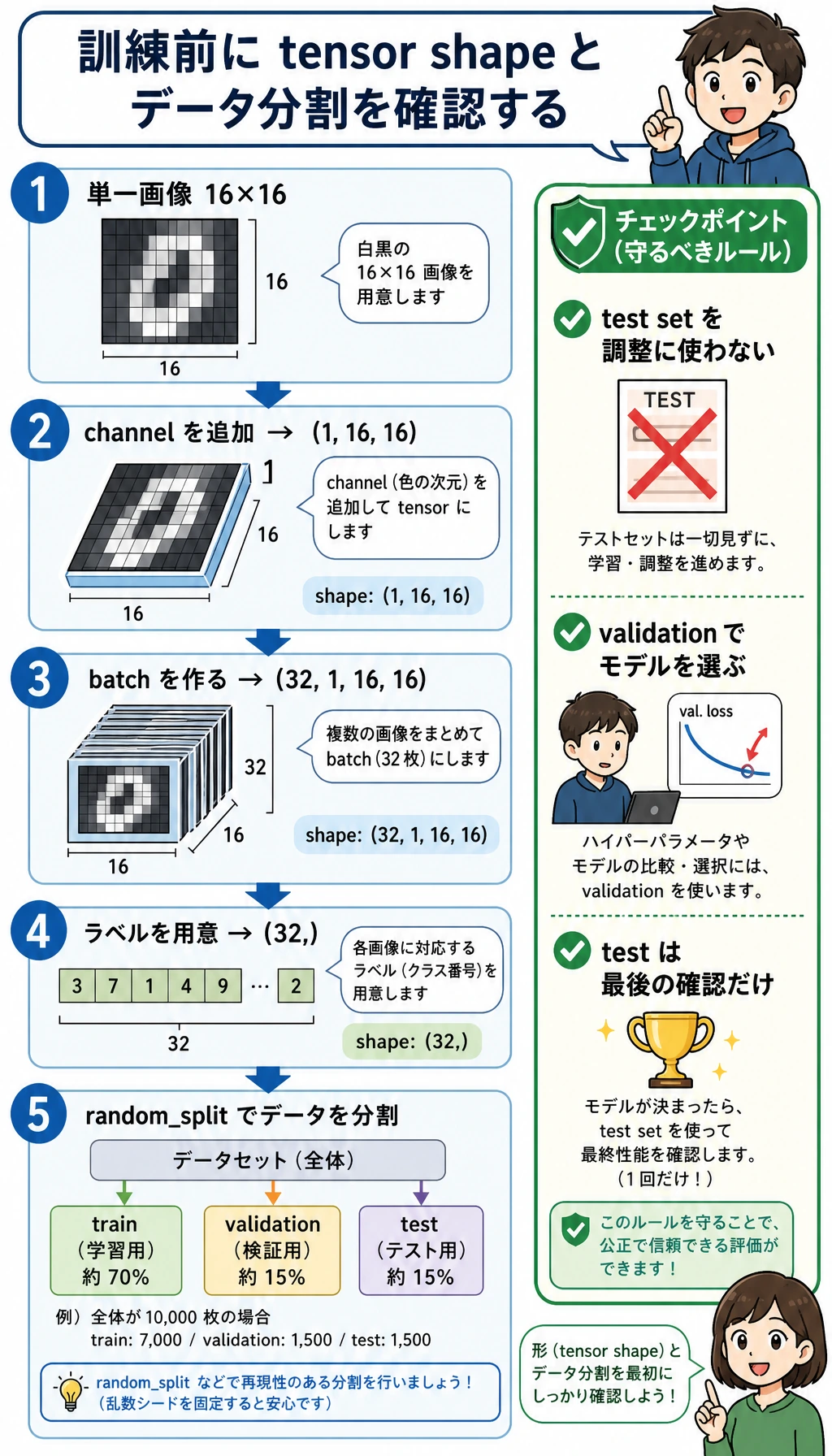
まず持つべき見取り図:1 枚の画像、1 つの batch、3 つの分割
スクリプトを実行する前に、この流れを頭に入れておきます。
- 生成される 1 枚の画像は shape
(1, 16, 16)の tensor です。1 つのグレースケール channel、高さ 16、幅 16 です。 - mini-batch になると
(32, 1, 16, 16)です。32 枚の画像をまとめて処理します。 - label batch は
(32,)です。各画像に整数の class id が 1 つあります。 train_setはモデルを学習させるため、val_setはモデルを選ぶため、test_setは最後の確認のために残します。
データ分割は重要です。learning rate、epoch、モデル幅を調整するたびに test set を見てしまうと、test score は正直な最終評価ではなくなります。この小さなワークショップでは、固定 seed の random_split を使うため、再実行しても同じ学習証拠を確認できます。
証拠の流れ:学習実行からレポートへ
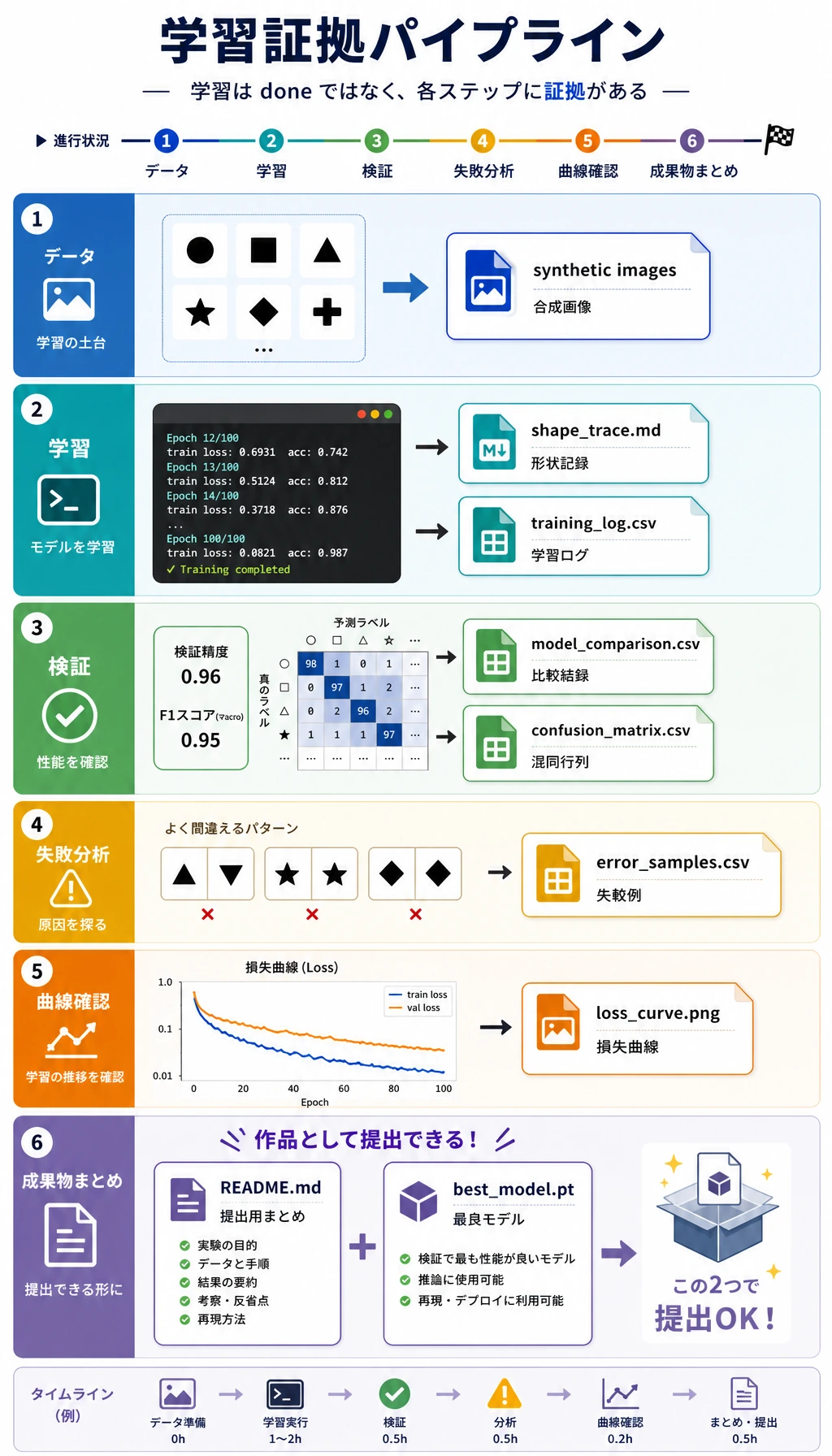
初心者がよくやる失敗は、ここで止まってしまうことです。
loss.backward()
optimizer.step()
print("done")
これだけでは、学習プロセスが健全だったとは言えません。使える深層学習プロジェクトは、次の問いに答える必要があります。
- どんな shape がモデルに入ったのか?
- loss は本当に下がったのか?
- validation は改善したのか、それとも training だけが良くなったのか?
- どのモデルが baseline を上回ったのか?
- どのサンプルを復習すべきか?
- 他の人がクリーンなフォルダから再実行できるか?
下のスクリプトは、この証拠パックを生成します。
deep_learning_workshop_run/
  outputs/training_log.csv
  outputs/model_comparison.csv
  outputs/confusion_matrix.csv
  outputs/error_samples.csv
  outputs/metrics_summary.json
  curves/loss_curve.png
  checkpoints/best_model.pt
  reports/shape_trace.md
  reports/debug_checklist.md
  README.md
実行前に用語を確認する
- Tensor:多次元配列。このワークショップでは、1 つの画像 batch の shape は
(batch, channel, height, width)です。 - Logits:softmax 前のモデルの生出力。
CrossEntropyLossは確率ではなく logits を受け取ります。 - Epoch:学習データを 1 周すること。
- Validation set:開発中にモデルを選ぶためのデータ。最終 test set とは別です。
- Checkpoint:あとで読み込めるよう保存したモデル状態。
- CNN:Convolutional Neural Network。畳み込みカーネルで局所的な視覚パターンを学ぶネットワーク。
- Overfitting(過学習):training は良くなるのに validation が良くならず、モデルが学習データを覚えすぎている状態。
環境を準備する
このコースリポジトリ内で作業している場合は、core と AI の実行環境を入れます。
python -m pip install -r requirements-course-core.txt -r requirements-course-ai.txt
別フォルダで練習している場合、このワークショップに必要なのは PyTorch と Matplotlib だけです。
python -m pip install torch matplotlib
PyTorch 公式のインストールページでは、Stable build は現在テスト済みでサポートされている版と説明されています。このワークショップは安定した PyTorch 2.x の core API を使い、torchvision、GPU、ダウンロードデータセットは不要です。ローカルでは Python 3.13 と PyTorch 2.11 で確認済みです。
完全なワークショップを実行する
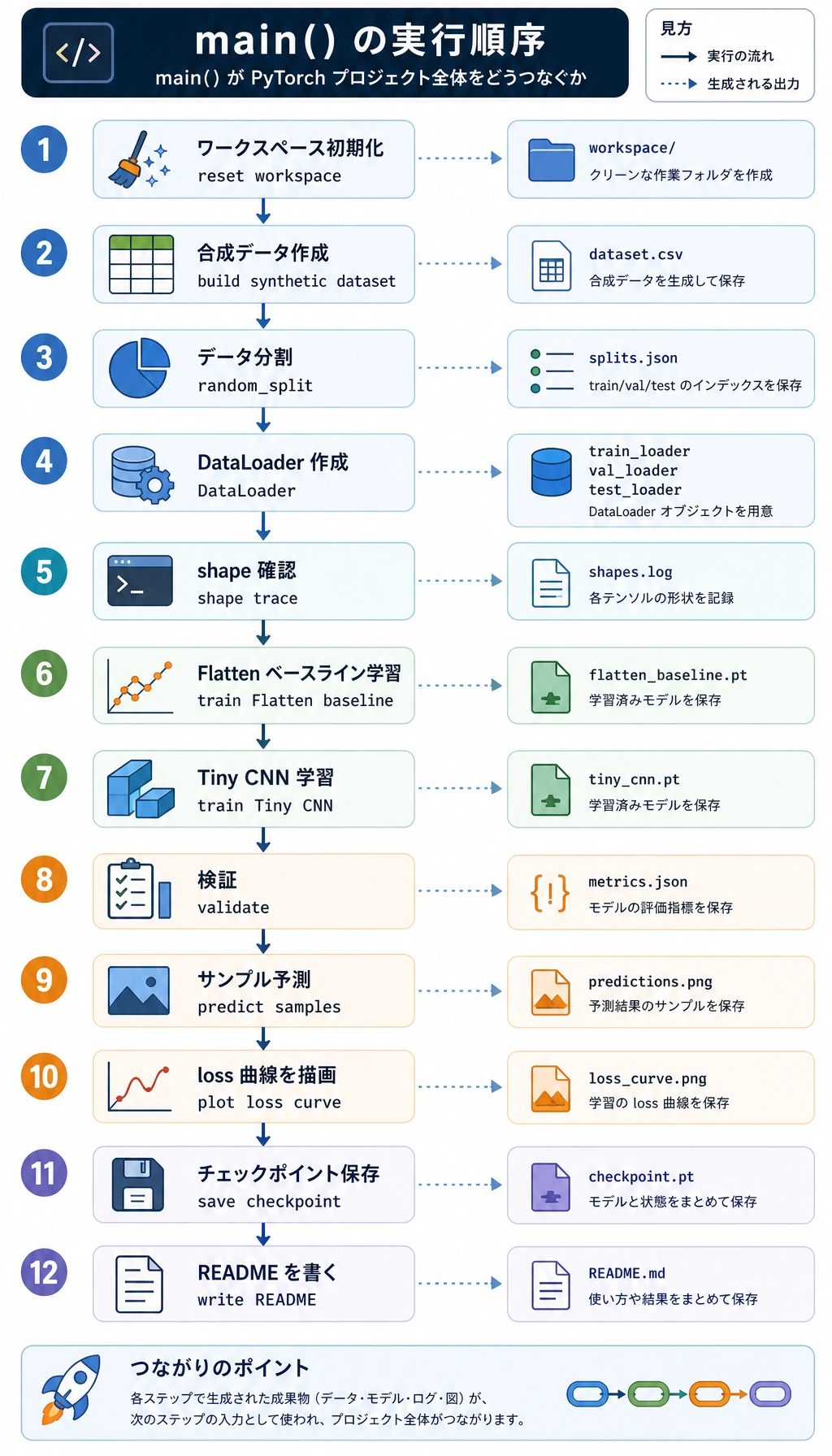
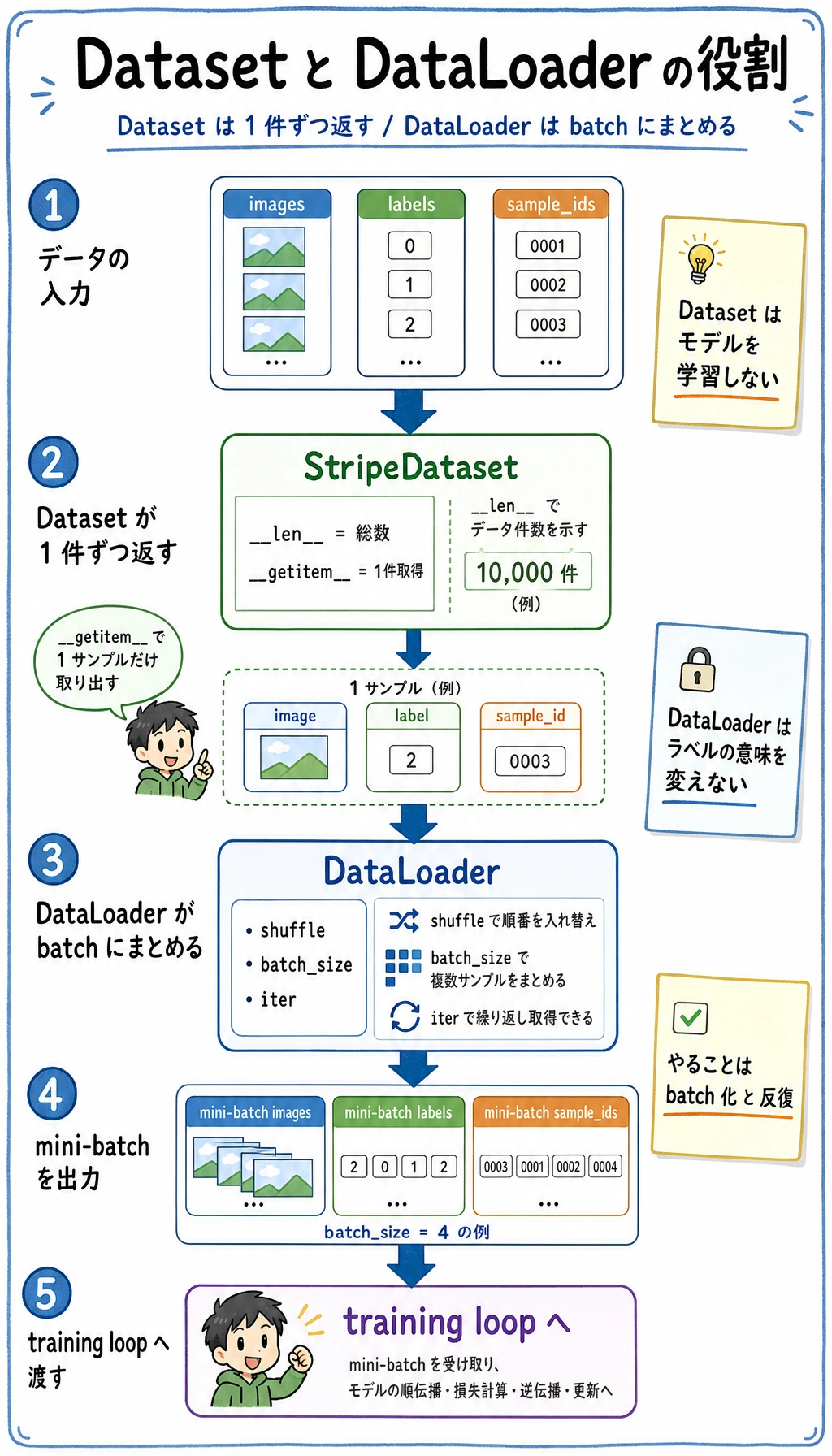
コードは 3 層に分けて読むと分かりやすくなります。
StripeDatasetはサンプル数を知っており、1 件の(image, label, sample_id)を返します。DataLoaderは多くの 1 件サンプルを、shuffle 済みの mini-batch にまとめます。- 学習ループはその mini-batch を受け取り、モデルのパラメータを更新します。
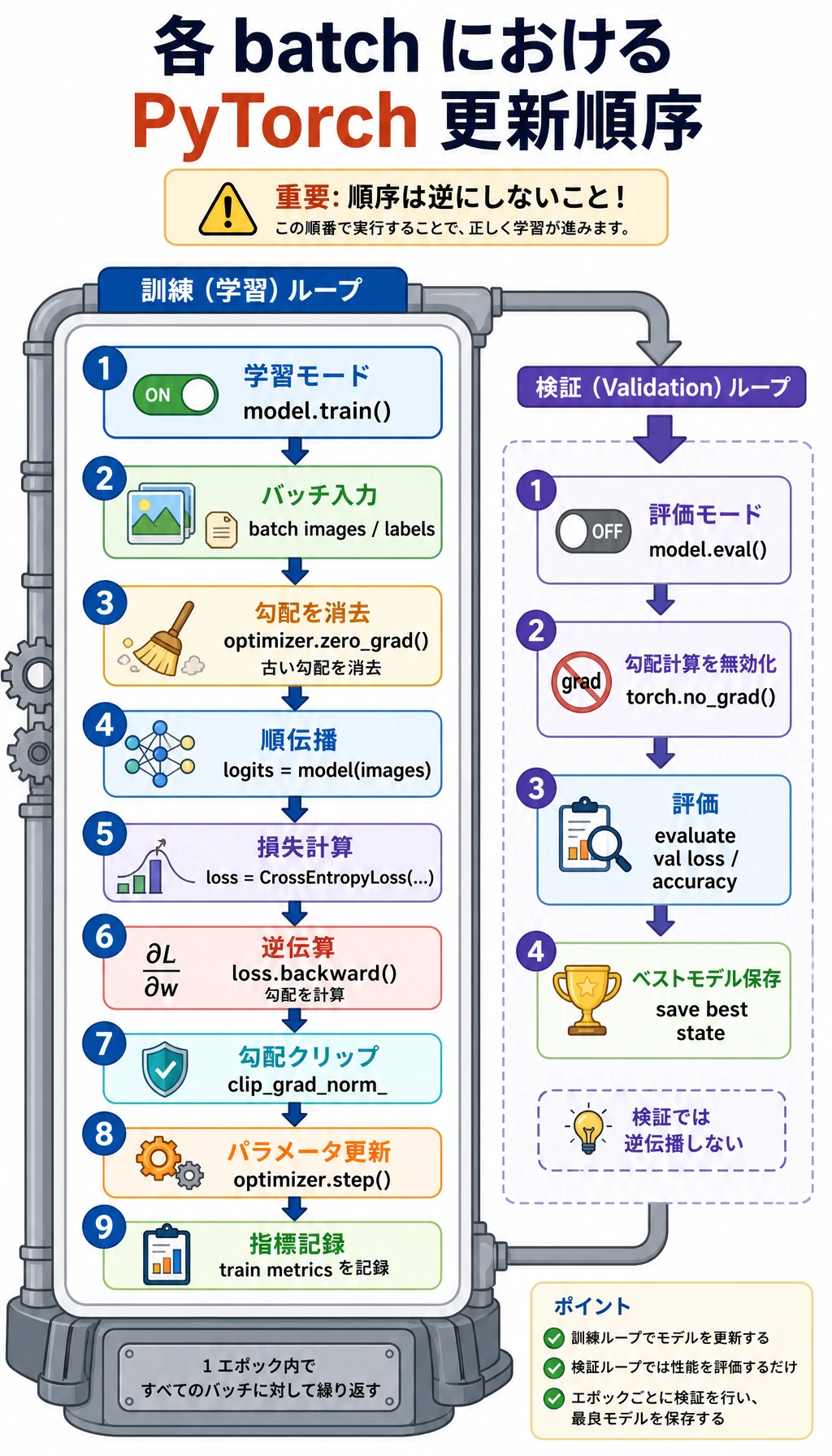
各 training batch では、順序のあるレシピとして読みます。古い勾配を消す、モデルを実行する、loss を計算する、backpropagation する、大きすぎる勾配を clip する、optimizer で更新する、という順番です。検証では model.eval() と torch.no_grad() を使います。検証は測定であり、モデルを変更しないからです。
クリーンなフォルダを作る
mkdir ch06-dl-workshop
cd ch06-dl-workshop
dl_workshop.py を作る
次のコードを dl_workshop.py に保存します。
from __future__ import annotations

import copy
import csv
import json
import math
import shutil
from pathlib import Path

import matplotlib

matplotlib.use("Agg")
import matplotlib.pyplot as plt
import torch
from torch import nn
from torch.utils.data import DataLoader, Dataset, random_split

RUN_DIR = Path("deep_learning_workshop_run")
DATA_DIR = RUN_DIR / "data"
OUTPUT_DIR = RUN_DIR / "outputs"
REPORT_DIR = RUN_DIR / "reports"
CURVE_DIR = RUN_DIR / "curves"
CHECKPOINT_DIR = RUN_DIR / "checkpoints"

CLASSES = ["vertical_stripe", "horizontal_stripe", "diagonal_stripe"]
IMAGE_SIZE = 16
SAMPLES_PER_CLASS = 140
BATCH_SIZE = 32
SEED = 42


def reset_workspace() -> None:
    if RUN_DIR.exists():
        shutil.rmtree(RUN_DIR)
    for folder in (DATA_DIR, OUTPUT_DIR, REPORT_DIR, CURVE_DIR, CHECKPOINT_DIR):
        folder.mkdir(parents=True, exist_ok=True)


class StripeDataset(Dataset):
    def __init__(self, images: torch.Tensor, labels: torch.Tensor, sample_ids: list[str]):
        self.images = images.float()
        self.labels = labels.long()
        self.sample_ids = sample_ids

    def __len__(self) -> int:
        return len(self.labels)

    def __getitem__(self, index: int):
        return self.images[index], self.labels[index], self.sample_ids[index]


def make_stripe_image(label: int, generator: torch.Generator) -> torch.Tensor:
    image = torch.randn((IMAGE_SIZE, IMAGE_SIZE), generator=generator) * 0.20
    if label == 0:
        col = int(torch.randint(1, IMAGE_SIZE - 2, (1,), generator=generator))
        image[:, col : col + 2] += 1.0
    elif label == 1:
        row = int(torch.randint(1, IMAGE_SIZE - 2, (1,), generator=generator))
        image[row : row + 2, :] += 1.0
    else:
        offset = int(torch.randint(-3, 4, (1,), generator=generator))
        for row in range(IMAGE_SIZE):
            col = row + offset
            if 0 <= col < IMAGE_SIZE:
                image[row, col] += 1.1
                if col + 1 < IMAGE_SIZE:
                    image[row, col + 1] += 0.8

    if float(torch.rand((), generator=generator)) < 0.18:
        top = int(torch.randint(0, IMAGE_SIZE - 4, (1,), generator=generator))
        left = int(torch.randint(0, IMAGE_SIZE - 4, (1,), generator=generator))
        image[top : top + 4, left : left + 4] *= 0.25
    return image.clamp(-1.0, 1.5).unsqueeze(0)


def build_dataset(seed: int = SEED) -> StripeDataset:
    generator = torch.Generator().manual_seed(seed)
    images = []
    labels = []
    sample_ids = []
    for label, class_name in enumerate(CLASSES):
        for index in range(SAMPLES_PER_CLASS):
            images.append(make_stripe_image(label, generator))
            labels.append(label)
            sample_ids.append(f"{class_name}_{index:03d}")
    return StripeDataset(torch.stack(images), torch.tensor(labels), sample_ids)


class FlattenBaseline(nn.Module):
    def __init__(self):
        super().__init__()
        self.net = nn.Sequential(nn.Flatten(), nn.Linear(IMAGE_SIZE * IMAGE_SIZE, len(CLASSES)))

    def forward(self, x: torch.Tensor) -> torch.Tensor:
        return self.net(x)


class TinyCNN(nn.Module):
    def __init__(self):
        super().__init__()
        self.features = nn.Sequential(
            nn.Conv2d(1, 8, kernel_size=3, padding=1),
            nn.ReLU(),
            nn.MaxPool2d(2),
            nn.Conv2d(8, 16, kernel_size=3, padding=1),
            nn.ReLU(),
            nn.AdaptiveAvgPool2d((1, 1)),
        )
        self.classifier = nn.Linear(16, len(CLASSES))

    def forward(self, x: torch.Tensor) -> torch.Tensor:
        x = self.features(x)
        x = torch.flatten(x, 1)
        return self.classifier(x)


def evaluate(model: nn.Module, loader: DataLoader, loss_fn: nn.Module) -> tuple[float, float]:
    model.eval()
    total_loss = 0.0
    total_correct = 0
    total_examples = 0
    with torch.no_grad():
        for images, labels, _sample_ids in loader:
            logits = model(images)
            loss = loss_fn(logits, labels)
            total_loss += float(loss.item()) * len(labels)
            total_correct += int((logits.argmax(dim=1) == labels).sum().item())
            total_examples += len(labels)
    return total_loss / total_examples, total_correct / total_examples


def train_model(name: str, model: nn.Module, train_loader: DataLoader, val_loader: DataLoader, *, epochs: int, lr: float):
    loss_fn = nn.CrossEntropyLoss()
    optimizer = torch.optim.Adam(model.parameters(), lr=lr)
    history = []
    best_state = copy.deepcopy(model.state_dict())
    best_val_acc = -math.inf

    for epoch in range(1, epochs + 1):
        model.train()
        total_loss = 0.0
        total_correct = 0
        total_examples = 0
        for images, labels, _sample_ids in train_loader:
            optimizer.zero_grad(set_to_none=True)
            logits = model(images)
            loss = loss_fn(logits, labels)
            loss.backward()
            torch.nn.utils.clip_grad_norm_(model.parameters(), max_norm=2.0)
            optimizer.step()

            total_loss += float(loss.item()) * len(labels)
            total_correct += int((logits.argmax(dim=1) == labels).sum().item())
            total_examples += len(labels)

        train_loss = total_loss / total_examples
        train_acc = total_correct / total_examples
        val_loss, val_acc = evaluate(model, val_loader, loss_fn)
        history.append(
            {
                "model": name,
                "epoch": epoch,
                "train_loss": round(train_loss, 4),
                "train_acc": round(train_acc, 4),
                "val_loss": round(val_loss, 4),
                "val_acc": round(val_acc, 4),
            }
        )
        if val_acc > best_val_acc:
            best_val_acc = val_acc
            best_state = copy.deepcopy(model.state_dict())

    model.load_state_dict(best_state)
    return history, best_val_acc


def predict_samples(model: nn.Module, loader: DataLoader) -> list[dict]:
    model.eval()
    rows = []
    with torch.no_grad():
        for images, labels, sample_ids in loader:
            logits = model(images)
            probabilities = torch.softmax(logits, dim=1)
            confidence, predictions = probabilities.max(dim=1)
            for sample_id, actual, pred, conf in zip(sample_ids, labels.tolist(), predictions.tolist(), confidence.tolist()):
                rows.append(
                    {
                        "sample_id": sample_id,
                        "actual": CLASSES[actual],
                        "predicted": CLASSES[pred],
                        "confidence": round(float(conf), 4),
                        "correct": actual == pred,
                    }
                )
    return rows


def confusion_matrix_rows(prediction_rows: list[dict]) -> list[list[str | int]]:
    matrix = [[0 for _ in CLASSES] for _ in CLASSES]
    name_to_index = {name: index for index, name in enumerate(CLASSES)}
    for row in prediction_rows:
        matrix[name_to_index[row["actual"]]][name_to_index[row["predicted"]]] += 1
    return [["actual/predicted", *CLASSES], *[[CLASSES[i], *matrix[i]] for i in range(len(CLASSES))]]


def write_csv(path: Path, rows: list[dict]) -> None:
    with path.open("w", newline="", encoding="utf-8") as file:
        writer = csv.DictWriter(file, fieldnames=list(rows[0].keys()))
        writer.writeheader()
        writer.writerows(rows)


def write_matrix_csv(path: Path, rows: list[list[str | int]]) -> None:
    with path.open("w", newline="", encoding="utf-8") as file:
        csv.writer(file).writerows(rows)


def plot_history(history: list[dict]) -> None:
    grouped = {}
    for row in history:
        grouped.setdefault(row["model"], []).append(row)

    plt.figure(figsize=(8, 5))
    for name, rows in grouped.items():
        epochs = [row["epoch"] for row in rows]
        plt.plot(epochs, [row["train_loss"] for row in rows], label=f"{name} train_loss")
        plt.plot(epochs, [row["val_loss"] for row in rows], linestyle="--", label=f"{name} val_loss")
    plt.xlabel("epoch")
    plt.ylabel("loss")
    plt.title("Training and validation loss")
    plt.legend()
    plt.tight_layout()
    plt.savefig(CURVE_DIR / "loss_curve.png", dpi=140)
    plt.close()


def write_text_reports(summary: dict, shape_trace: str) -> None:
    (REPORT_DIR / "shape_trace.md").write_text(shape_trace, encoding="utf-8")
    (REPORT_DIR / "debug_checklist.md").write_text(
        "\n".join(
            [
                "# Debug Checklist",
                "",
                "- If the loss does not decrease, lower the learning rate and verify labels.",
                "- If shapes do not match, print one batch and one logits tensor first.",
                "- If training accuracy rises but validation accuracy stalls, suspect overfitting.",
                "- If results change every run, check random seeds and DataLoader shuffle settings.",
                "- If GPU memory is exhausted, reduce batch size or image size before changing the model.",
            ]
        )
        + "\n",
        encoding="utf-8",
    )
    (RUN_DIR / "README.md").write_text(
        "\n".join(
            [
                "# Deep Learning Workshop Evidence Pack",
                "",
                "Run command:",
                "",
                "```bash",
                "python dl_workshop.py",
                "```",
                "",
                f"Best model: {summary['best_model']}",
                f"Test accuracy: {summary['test_accuracy']}",
                "",
                "Evidence files:",
                "- outputs/training_log.csv",
                "- outputs/model_comparison.csv",
                "- outputs/confusion_matrix.csv",
                "- outputs/error_samples.csv",
                "- curves/loss_curve.png",
                "- reports/shape_trace.md",
                "- reports/debug_checklist.md",
            ]
        )
        + "\n",
        encoding="utf-8",
    )


def main() -> None:
    torch.manual_seed(SEED)
    reset_workspace()

    dataset = build_dataset()
    generator = torch.Generator().manual_seed(SEED)
    train_set, val_set, test_set = random_split(dataset, [252, 84, 84], generator=generator)
    train_loader = DataLoader(train_set, batch_size=BATCH_SIZE, shuffle=True, generator=generator)
    val_loader = DataLoader(val_set, batch_size=BATCH_SIZE)
    test_loader = DataLoader(test_set, batch_size=BATCH_SIZE)

    sample_images, sample_labels, _sample_ids = next(iter(train_loader))
    shape_trace = "\n".join(
        [
            "# Shape Trace",
            "",
            f"- One image batch: `{tuple(sample_images.shape)}` means batch, channel, height, width.",
            f"- One label batch: `{tuple(sample_labels.shape)}` means one class id per image.",
            f"- Model output should be `(batch, {len(CLASSES)})`, one logit per class.",
        ]
    ) + "\n"

    configs = [
        {"name": "Flatten baseline", "model": FlattenBaseline(), "epochs": 4, "lr": 0.01},
        {"name": "Tiny CNN", "model": TinyCNN(), "epochs": 10, "lr": 0.006},
    ]
    all_history = []
    comparison_rows = []
    trained_models = {}
    loss_fn = nn.CrossEntropyLoss()

    for config in configs:
        history, best_val_acc = train_model(
            config["name"],
            config["model"],
            train_loader,
            val_loader,
            epochs=config["epochs"],
            lr=config["lr"],
        )
        test_loss, test_acc = evaluate(config["model"], test_loader, loss_fn)
        all_history.extend(history)
        comparison_rows.append(
            {
                "model": config["name"],
                "epochs": config["epochs"],
                "best_val_acc": round(best_val_acc, 4),
                "test_loss": round(test_loss, 4),
                "test_accuracy": round(test_acc, 4),
            }
        )
        trained_models[config["name"]] = config["model"]

    comparison_rows = sorted(comparison_rows, key=lambda row: (row["test_accuracy"], row["best_val_acc"]), reverse=True)
    best_name = comparison_rows[0]["model"]
    best_model = trained_models[best_name]
    predictions = predict_samples(best_model, test_loader)
    errors = [row for row in predictions if not row["correct"]]
    review_rows = errors[:10] if errors else sorted(predictions, key=lambda row: row["confidence"])[:10]
    for row in review_rows:
        row["review_reason"] = "wrong prediction" if not row["correct"] else "lowest-confidence correct prediction"

    summary = {
        "best_model": best_name,
        "test_accuracy": comparison_rows[0]["test_accuracy"],
        "classes": CLASSES,
        "train_samples": len(train_set),
        "val_samples": len(val_set),
        "test_samples": len(test_set),
    }

    write_csv(OUTPUT_DIR / "training_log.csv", all_history)
    write_csv(OUTPUT_DIR / "model_comparison.csv", comparison_rows)
    write_matrix_csv(OUTPUT_DIR / "confusion_matrix.csv", confusion_matrix_rows(predictions))
    write_csv(OUTPUT_DIR / "error_samples.csv", review_rows)
    (OUTPUT_DIR / "metrics_summary.json").write_text(json.dumps(summary, indent=2), encoding="utf-8")
    torch.save({"model_name": best_name, "model_state": best_model.state_dict(), "classes": CLASSES}, CHECKPOINT_DIR / "best_model.pt")
    plot_history(all_history)
    write_text_reports(summary, shape_trace)

    print("STEP 1: data prepared")
    print(f"train_samples: {len(train_set)}")
    print(f"val_samples: {len(val_set)}")
    print(f"test_samples: {len(test_set)}")
    print(f"classes: {len(CLASSES)}")
    print("STEP 2: model comparison")
    print(f"baseline_val_acc: {next(row['best_val_acc'] for row in comparison_rows if row['model'] == 'Flatten baseline'):.3f}")
    print(f"cnn_val_acc: {next(row['best_val_acc'] for row in comparison_rows if row['model'] == 'Tiny CNN'):.3f}")
    print(f"best_model: {best_name}")
    print(f"test_accuracy: {comparison_rows[0]['test_accuracy']:.3f}")
    print("STEP 3: evidence files")
    print(RUN_DIR / "README.md")
    print(OUTPUT_DIR / "training_log.csv")
    print(OUTPUT_DIR / "model_comparison.csv")
    print(CURVE_DIR / "loss_curve.png")
    print(REPORT_DIR / "shape_trace.md")


if __name__ == "__main__":
    main()
実行する
python dl_workshop.py
期待される出力は次のようになります。
STEP 1: data prepared
train_samples: 252
val_samples: 84
test_samples: 84
classes: 3
STEP 2: model comparison
baseline_val_acc: 0.929
cnn_val_acc: 1.000
best_model: Tiny CNN
test_accuracy: 1.000
STEP 3: evidence files
deep_learning_workshop_run/README.md
deep_learning_workshop_run/outputs/training_log.csv
deep_learning_workshop_run/outputs/model_comparison.csv
deep_learning_workshop_run/curves/loss_curve.png
deep_learning_workshop_run/reports/shape_trace.md
証拠ファイルが本当に生成されたか確認します。
find deep_learning_workshop_run -maxdepth 2 -type f | sort
期待される出力は次の通りです。
deep_learning_workshop_run/README.md
deep_learning_workshop_run/checkpoints/best_model.pt
deep_learning_workshop_run/curves/loss_curve.png
deep_learning_workshop_run/outputs/confusion_matrix.csv
deep_learning_workshop_run/outputs/error_samples.csv
deep_learning_workshop_run/outputs/metrics_summary.json
deep_learning_workshop_run/outputs/model_comparison.csv
deep_learning_workshop_run/outputs/training_log.csv
deep_learning_workshop_run/reports/debug_checklist.md
deep_learning_workshop_run/reports/shape_trace.md
出力を順番に読む

まず shape_trace.md を見る
実行します。
sed -n '1,20p' deep_learning_workshop_run/reports/shape_trace.md
期待される出力は次の通りです。
# Shape Trace

- One image batch: `(32, 1, 16, 16)` means batch, channel, height, width.
- One label batch: `(32,)` means one class id per image.
- Model output should be `(batch, 3)`, one logit per class.
次のように読みます。
32:batch size1:グレースケールの channel16:画像の高さ16:画像の幅
この shape が Conv2d の期待と合わないと、モデルが学習を始める前に失敗します。
training_log.csv を読む
CSV 全体を目で追う前に、小さな読み取りコードを実行します。
python - <<'PY'
import csv
from collections import defaultdict
from pathlib import Path

rows = list(csv.DictReader((Path("deep_learning_workshop_run") / "outputs" / "training_log.csv").open()))
by_model = defaultdict(list)
for row in rows:
    by_model[row["model"]].append(row)

for model, model_rows in by_model.items():
    first = model_rows[0]
    last = model_rows[-1]
    print(
        f"{model}: "
        f"first_train_loss={float(first['train_loss']):.4f}, "
        f"last_train_loss={float(last['train_loss']):.4f}, "
        f"last_val_acc={float(last['val_acc']):.4f}"
    )
PY
期待される出力は次の通りです。
Flatten baseline: first_train_loss=0.8555, last_train_loss=0.1929, last_val_acc=0.9286
Tiny CNN: first_train_loss=1.0961, last_train_loss=0.0711, last_val_acc=1.0000
見るべきことは 3 つです。
train_lossは下がっているか?val_lossも下がっているか?val_accは改善し、train/validation の差が大きくなりすぎていないか?
最終 accuracy だけを見るより、この問いのほうが大切です。
baseline と CNN を比較する
実行します。
python - <<'PY'
import csv
import json
from pathlib import Path

run = Path("deep_learning_workshop_run")
summary = json.loads((run / "outputs" / "metrics_summary.json").read_text())
print(f"best_model={summary['best_model']}")
print(f"test_accuracy={summary['test_accuracy']:.3f}")

with (run / "outputs" / "model_comparison.csv").open() as file:
    for row in csv.DictReader(file):
        print(
            f"{row['model']}: "
            f"best_val_acc={float(row['best_val_acc']):.3f}, "
            f"test_accuracy={float(row['test_accuracy']):.3f}"
        )
PY
期待される出力は次の通りです。
best_model=Tiny CNN
test_accuracy=1.000
Tiny CNN: best_val_acc=1.000, test_accuracy=1.000
Flatten baseline: best_val_acc=0.929, test_accuracy=0.917
Flatten baseline は局所的な視覚パターンを活かせません。Tiny CNN は小さな局所カーネルを学べるため、縞模様のような画像データにより合っています。これが「データ構造に合うモデル構造を選ぶ」という実践的な意味です。
error_samples.csv を復習する
まず confusion matrix を読みます。
cat deep_learning_workshop_run/outputs/confusion_matrix.csv
期待される出力は次の通りです。
actual/predicted,vertical_stripe,horizontal_stripe,diagonal_stripe
vertical_stripe,25,0,0
horizontal_stripe,0,28,0
diagonal_stripe,0,0,31
次に復習サンプルのファイルを確認します。
python - <<'PY'
import csv
from pathlib import Path

rows = list(csv.DictReader((Path("deep_learning_workshop_run") / "outputs" / "error_samples.csv").open()))
print(f"review_rows={len(rows)}")
first = rows[0]
print(
    f"first_review={first['sample_id']} "
    f"predicted={first['predicted']} "
    f"confidence={float(first['confidence']):.4f} "
    f"reason={first['review_reason']}"
)
PY
期待される出力は次の通りです。
review_rows=10
first_review=diagonal_stripe_099 predicted=diagonal_stripe confidence=0.4211 reason=lowest-confidence correct prediction
モデルが間違えた場合、このファイルには誤予測が入ります。すべて正解した場合は、信頼度が低い正解サンプルを保存します。どちらも役立ちます。実プロジェクトには最終スコアだけでなく、復習サンプルが必要です。
loss 曲線を見る
deep_learning_workshop_run/curves/loss_curve.png を開きます。
次のように確認します。
- training と validation は同じ方向に動いているか?
- どちらのモデルがより速く収束するか?
- validation が止まった後も training だけ改善していないか?
この習慣は、転移学習、fine-tuning、大規模モデル学習でも使い続けます。
checkpoint を一度読み込む
checkpoint は読み込めて初めて役に立ちます。簡単な smoke test を実行します。
python - <<'PY'
from pathlib import Path
import torch

checkpoint = torch.load(Path("deep_learning_workshop_run") / "checkpoints" / "best_model.pt", map_location="cpu")
print(checkpoint["model_name"])
print(", ".join(checkpoint["classes"]))
PY
期待される出力は次の通りです。
Tiny CNN
vertical_stripe, horizontal_stripe, diagonal_stripe
この段階では、まだ完全なモデルを再構築していません。将来の推論スクリプトに必要なモデル名、保存済みパラメータ、クラス一覧がファイルに入っていることを確認しています。
よくあるエラーとデバッグループ
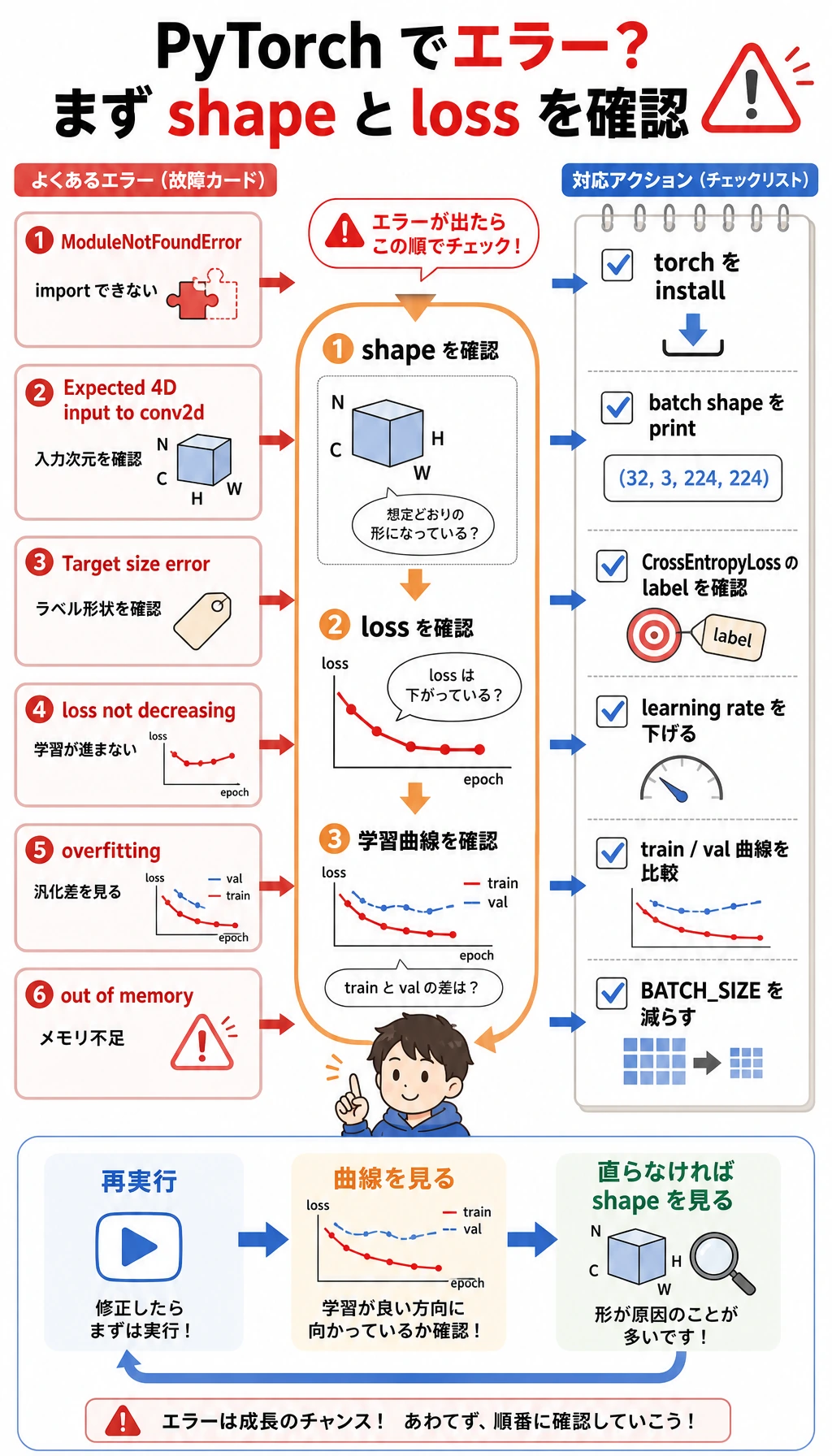
| 症状 | よくある原因 | 対処 |
|---|---|---|
ModuleNotFoundError: No module named 'torch' | 有効な環境に PyTorch が入っていない | python -m pip install torch matplotlib を実行する |
Expected 4D input to conv2d | 画像 tensor に channel または batch 次元がない | batch shape を出力し、(batch, channel, height, width) になっているか確認する |
Target size または class index エラー | ラベルが CrossEntropyLoss の期待と合っていない | shape が (batch,) の整数 class id を使う |
| loss が下がらない | 学習率、ラベル、入力スケールのどれかがおかしい | 学習率を下げ、tiny batch を過学習できるか確認する |
| training は良いが validation が良くない | 過学習または分割が悪い | 正則化、データ追加、augmentation、early stopping を検討する |
| CPU/GPU メモリ不足 | batch、画像、モデルが大きすぎる | まず BATCH_SIZE、画像サイズ、モデル幅を下げる |
作品集プロジェクトに発展させる

小さなステップでこのワークショップを発展させましょう。
- 合成 stripe データを、実際の小さな画像フォルダに置き換える。
batch_size、learning_rate、epochs、モデル名を管理するconfig.jsonを追加する。- 安定した baseline を作ってから data augmentation を追加する。
- CSV だけでなく、復習サンプルの画像グリッドを保存する。
- early stopping を追加し、なぜその epoch が最良なのかを説明する。
- README に上位の失敗パターンを 1 段落で書く。
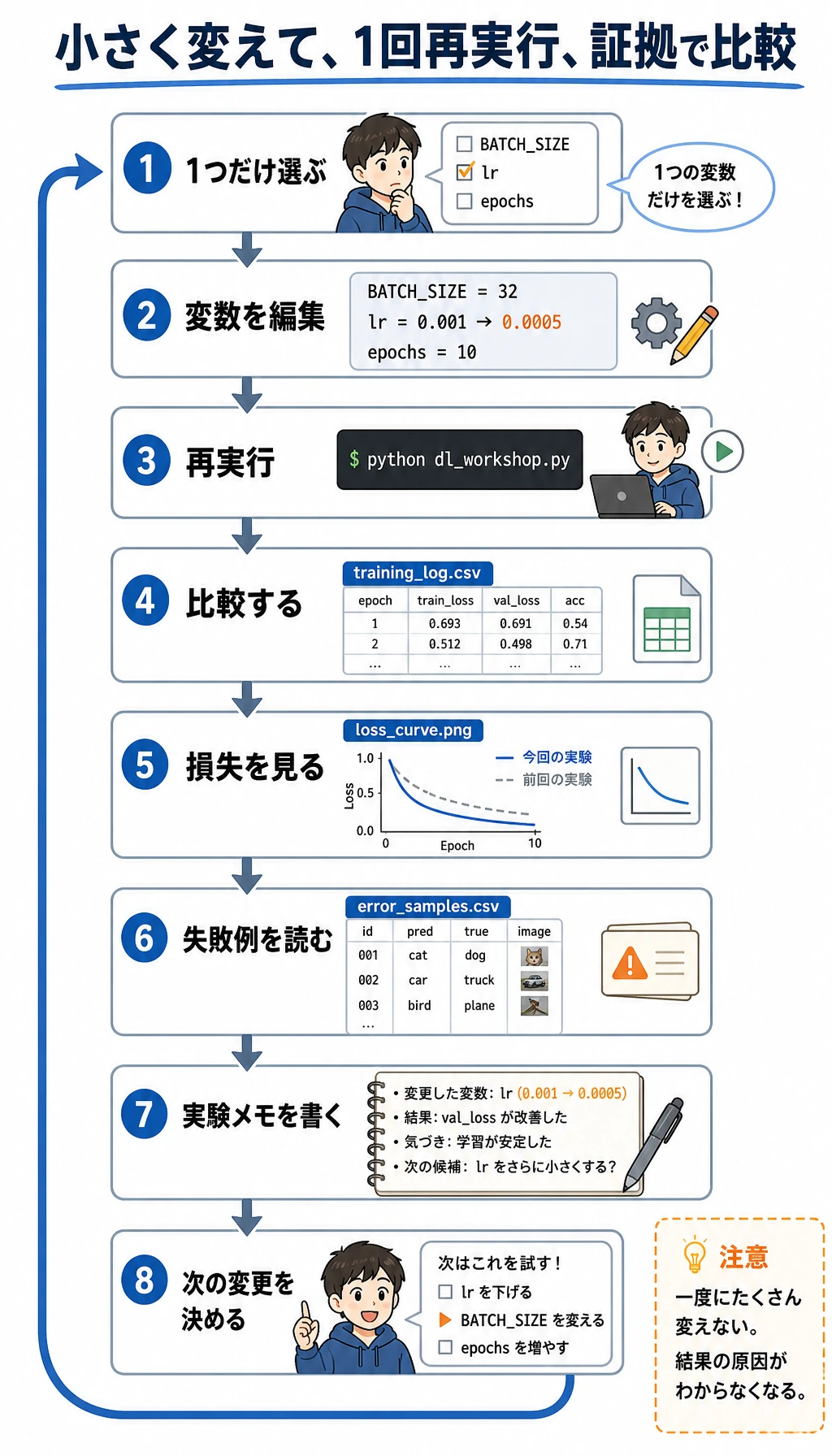
「1 つの変数だけ変えて再実行」を練習する
次に進む前に、小さな実験を 1 回行います。
- 初回実行の
training_log.csvとloss_curve.pngを残しておきます。 dl_workshop.pyの定数を 1 つだけ変更します。たとえばBATCH_SIZE、CNN の learning rate、CNN の epoch 数です。- もう一度
python dl_workshop.pyを実行します。 - 新しい
training_log.csv、model_comparison.csv、loss_curve.png、error_samples.csvを比較します。
短い実験メモを書きます。
python - <<'PY'
from pathlib import Path

run = Path("deep_learning_workshop_run")
note = run / "reports" / "experiment_notes.md"
note.write_text(
    "\n".join(
        [
            "# Experiment Notes",
            "",
            "- Run 1: default constants, Tiny CNN selected by validation accuracy.",
            "- Next change: adjust only `BATCH_SIZE` or only `lr`, then compare `training_log.csv` and `loss_curve.png`.",
        ]
    )
    + "\n",
    encoding="utf-8",
)
print(note)
PY
期待される出力は次の通りです。
deep_learning_workshop_run/reports/experiment_notes.md
大切なのは、毎回スコアを上げることではありません。1 つの変数だけを変え、クリーンに再実行し、証拠を使って結果を説明できることです。
作品集チェックリスト
第 6 章のプロジェクトを完了したと言う前に、次が揃っているか確認してください。
- クリーンなフォルダから動く実行コマンド
- tensor shape trace
- baseline モデル
- 改善モデル
- training と validation のログ
- loss 曲線
- モデル比較表
- checkpoint
- 復習サンプルまたは失敗サンプル
- 制限と次の改善を含む README
まとめ
このワークショップは、第 6 章を 1 つの実行可能な流れにします。tensor、dataset、dataloader、model、loss、optimizer、training、validation、checkpoint、curve、review samples、README 証拠を一通り作ります。再実行でき、各出力ファイルを説明できるなら、あなたは PyTorch コードを写しているだけではありません。エンジニアリングとして深層学習を練習しています。