7.2.5 Hands-on: LLM Call Workbench
This lesson turns the previous concepts into a practical workflow. Before you worry about which model is strongest, first learn what happens during one complete LLM call: user task, token budget, request payload, model output, validation, and retry.
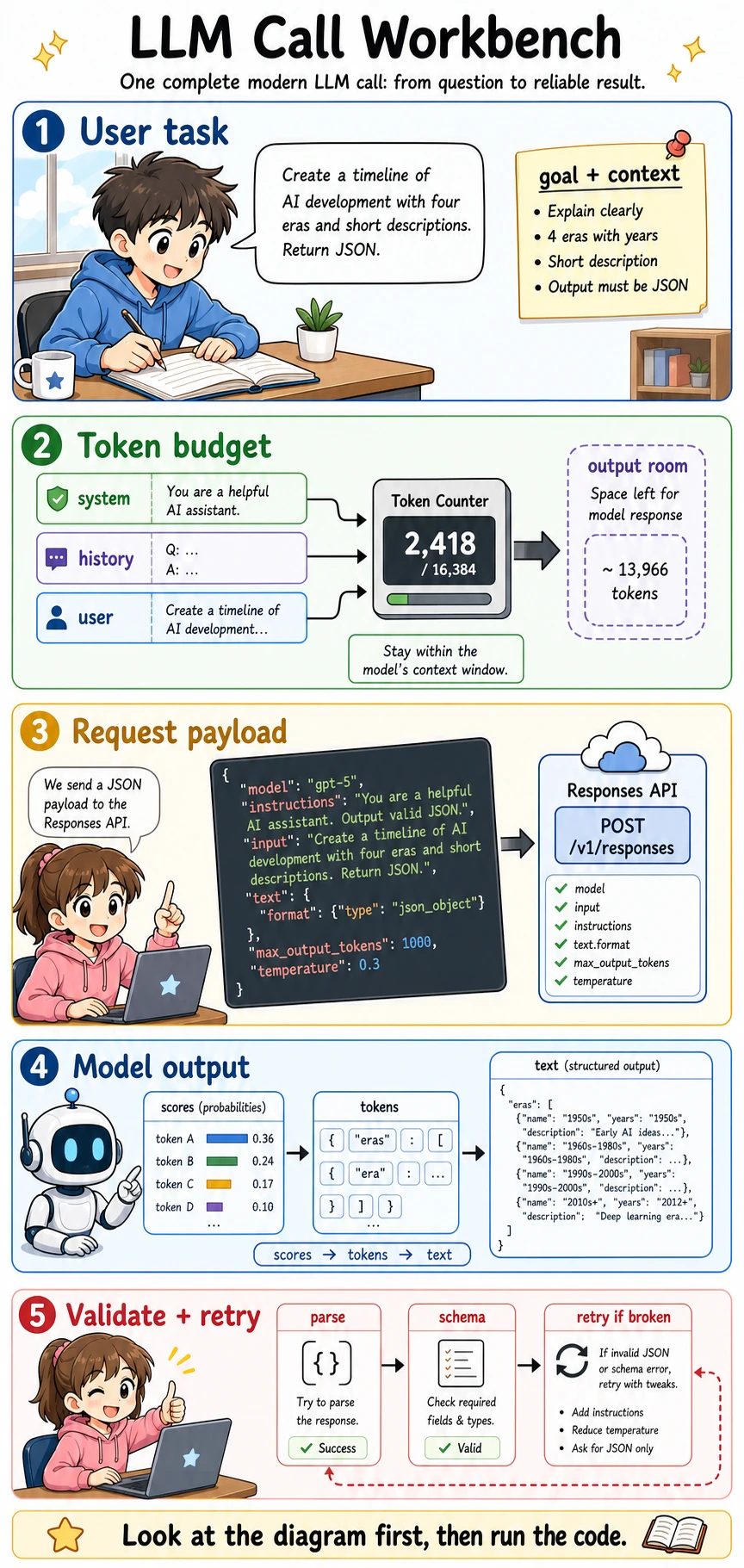
Follow this order: look at the picture first, run the code second, then read the terms and formulas. LLM engineering becomes much less mysterious once you can trace one request from input to validated output.
What this lab teaches
After this lab, you should be able to explain:
- What an API request sends to a model.
- Why a context window is really a token budget.
- Why structured output needs parsing and validation.
- Why retry logic should change the request instead of blindly asking again.
- Why a demo that prints a nice answer is not yet a reliable product feature.
Terms you should understand before the code
| Term | Plain meaning | In this lab |
|---|---|---|
| API | Application Programming Interface: a standard way for software to call another service | Your program sends a request to the model service and receives a response |
| SDK | Software Development Kit: a library that wraps API calls in convenient code | The optional real API example uses the official Python SDK |
| Endpoint | The URL path that receives the request | The modern OpenAI text API endpoint is /v1/responses |
| Payload | The JSON body sent to the API | It includes model name, instructions, input, output settings, and constraints |
| Token budget | The available space inside the context window | System rules, chat history, user input, retrieved context, and output all compete for this space |
| JSON | A structured data format that programs can parse | We ask the model to return a timeline object, not a free paragraph |
| Schema | The expected shape of the JSON | It tells the program which fields must exist and what type they should be |
| Validation | Programmatic checking of the output | It catches missing fields, wrong types, and invalid JSON |
| Retry | Trying again after a controlled failure | A useful retry should fix the cause, such as adding clearer schema instructions |
| Latency | How long the request takes | Longer context and larger outputs usually increase latency |
Run the offline workbench first
This first example uses only the Python standard library. It does not call a real model. That is intentional: it lets you understand the engineering loop without needing an API key, internet access, or paid model usage.
Save it as llm_call_workbench.py, then run:
python llm_call_workbench.py
import json


CONTEXT_LIMIT = 4096


def rough_token_count(text):
    # A real tokenizer is more complex. This simple counter is enough for budget intuition.
    return max(1, len(text.split()))


def build_payload(user_task, max_output_tokens=600, temperature=0.3):
    instructions = (
        "You are a teaching assistant. Return valid JSON only. "
        "Each timeline era must include period, key_event, and summary."
    )
    input_text = (
        "Create a beginner-friendly timeline of AI development with four eras. "
        f"User task: {user_task}"
    )
    used_tokens = rough_token_count(instructions) + rough_token_count(input_text)
    remaining = CONTEXT_LIMIT - used_tokens - max_output_tokens

    payload = {
        "model": "gpt-5.5",
        "instructions": instructions,
        "input": input_text,
        "text": {"format": {"type": "json_object"}},
        "max_output_tokens": max_output_tokens,
        "temperature": temperature,
    }
    return payload, used_tokens, remaining


def fake_model_response(attempt):
    if attempt == 1:
        # The first response is intentionally broken: the first era misses "summary".
        return """
        {
          "timeline": [
            {"period": "1950s", "key_event": "Turing Test"},
            {"period": "2017", "key_event": "Transformer", "summary": "Self-attention became the backbone of LLMs."}
          ]
        }
        """

    return """
    {
      "timeline": [
        {"period": "1936-1950", "key_event": "Turing machine and Turing Test", "summary": "AI became a testable question."},
        {"period": "1956-1980s", "key_event": "Symbolic AI and expert systems", "summary": "Rules worked in narrow domains but did not scale well."},
        {"period": "1990s-2012", "key_event": "Statistical learning and deep learning", "summary": "Data and neural networks replaced many hand-written rules."},
        {"period": "2017-now", "key_event": "Transformer and LLMs", "summary": "Self-attention, scale, and alignment made general assistants practical."}
      ]
    }
    """


def validate_timeline(text):
    try:
        data = json.loads(text)
    except json.JSONDecodeError:
        return False, "invalid_json", None

    if "timeline" not in data or not isinstance(data["timeline"], list):
        return False, "missing_timeline_list", None

    required_fields = {"period", "key_event", "summary"}
    for index, era in enumerate(data["timeline"]):
        if not isinstance(era, dict):
            return False, f"era_{index}_not_object", None
        missing = required_fields - set(era)
        if missing:
            return False, f"era_{index}_missing_{sorted(missing)}", None

    return True, "valid", data


def run_workbench(user_task):
    payload, used_tokens, remaining = build_payload(user_task)
    print("used input tokens estimate:", used_tokens)
    print("remaining output room     :", remaining)
    print("request model             :", payload["model"])

    for attempt in [1, 2]:
        print("\nattempt:", attempt)
        raw_output = fake_model_response(attempt)
        ok, reason, parsed = validate_timeline(raw_output)
        print("validation:", reason)

        if ok:
            print("first era:", parsed["timeline"][0])
            return parsed

        payload["instructions"] += " Do not omit any required field."
        payload["temperature"] = 0.1
        print("retry fix: strengthen schema instruction and lower temperature")

    raise RuntimeError("Could not get a valid timeline after retries.")


run_workbench("Explain AI history with simple language.")
Expected output shape:
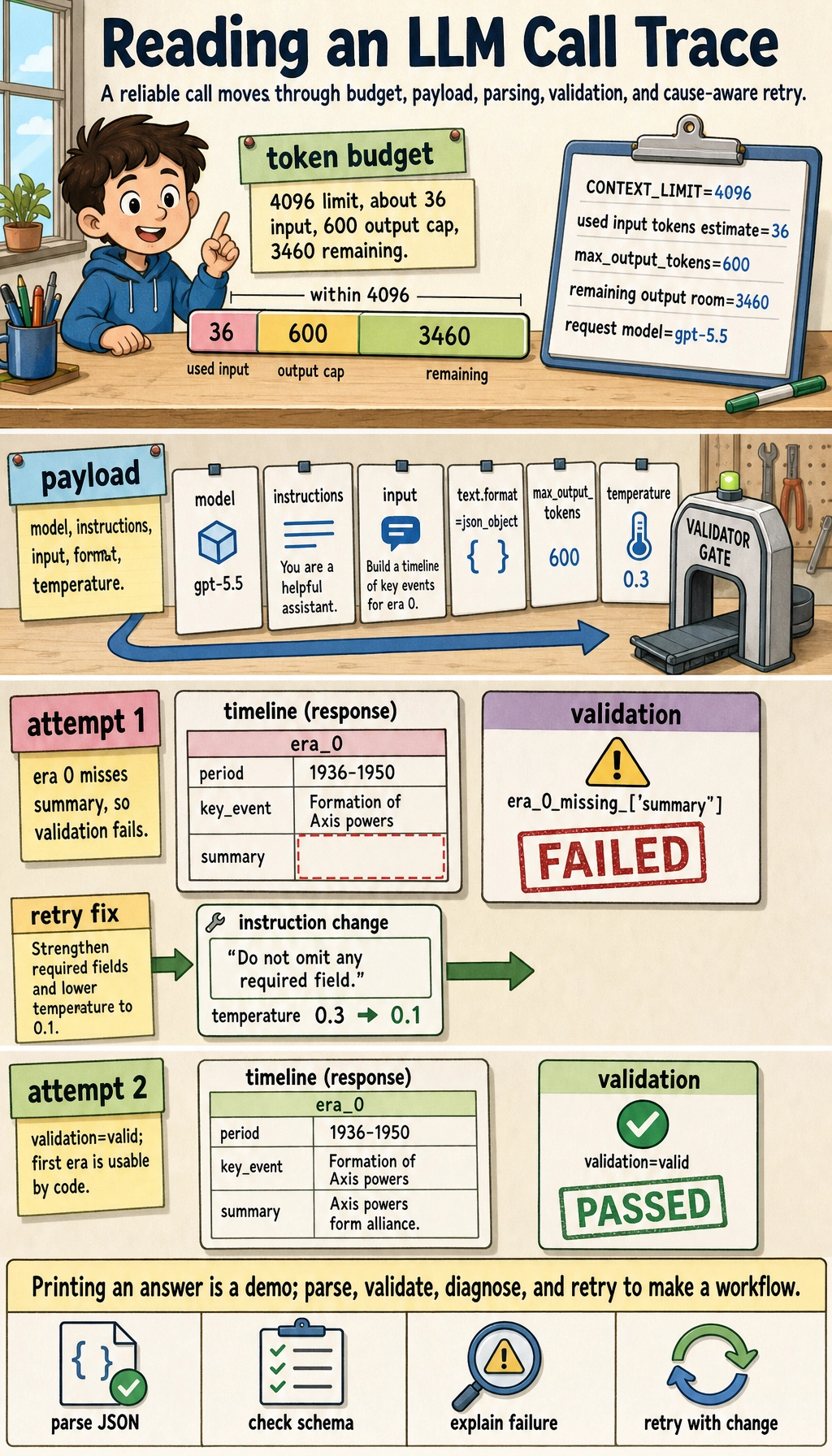
used input tokens estimate: 36
remaining output room     : 3460
request model             : gpt-5.5

attempt: 1
validation: era_0_missing_['summary']
retry fix: strengthen schema instruction and lower temperature

attempt: 2
validation: valid
first era: {'period': '1936-1950', ...}
What this code is really showing
A request is not only a prompt
The payload includes model, instructions, input, text.format, max_output_tokens, and temperature. A beginner often changes only the prompt sentence, but real LLM engineering also controls output length, format, randomness, and validation behavior.
Token budget is a product constraint
The model cannot see infinite text. System instructions, user messages, conversation history, retrieved documents, and output space all share the context window. If you fill the whole window with background text, the model may not have enough room to answer.
Validation changes a demo into a workflow
Printing a response is only a demo. A workflow must parse the output, check required fields, detect failure types, and decide whether to retry, ask the user for clarification, or hand the case to a human.
Retry should fix the cause
Blind retries waste time and cost. A better retry changes something specific:
| Failure | Better retry |
|---|---|
| Invalid JSON | Ask for JSON only, reduce extra prose, or use structured outputs |
| Missing fields | Repeat the required fields and mark them as mandatory |
| Output too long | Lower max_output_tokens or ask for a shorter format |
| Unstable classification | Lower temperature and add examples |
| Missing knowledge | Add retrieval context or move the problem to RAG later |
Optional: a real Responses API call
If you have an API key, you can run the same idea with the official OpenAI Python SDK and the modern Responses API. Use this only after the offline workbench makes sense.
python -m pip install --upgrade openai pydantic
export OPENAI_API_KEY="your_api_key_here"
python real_responses_call.py
import os
from pydantic import BaseModel
from openai import OpenAI


class Era(BaseModel):
    period: str
    key_event: str
    summary: str


class Timeline(BaseModel):
    timeline: list[Era]


client = OpenAI()

response = client.responses.parse(
    model=os.getenv("OPENAI_MODEL", "gpt-5.5"),
    input=[
        {
            "role": "system",
            "content": (
                "You are a teaching assistant. Return a concise beginner-friendly "
                "AI history timeline."
            ),
        },
        {
            "role": "user",
            "content": "Create a four-era AI development timeline for beginners.",
        },
    ],
    text_format=Timeline,
)

print(response.output_parsed.model_dump())
For new text-generation applications, prefer the Responses API rather than starting from older chat-completion examples. The key engineering idea is the same as the offline workbench: build a request, control output, parse the result, and verify that the result is usable by the program.
Set OPENAI_MODEL if your account or deployment uses a different approved model. The example keeps the model name configurable so course code does not depend on one fixed vendor default forever.
How to practice
- Change the offline task from "AI history timeline" to "course study plan" and update the required schema fields.
- Make the first fake response invalid JSON and observe whether the validator catches it.
- Add a
source_refsfield to every era and require it in validation. - Lower
max_output_tokensand explain what product problem this simulates. - Write a one-page note: which part is prompt design, which part is API payload design, and which part is application reliability?
Summary
A real LLM call is not just "send a question and get an answer." It is a small engineering loop:
Define the task, manage the token budget, send a clear payload, parse the output, validate the schema, and retry only when you know what failed.
Once this loop becomes familiar, Prompt, structured output, RAG, tool calling, and Agent workflows will feel like extensions of the same foundation rather than disconnected buzzwords.