12.5.3 Hands-on: Build a Reproducible Multimodal Creative Package
Before you connect real image, video, or speech models, first build a small workflow that proves you understand the product loop: input, prompt planning, asset generation, version records, review, export, and failure cases.
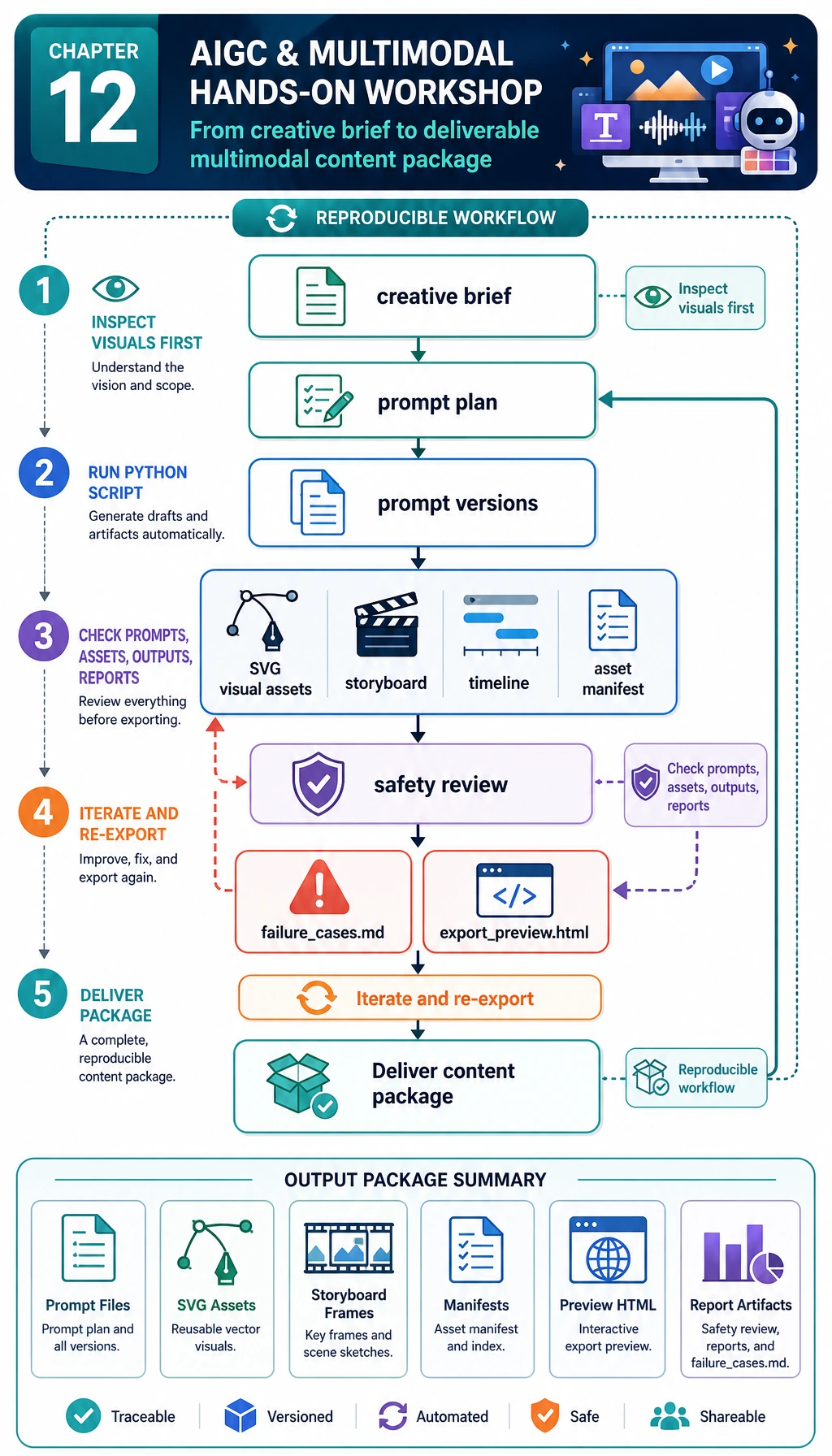
This workshop uses only the Python standard library and generates SVG mock assets locally. That is intentional: the goal is to make the workflow reproducible before you replace the SVG baseline with image generation, TTS, video generation, or a multimodal model API.
What You Will Build
You will create this folder:
multimodal_workshop_run/
  inputs/
    creative_brief.json
  prompts/
    prompt_plan.json
    prompt_versions.md
  assets/
    scene_01.svg
    scene_02.svg
    scene_03.svg
  outputs/
    storyboard.json
    timeline.csv
    content_package.json
    export_preview.html
  reports/
    asset_manifest.csv
    safety_review.md
    failure_cases.md
  README.md
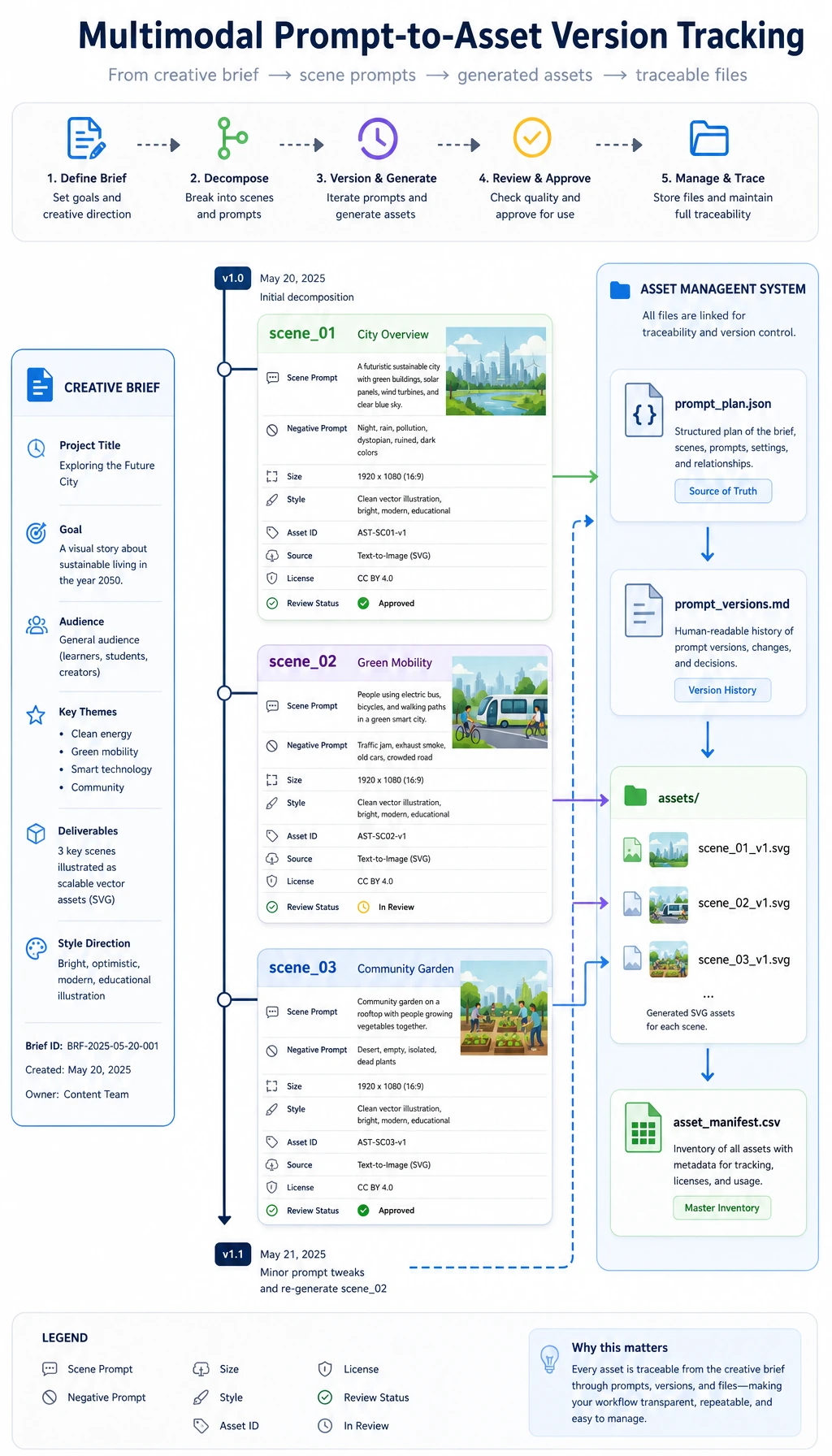
The most important result is not the SVG itself. The important result is that every generated asset has a prompt, source record, review result, export boundary, and failure note.
Step 0: Read the Product Loop
The practical loop is:
- Write a creative brief.
- Split the brief into scene-level prompts.
- Generate baseline visual assets.
- Build a storyboard and timeline.
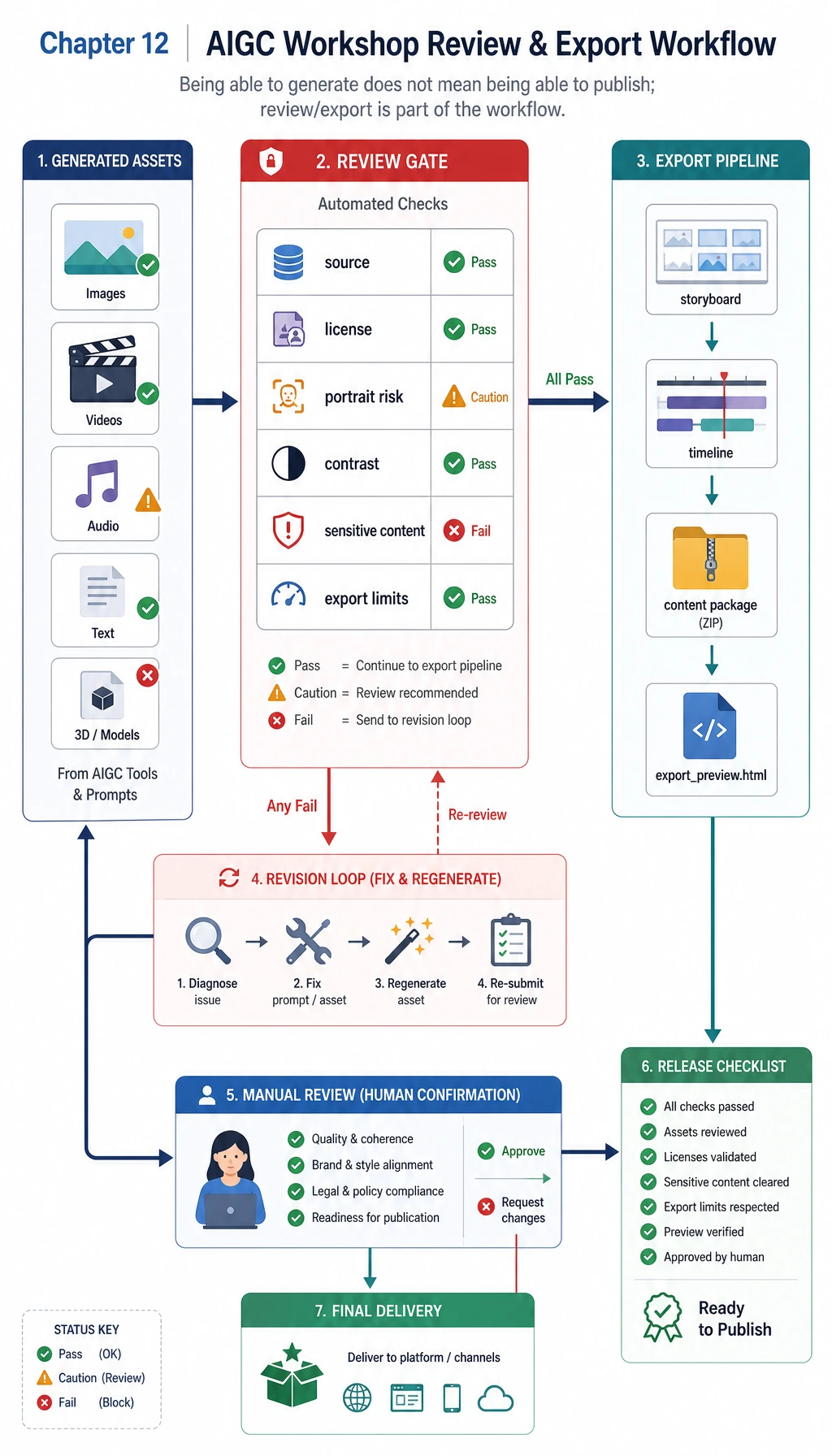
- Review asset sources, licenses, portrait risks, contrast, and export limits.
- Export an HTML preview and a content package.
- Save failure cases for the next iteration.
Step 1: Create the Folder and File
mkdir multimodal-workshop
cd multimodal-workshop
python3 -m venv .venv
source .venv/bin/activate
No pip install is needed. Create multimodal_workshop.py and paste the complete script below.
Step 2: Run the Complete Script
from __future__ import annotations

import csv
import html
import json
import shutil
from pathlib import Path

RUN_DIR = Path("multimodal_workshop_run")
if RUN_DIR.exists():
    shutil.rmtree(RUN_DIR)
INPUT_DIR = RUN_DIR / "inputs"
PROMPT_DIR = RUN_DIR / "prompts"
ASSET_DIR = RUN_DIR / "assets"
OUTPUT_DIR = RUN_DIR / "outputs"
REPORT_DIR = RUN_DIR / "reports"
for folder in [INPUT_DIR, PROMPT_DIR, ASSET_DIR, OUTPUT_DIR, REPORT_DIR]:
    folder.mkdir(parents=True, exist_ok=True)

BRIEF = {
    "project_id": "course-launch-multimodal-kit",
    "topic": "AI learning assistant launch kit",
    "audience": "beginners learning AI full-stack development",
    "goal": "create a small content package for a course landing page and short video storyboard",
    "tone": "clear, practical, optimistic",
    "deliverables": ["poster SVG", "three-shot storyboard", "review checklist", "export preview HTML"],
    "constraints": ["no real person likeness", "no external copyrighted assets", "show source and review records"],
}

SCENES = [
    {
        "id": "scene_01",
        "title": "From scattered materials to one learning assistant",
        "visual_prompt": "A clean course dashboard combining text notes, screenshots, and voice notes into one AI learning assistant workspace.",
        "copy": "Turn scattered study materials into a guided AI learning workflow.",
        "duration_sec": 5,
        "background": "#f7f3e8",
        "accent": "#2563eb",
        "text_color": "#1f2937",
        "source": "script_generated_svg",
        "license": "generated_by_script_for_course_demo",
        "uses_real_person": False,
    },
    {
        "id": "scene_02",
        "title": "Review before export",
        "visual_prompt": "A multimodal review desk with prompt versions, asset records, copyright checks, and export options.",
        "copy": "Save prompts, assets, human review, and export limits before sharing.",
        "duration_sec": 6,
        "background": "#e8eef7",
        "accent": "#93c5fd",
        "text_color": "#bfdbfe",
        "source": "script_generated_svg",
        "license": "generated_by_script_for_course_demo",
        "uses_real_person": False,
    },
    {
        "id": "scene_03",
        "title": "Ready for a portfolio demo",
        "visual_prompt": "A final portfolio package showing poster, storyboard, safety checklist, and README ready for presentation.",
        "copy": "A usable AIGC project is a workflow, not a single pretty output.",
        "duration_sec": 5,
        "background": "#ecfdf5",
        "accent": "#059669",
        "text_color": "#064e3b",
        "source": "script_generated_svg",
        "license": "generated_by_script_for_course_demo",
        "uses_real_person": False,
    },
]

REVIEW_RULES = [
    "source_recorded",
    "license_recorded",
    "no_real_person_likeness",
    "sufficient_contrast",
    "export_limits_written",
]


def write_json(path: Path, data: object) -> None:
    path.write_text(json.dumps(data, indent=2, ensure_ascii=False), encoding="utf-8")


def write_csv(path: Path, rows: list[dict[str, object]], fieldnames: list[str]) -> None:
    with path.open("w", newline="", encoding="utf-8") as f:
        writer = csv.DictWriter(f, fieldnames=fieldnames)
        writer.writeheader()
        writer.writerows(rows)


def hex_to_rgb(color: str) -> tuple[int, int, int]:
    color = color.lstrip("#")
    return tuple(int(color[i:i + 2], 16) for i in (0, 2, 4))


def relative_luminance(color: str) -> float:
    def channel(value: int) -> float:
        value = value / 255
        return value / 12.92 if value <= 0.03928 else ((value + 0.055) / 1.055) ** 2.4

    r, g, b = (channel(v) for v in hex_to_rgb(color))
    return 0.2126 * r + 0.7152 * g + 0.0722 * b


def contrast_ratio(left: str, right: str) -> float:
    l1 = relative_luminance(left)
    l2 = relative_luminance(right)
    lighter = max(l1, l2)
    darker = min(l1, l2)
    return (lighter + 0.05) / (darker + 0.05)


def wrap_text(text: str, width: int = 46) -> list[str]:
    words = text.split()
    lines = []
    current = ""
    for word in words:
        trial = f"{current} {word}".strip()
        if len(trial) > width and current:
            lines.append(current)
            current = word
        else:
            current = trial
    if current:
        lines.append(current)
    return lines


def svg_text_lines(lines: list[str], x: int, y: int, size: int, fill: str) -> str:
    chunks = []
    for index, line in enumerate(lines):
        chunks.append(
            f'<text x="{x}" y="{y + index * int(size * 1.35)}" font-size="{size}" fill="{fill}" font-family="Arial, sans-serif">{html.escape(line)}</text>'
        )
    return "\n".join(chunks)


def create_svg(scene: dict[str, object], path: Path) -> None:
    title_lines = wrap_text(str(scene["title"]), 30)
    copy_lines = wrap_text(str(scene["copy"]), 44)
    prompt_lines = wrap_text(str(scene["visual_prompt"]), 58)
    svg = f'''<svg xmlns="http://www.w3.org/2000/svg" width="1200" height="675" viewBox="0 0 1200 675">
  <rect width="1200" height="675" fill="{scene['background']}"/>
  <rect x="64" y="64" width="1072" height="547" rx="24" fill="#ffffff" opacity="0.86"/>
  <circle cx="1000" cy="154" r="74" fill="{scene['accent']}" opacity="0.18"/>
  <circle cx="964" cy="204" r="42" fill="{scene['accent']}" opacity="0.28"/>
  <rect x="96" y="110" width="236" height="156" rx="18" fill="{scene['accent']}" opacity="0.16"/>
  <rect x="126" y="142" width="176" height="18" rx="9" fill="{scene['accent']}" opacity="0.62"/>
  <rect x="126" y="178" width="132" height="18" rx="9" fill="{scene['accent']}" opacity="0.42"/>
  <rect x="126" y="214" width="154" height="18" rx="9" fill="{scene['accent']}" opacity="0.42"/>
  <path d="M370 188 C470 104, 606 104, 706 188 S940 272, 1040 188" fill="none" stroke="{scene['accent']}" stroke-width="12" stroke-linecap="round" opacity="0.48"/>
  <rect x="762" y="112" width="256" height="176" rx="22" fill="{scene['accent']}" opacity="0.12"/>
  <path d="M806 230 L864 170 L916 222 L946 194 L990 244" fill="none" stroke="{scene['accent']}" stroke-width="10" stroke-linecap="round" stroke-linejoin="round" opacity="0.68"/>
  {svg_text_lines(title_lines, 96, 352, 42, scene['text_color'])}
  {svg_text_lines(copy_lines, 96, 458, 28, scene['text_color'])}
  <rect x="96" y="548" width="1008" height="38" rx="19" fill="#111827" opacity="0.06"/>
  {svg_text_lines(prompt_lines, 118, 574, 18, '#374151')}
</svg>
'''
    path.write_text(svg, encoding="utf-8")


def build_prompt_plan(brief: dict[str, object], scenes: list[dict[str, object]]) -> list[dict[str, object]]:
    plan = []
    for index, scene in enumerate(scenes, start=1):
        plan.append({
            "version": f"v{index}",
            "scene_id": scene["id"],
            "task": "image_generation_prompt",
            "prompt": scene["visual_prompt"],
            "negative_prompt": "no real person likeness, no brand logo, no copyrighted character, no unreadable text",
            "size": "1200x675",
            "style": brief["tone"],
            "status": "ready_for_model_or_svg_baseline",
        })
    return plan


def review_scene(scene: dict[str, object]) -> tuple[dict[str, object], list[str]]:
    contrast = contrast_ratio(str(scene["background"]), str(scene["text_color"]))
    checks = {
        "source_recorded": bool(scene.get("source")),
        "license_recorded": bool(scene.get("license")),
        "no_real_person_likeness": not bool(scene.get("uses_real_person")),
        "sufficient_contrast": contrast >= 4.5,
        "export_limits_written": True,
    }
    failures = [name for name, passed in checks.items() if not passed]
    return {
        "scene_id": scene["id"],
        "title": scene["title"],
        "source": scene["source"],
        "license": scene["license"],
        "contrast_ratio": round(contrast, 2),
        "passed": not failures,
        **checks,
    }, failures


def build_storyboard(scenes: list[dict[str, object]]) -> list[dict[str, object]]:
    elapsed = 0
    storyboard = []
    for scene in scenes:
        start = elapsed
        end = start + int(scene["duration_sec"])
        elapsed = end
        storyboard.append({
            "scene_id": scene["id"],
            "start_sec": start,
            "end_sec": end,
            "visual": scene["visual_prompt"],
            "voiceover": scene["copy"],
            "asset_file": f"assets/{scene['id']}.svg",
        })
    return storyboard


def build_html_preview(brief: dict[str, object], scenes: list[dict[str, object]], review_rows: list[dict[str, object]]) -> str:
    cards = []
    for scene, review in zip(scenes, review_rows):
        status = "PASS" if review["passed"] else "REVIEW"
        cards.append(f'''
<section class="card">
  <img src="../assets/{scene['id']}.svg" alt="{html.escape(str(scene['title']))}">
  <h2>{html.escape(str(scene['title']))}</h2>
  <p>{html.escape(str(scene['copy']))}</p>
  <p><strong>Review:</strong> {status} | contrast {review['contrast_ratio']}</p>
</section>''')
    return f'''<!doctype html>
<html lang="en">
<head>
  <meta charset="utf-8">
  <title>{html.escape(str(brief['topic']))}</title>
  <style>
    body {{ font-family: Arial, sans-serif; margin: 0; background: #f8fafc; color: #111827; }}
    main {{ max-width: 960px; margin: 0 auto; padding: 32px; }}
    .card {{ background: white; border: 1px solid #e5e7eb; border-radius: 8px; padding: 18px; margin-bottom: 18px; }}
    img {{ width: 100%; border-radius: 6px; border: 1px solid #e5e7eb; }}
  </style>
</head>
<body>
<main>
  <h1>{html.escape(str(brief['topic']))}</h1>
  <p>{html.escape(str(brief['goal']))}</p>
  {''.join(cards)}
</main>
</body>
</html>
'''


def main() -> None:
    write_json(INPUT_DIR / "creative_brief.json", BRIEF)
    prompt_plan = build_prompt_plan(BRIEF, SCENES)
    write_json(PROMPT_DIR / "prompt_plan.json", prompt_plan)
    prompt_md = ["# Prompt Versions", ""]
    for item in prompt_plan:
        prompt_md.append(f"## {item['version']} - {item['scene_id']}")
        prompt_md.append(f"- Prompt: {item['prompt']}")
        prompt_md.append(f"- Negative prompt: {item['negative_prompt']}")
        prompt_md.append(f"- Status: {item['status']}")
        prompt_md.append("")
    (PROMPT_DIR / "prompt_versions.md").write_text("\n".join(prompt_md), encoding="utf-8")

    review_rows = []
    failure_cases = []
    for scene in SCENES:
        asset_path = ASSET_DIR / f"{scene['id']}.svg"
        create_svg(scene, asset_path)
        review, failures = review_scene(scene)
        review_rows.append(review)
        if failures:
            failure_cases.append({
                "scene_id": scene["id"],
                "title": scene["title"],
                "failures": failures,
                "suspected_cause": "visual design or missing asset metadata does not meet export rules",
                "fix_action": "adjust colors, source records, license notes, or review thresholds, then rerun the script",
            })

    write_csv(REPORT_DIR / "asset_manifest.csv", review_rows, ["scene_id", "title", "source", "license", "contrast_ratio", "passed", *REVIEW_RULES])
    storyboard = build_storyboard(SCENES)
    write_json(OUTPUT_DIR / "storyboard.json", storyboard)
    write_csv(OUTPUT_DIR / "timeline.csv", storyboard, ["scene_id", "start_sec", "end_sec", "visual", "voiceover", "asset_file"])
    write_json(OUTPUT_DIR / "content_package.json", {"brief": BRIEF, "prompts": prompt_plan, "storyboard": storyboard, "review": review_rows})
    (OUTPUT_DIR / "export_preview.html").write_text(build_html_preview(BRIEF, SCENES, review_rows), encoding="utf-8")

    safety_lines = ["# Safety Review", "", "| Scene | Source | License | Contrast | Result |", "|---|---|---|---:|---|"]
    for row in review_rows:
        result = "PASS" if row["passed"] else "NEEDS REVIEW"
        safety_lines.append(f"| {row['scene_id']} | {row['source']} | {row['license']} | {row['contrast_ratio']} | {result} |")
    safety_lines.append("")
    safety_lines.append("Export limits: course demo only; replace SVG baseline assets with reviewed model outputs before public release.")
    (REPORT_DIR / "safety_review.md").write_text("\n".join(safety_lines), encoding="utf-8")

    failure_lines = ["# Failure Cases", ""]
    if not failure_cases:
        failure_lines.append("No failure cases were triggered. Add a boundary sample before using this as a portfolio report.")
    for index, case in enumerate(failure_cases, start=1):
        failure_lines.append(f"## Case {index}: {case['scene_id']}")
        failure_lines.append(f"- Title: {case['title']}")
        failure_lines.append(f"- Failures: {', '.join(case['failures'])}")
        failure_lines.append(f"- Suspected cause: {case['suspected_cause']}")
        failure_lines.append(f"- Fix action: {case['fix_action']}")
        failure_lines.append("")
    (REPORT_DIR / "failure_cases.md").write_text("\n".join(failure_lines), encoding="utf-8")

    readme = f"""# Multimodal Workshop Run

Run command:

~~~bash
python multimodal_workshop.py
~~~

Artifacts:

- inputs/creative_brief.json
- prompts/prompt_plan.json and prompts/prompt_versions.md
- assets/*.svg
- outputs/storyboard.json
- outputs/export_preview.html
- reports/asset_manifest.csv
- reports/safety_review.md
- reports/failure_cases.md

Summary:

- scenes: {len(SCENES)}
- generated_svg_assets: {len(list(ASSET_DIR.glob('*.svg')))}
- review_passed: {sum(1 for row in review_rows if row['passed'])}/{len(review_rows)}
- failure_cases: {len(failure_cases)}
"""
    (RUN_DIR / "README.md").write_text(readme, encoding="utf-8")

    print("STEP 1: project brief")
    print(f"topic: {BRIEF['topic']}")
    print(f"deliverables: {len(BRIEF['deliverables'])}")
    print("")
    print("STEP 2: generated assets")
    print(f"svg_assets: {len(list(ASSET_DIR.glob('*.svg')))}")
    print(f"storyboard_scenes: {len(storyboard)}")
    print(f"review_passed: {sum(1 for row in review_rows if row['passed'])}/{len(review_rows)}")
    print(f"failure_cases: {len(failure_cases)}")
    print("")
    print("STEP 3: files to inspect")
    print(f"prompt_plan: {PROMPT_DIR / 'prompt_plan.json'}")
    print(f"asset_manifest: {REPORT_DIR / 'asset_manifest.csv'}")
    print(f"safety_review: {REPORT_DIR / 'safety_review.md'}")
    print(f"export_preview: {OUTPUT_DIR / 'export_preview.html'}")


if __name__ == "__main__":
    main()
Run it:
python multimodal_workshop.py
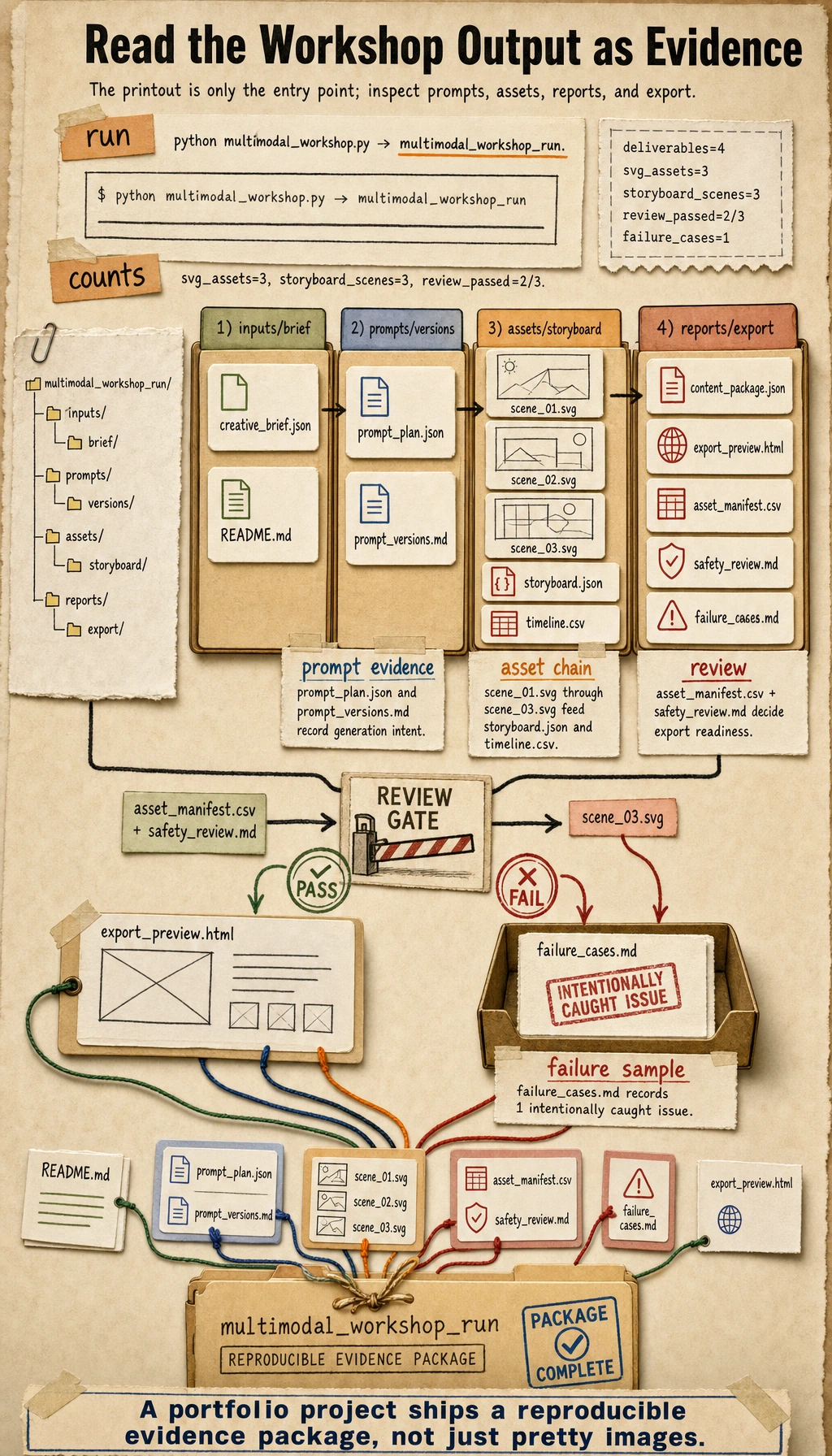
Expected output:
STEP 1: project brief
topic: AI learning assistant launch kit
deliverables: 4

STEP 2: generated assets
svg_assets: 3
storyboard_scenes: 3
review_passed: 2/3
failure_cases: 1

STEP 3: files to inspect
prompt_plan: multimodal_workshop_run/prompts/prompt_plan.json
asset_manifest: multimodal_workshop_run/reports/asset_manifest.csv
safety_review: multimodal_workshop_run/reports/safety_review.md
export_preview: multimodal_workshop_run/outputs/export_preview.html
Step 3: Inspect the Brief and Prompt Records
Open inputs/creative_brief.json. This is the user requirement in structured form: topic, audience, goal, tone, deliverables, and constraints.
Then open prompts/prompt_plan.json and prompts/prompt_versions.md. A real AIGC project should not lose the prompt once an image or video is generated. The prompt is part of the project evidence.
Step 4: Inspect the Assets and Storyboard
Open assets/scene_01.svg, assets/scene_02.svg, and assets/scene_03.svg in your browser. They are baseline SVG assets generated by the script, and they behave like generated assets in the workflow.
Open outputs/storyboard.json and outputs/timeline.csv. These files explain how visual assets become a short video or landing-page sequence.
Step 5: Read the Review Files
Open reports/asset_manifest.csv. Each row stores:
| Field | Meaning |
|---|---|
source | Where the asset came from |
license | Whether the asset can be used in this demo |
contrast_ratio | Whether text is readable enough |
passed | Whether the asset can move to export |
Then open reports/safety_review.md. This file is where you record copyright, portrait rights, content safety, and export boundaries.
Step 6: Open the Export Preview
Open outputs/export_preview.html in a browser. It is not a full app, but it proves that the project can move from creative requirement to exportable package.
In a real upgrade, you can replace:
| Baseline module | Real project replacement |
|---|---|
| Baseline SVG asset | Image generation API or local image model |
| Storyboard JSON | Video generation workflow |
| Copy text | LLM-generated copy with review |
| Safety checklist | Human review plus policy checks |
| HTML preview | Frontend creative workspace |
Step 7: Read the Failure Report
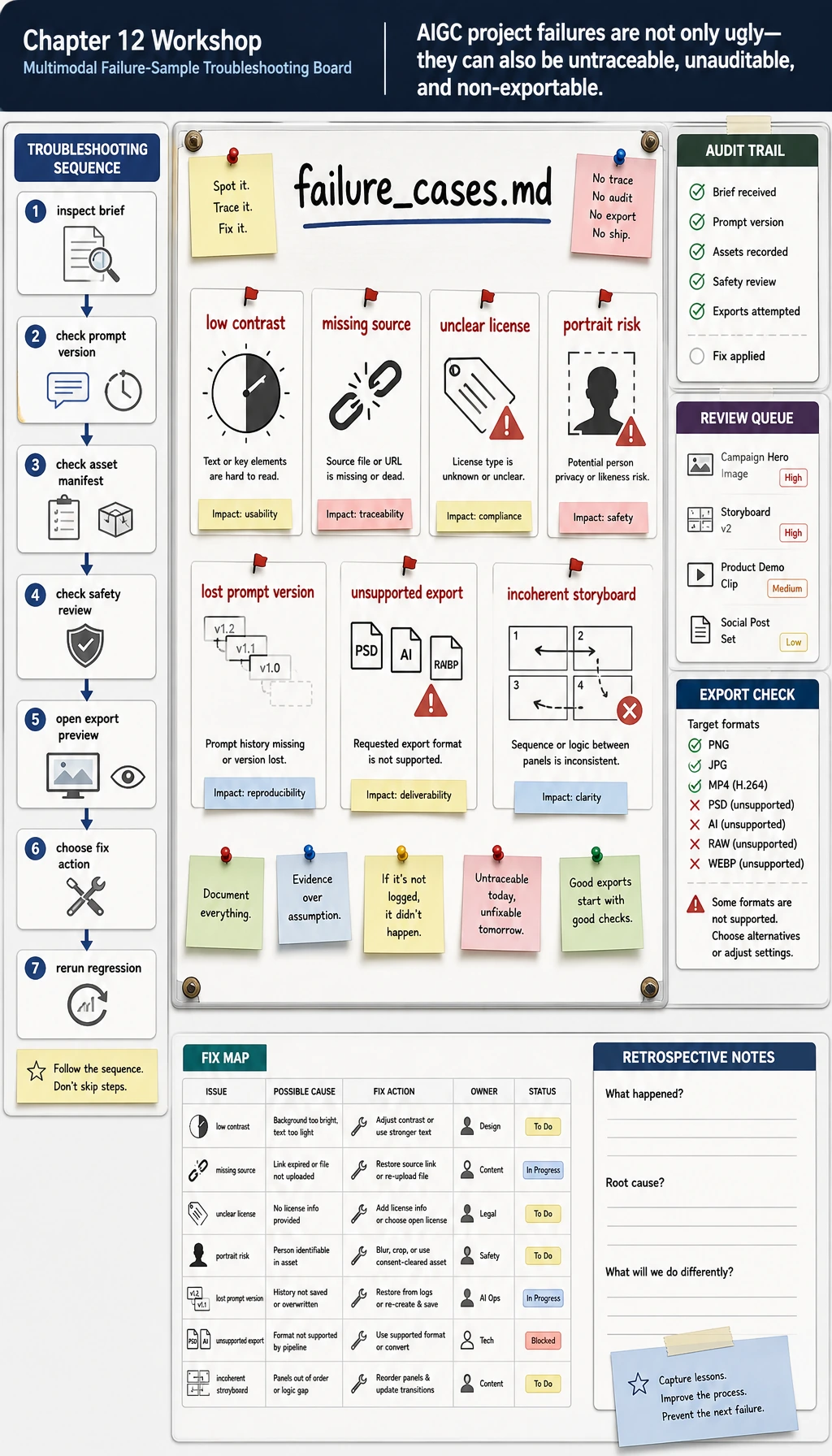
Open reports/failure_cases.md. This workshop intentionally makes one scene fail the contrast check. That is useful because a portfolio project should show how you catch problems, not only how you produce pretty outputs.
For each failure, ask:
- Is the material source recorded?
- Is the license or usage scope clear?
- Does the asset contain a real person or brand risk?
- Is the generated content readable and exportable?
- Does the project state what must be manually confirmed before publishing?
Common Errors
| Symptom | Likely cause | Fix |
|---|---|---|
| Generated assets cannot be reused | No source or license record | Add asset_manifest.csv and review every asset |
| Prompt versions are lost | Prompt only exists in chat history | Save prompt_plan.json before generation |
| Video script feels incoherent | No storyboard or timeline | Write storyboard.json before generation |
| Output looks good but cannot be published | No copyright, portrait, or safety review | Add safety_review.md and export limits |
| Users cannot compare versions | Assets overwrite each other | Add scene IDs, prompt versions, and output folders |
Practice Tasks
- Fix
scene_02colors so all scenes pass the contrast review. - Add
scene_04and extend the storyboard timeline. - Add a field called
manual_reviewerto the safety review. - Replace one SVG with an image generated by your preferred image model, but keep the same manifest and review files.
- Add one intentionally risky asset and confirm that it enters
failure_cases.md.
Completion Standard
You have completed this workshop when you can explain:
- what the creative brief controls;
- why prompts and assets need version records;
- how a storyboard turns assets into a video or page sequence;
- why safety review is part of the workflow, not an afterthought;
- which files prove the project is reproducible.
This is the smallest useful baseline for Chapter 12: a multimodal project that can be generated, reviewed, exported, and explained.